LANE RECOGNITION CAMERA SENSOR REMOVAL

PROCEDURE
-
REMOVE LANE DEPARTURE WARNING CAMERA COVER (for LHD)
-
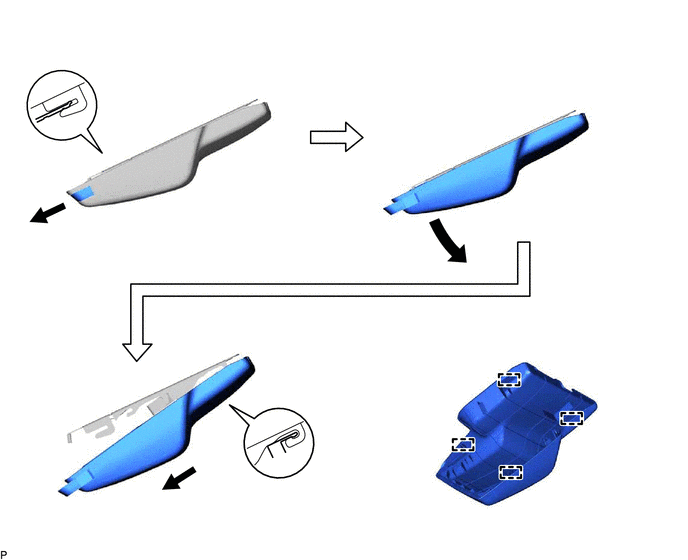
Disengage the 4 guides to remove the lane departure warning camera cover as shown in the illustration.
-
-
REMOVE LANE DEPARTURE WARNING CAMERA (for LHD)
-
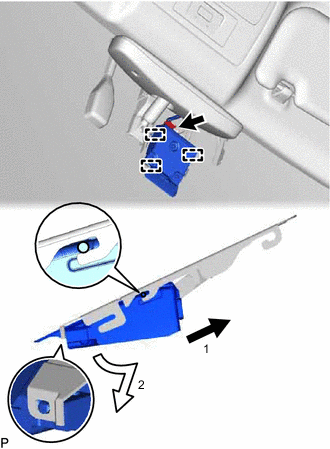
Disconnect the connector.
-
Disengage the 3 guides and remove the lane departure warning camera as shown in the illustration.
Note
-
Do not pull the harness forcibly when disconnecting the connector.
-
If the lane departure warning camera bracket is deformed or damaged, replace it together with the windshield glass.
-
If the lane departure warning camera is dropped, replace it with a new one.
-
-
-
REMOVE LANE DEPARTURE WARNING CAMERA COVER (for RHD)
-
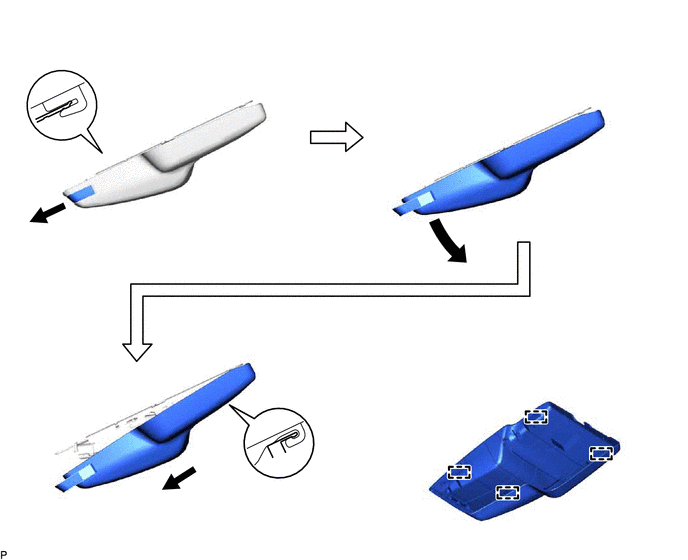
Disengage the 4 guides to remove the lane departure warning camera cover as shown in the illustration.
-
-
REMOVE LANE DEPARTURE WARNING CAMERA (for RHD)
-
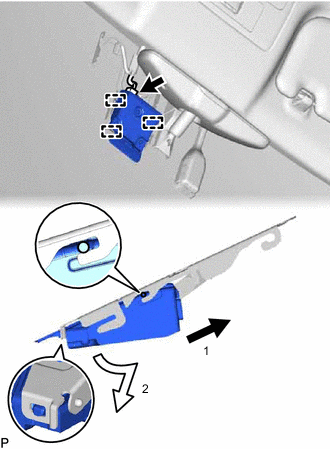
Disconnect the connector.
-
Disengage the 3 guides and remove the lane departure warning camera as shown in the illustration.
Note
-
Do not pull the harness forcibly when disconnecting the connector.
-
If the lane departure warning camera bracket is deformed or damaged, replace it together with the windshield glass.
-
If the lane departure warning camera is dropped, replace it with a new one.
-
-