INTAKE AIR CONTROL VALVE(for ACIS) ON-VEHICLE INSPECTION
PROCEDURE
-
INSPECT INTAKE AIR CONTROL VALVE (for ACIS)
-
Perform the following inspection procedure when using the GTS:
-
Remove the V-bank cover sub-assembly.
-
Stop the engine.
-
Connect the GTS to the DLC3.
-
Start the engine and turn the GTS on.
-
Enter the following menus: Powertrain / Engine / Active Test / Activate the VSV for Intake Control.
Powertrain > Engine > Active TestTester Display Activate the VSV for Intake Control -
Make sure that a clicking sound is heard from the intake air control valve (for ACIS) when current flows.
If the intake air control valve (for ACIS) does not operate, check the ACIS control circuit.
-
w/ Canister Pump Module:
-
w/o Canister Pump Module:
-
-
Install the V-bank cover sub-assembly.
-
-
Perform the following inspection procedure when not using the GTS:
-
Remove the V-bank cover sub-assembly.
-
Disconnect the intake air control valve (for ACIS) connector.
-
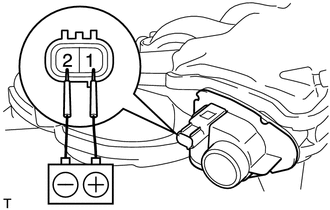
Apply battery voltage between terminals 1 (+) and 2 (-) of the intake air control valve (for ACIS). Check that a clicking sound is heard from the intake air control valve (for ACIS).
If the result is not as specified, replace the intake air surge tank assembly.
-
Install the V-bank cover sub-assembly.
-
-