POWER WINDOW CONTROL SYSTEM(w/ Jam Protection Function) INITIALIZATION
-
INITIALIZE POWER WINDOW CONTROL SYSTEM (FOR DRIVER DOOR)
Note
-
When the front power window regulator motor assembly LH (for LHD) or front power window regulator motor assembly RH (for RHD), power window regulator motor assembly, door glass or door glass run is reinstalled or replaced, the power window control system must be initialized. Functions such as the auto up and down function, jam protection function, catch protection function, remote control function, key-linked function, wireless transmitter-linked function, key-off operation function and window open warning function will not operate if initialization is not performed.
-
When the front power window regulator motor assembly LH (for LHD) or front power window regulator motor assembly RH (for RHD) is replaced, DTC B2313 is stored. Clear the DTC after initialization.
-
When performing initialization, do not perform any other procedures.
-
When performing initialization, use the power window switch of each door to initialize each door window.
-
Make sure to park the vehicle and turn off all electrical systems before performing initialization. Initialization will be canceled if the vehicle is driven during initialization.
-
Make sure not to hit, strike or vibrate the door window glass during initialization because the vehicle is learning the sliding resistance of the door window glass.
-
Make sure not to turn the ignition switch to ON or off during initialization.
Tech Tips
-
If the battery has been replaced, it is not necessary to initialize the front power window regulator motor assembly LH (for LHD) or front power window regulator motor assembly RH (for RHD).
-
If initialization does not complete properly, the LIN communication system may be malfunctioning.
-
Perform initialization according to the table below.
Condition of Power Window Proceed to Initialization procedure for when a power window regulator motor assembly has been replaced with a new one Procedure A
-
Initialization procedure for when a power window regulator motor assembly has been removed/installed or a door glass and/or door glass run etc. have been removed/installed or replaced with new ones
-
Initialization procedure for when the window cannot fully open via a down operation (door glass remains visible)
-
Initialization procedure for when the door glass cannot fully close (erroneously operates in reverse)
-
Initialization procedure for when the door glass cannot fully open (erroneously stops)
-
Initialization procedure for when instructions to perform initialization appear in other troubleshooting flowcharts
Tech Tips
Use this procedure if a power window regulator motor assembly is being reused.
Procedure B -
-
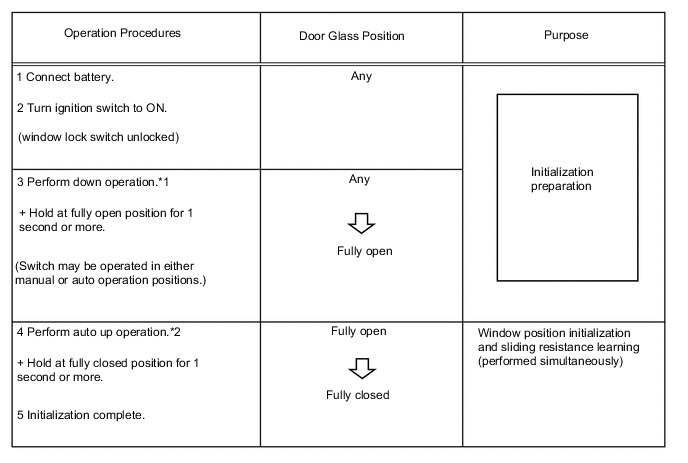
Procedure A
Perform registration of the door glass position (fully closed, fully open) and sliding resistance learning.
Tech Tips
-
*1: Even if the door glass is in the fully open condition before performing step 3, perform the down operation for 1 second or more.
-
*2: Do not stop the procedure during step 4.
-
-
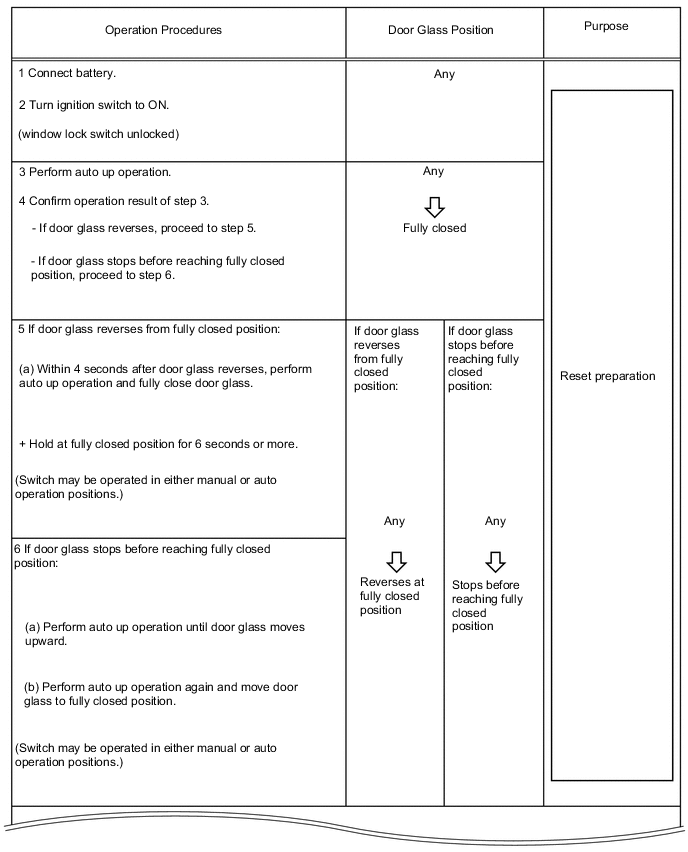
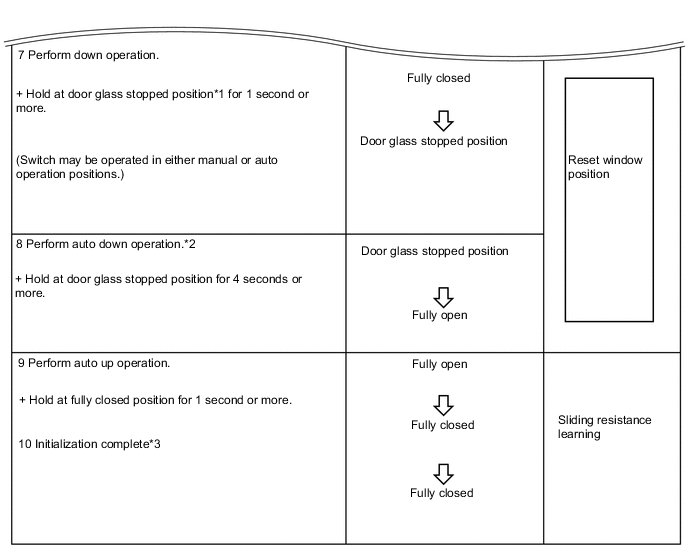
Procedure B
Reset the door glass position, and perform registration of the door glass position (fully closed, fully open) and sliding resistance learning.
Tech Tips
When the GTS is used to perform "Reset Memory", the operation procedures are the same as procedure A.
-
When using the GTS
-
Using the GTS, perform "Reset Memory" under "Utility".
-
Perform procedure A.
-
When not using the GTS
Tech Tips
-
*1: The door glass stopped position is the fully open position stored in the ECU.
-
*2: After performing step 7, return the switch to the neutral position once, and then perform an auto down operation.
-
*3: After completion, check that the door glass can fully close via an auto up operation.
-
If the initialization is not completed properly, the LIN communication system may have a malfunction.
-
-