BACK DOOR CLOSER ECU INSTALLATION
CAUTION / NOTICE / HINT
Note
When replacing the multiplex network door ECU, the back door automatic open stop position (memory stopped position) is memorized, so be sure to make a note of the automatic open stop position.
PROCEDURE
-
INSTALL MULTIPLEX NETWORK DOOR ECU
-
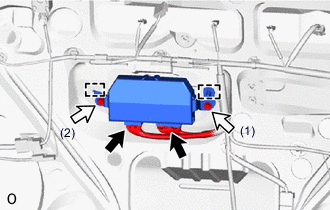
Temporarily install the multiplex network door ECU by attaching the guide and clamp of the multiplex network door ECU to the door panel.
-
Install the multiplex network door ECU with the 2 bolts.
Tech Tips
Tighten the 2 bolts in the order shown in the illustration.
- Torque:
- 8.4 N*m { 86 kgf*cm, 74 in.*lbf }
-
Connect the 2 connectors.
-
-
INSTALL BACK DOOR TRIM BOARD ASSEMBLY
-
INSTALL BACK DOOR SIDE GARNISH LH
-
INSTALL BACK DOOR SIDE GARNISH RH
Tech Tips
Use the same procedure as for the LH side.
-
INSTALL BACK DOOR CENTER GARNISH
-
SET MULTIPLEX NETWORK DOOR ECU
Tech Tips
When replacing the multiplex network door ECU, be sure to set it to the back door memorized automatic open stop position (memory stopped position) before performing the replacement.