POWER BACK DOOR SYSTEM, Diagnostic DTC:B2205
| DTC Code | DTC Name |
|---|---|
| B2205 | Kick Sensor Circuit |
DESCRIPTION
B2205 is output when the multiplex network door ECU detects that the kick door control sensor is stuck on.
| DTC No. | Detection Item | DTC Detection Condition | Trouble Area |
|---|---|---|---|
| B2205 | Kick Sensor Circuit | One of the following conditions is met for approximately 60 seconds or more:
|
|
WIRING DIAGRAM
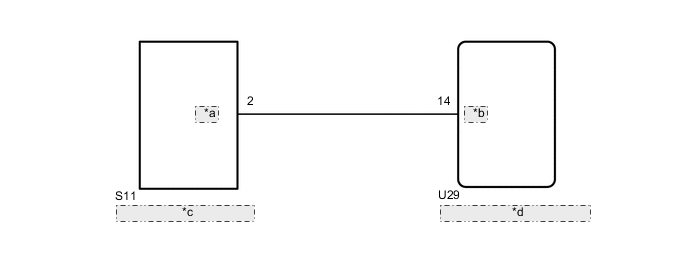
| *a | KSOT |
| *b | KSIN |
| *c | Kick Door Control Sensor |
| *d | Multiplex Network Door ECU |
CAUTION / NOTICE / HINT
Note
-
Before troubleshooting, make sure that the kick door control sensor is not damaged.
-
Before troubleshooting, be sure to read Precautions for Touchless Power Back Door.
-
If the multiplex network door ECU has been removed and installed or replaced, or if any of the connectors has been disconnected, initialize the power back door system.
-
After performing work, using the GTS, read the Data List item "Kick Sensor Connection" and check that the kick door control sensor is connected.
PROCEDURE
-
CHECK FOR DTC
-
Clear the DTCs.
Body Electrical > Back Door > Clear DTCs -
Check for DTCs.
Body Electrical > Back Door > Trouble CodesResult Result Proceed to DTC is not output A DTC B2205 is output B
A 
USE SIMULATION METHOD TO CHECK Click here
B 
-
-
CHECK FOR DTC
-
Disconnect the S11 kick door control sensor connector.
-
Wait for approximately 60 seconds.
-
Clear the DTCs.
Body Electrical > Back Door > Clear DTCs -
Check for DTCs.
Body Electrical > Back Door > Trouble CodesResult Result Proceed to DTC is not output A DTC B2205 is output B
A
REPLACE KICK DOOR CONTROL SENSOR Click here
B
-
-
CHECK HARNESS AND CONNECTOR (MULTIPLEX NETWORK DOOR ECU - KICK DOOR CONTROL SENSOR)
-
Disconnect the U29 multiplex network door ECU connector.
-
Disconnect the S11 kick door control sensor connector.
-
Measure the resistance according to the value(s) in the table below.
Standard Resistance Tester Connection Condition Specified Condition U29-14 (KSIN) or S11-2 (KSOT) - Body ground Always 10 kΩ or higher Result Proceed to OK NG
OK
REPLACE MULTIPLEX NETWORK DOOR ECU Click here
NG
REPAIR OR REPLACE HARNESS OR CONNECTOR
-