THEFT DETERRENT SYSTEM, Diagnostic DTC:B2764
| DTC Code | DTC Name |
|---|---|
| B2764 | Short to GND in Intrusion Sensor Signal Circuit |
DESCRIPTION
The intrusion sensor (theft warning ultrasonic sensor) conducts self-diagnosis immediately after power is supplied to the sensor (when the theft deterrent system is set).
If a malfunction is detected in the ISIF line, the main body ECU (multiplex network body ECU) stores this DTC.
| DTC No. | Detection Item | DTC Detection Condition | Trouble Area |
|---|---|---|---|
| B2764 | Short to GND in Intrusion Sensor Signal Circuit |
After normal/trouble signal is output from intrusion sensor (theft warning ultrasonic sensor) as result of self-diagnosis, following malfunctions are detected: |
|
WIRING DIAGRAM
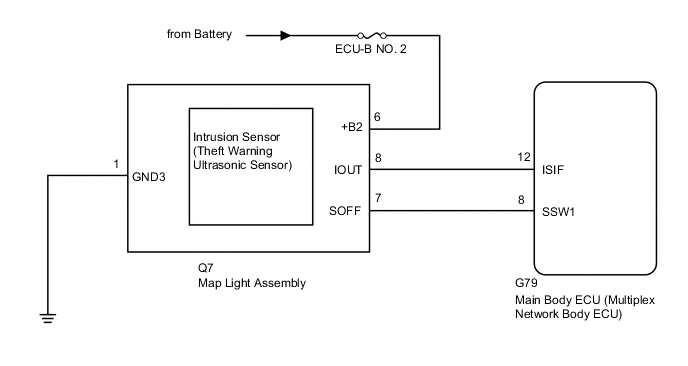
CAUTION / NOTICE / HINT
Note
-
Inspect the fuses for circuits related to this system before performing the following inspection procedure.
-
When replacing the main body ECU (multiplex network body ECU), make sure to replace it with a new one.
PROCEDURE
-
CHECK WAVEFORM (INTRUSION SENSOR [THEFT WARNING ULTRASONIC SENSOR]) (IOUT)
-
Using an oscilloscope, check the waveform.
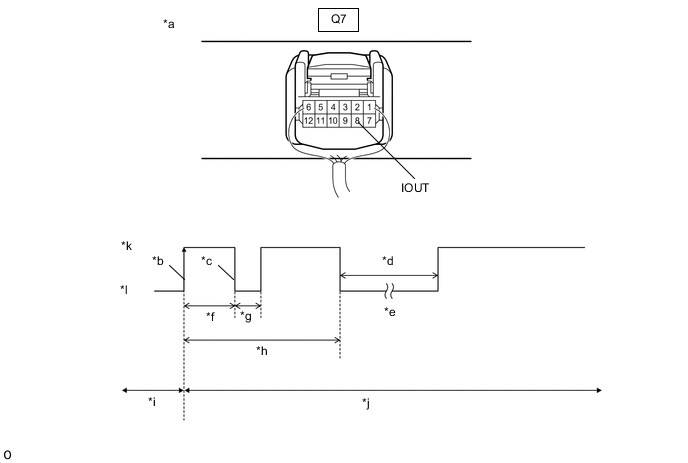
*a Component with harness connected
(Map Light Assembly)
*b IOUT Initial Signal *c IOUT Initial Response *d Approximately 1.0 seconds *e Initial Diagnosis *f Approximately 1.0 to 1.6 seconds *g Approximately 0.05 seconds *h Approximately 5.5 seconds *i Disarmed State *j Arming Preparation State *k HI *l LO Measurement Condition Tester Connection Content Tester Connection Q7-8 (IOUT) - Body ground Tool Setting 2 V/DIV., 100 ms./DIV. Condition Theft deterrent system is set (system changes from disarmed state to arming preparation state) Tech Tips
-
If the intrusion sensor (theft warning ultrasonic sensor) is normal, an initial response is output in response to the HI input from the main body ECU (multiplex network body ECU).
-
If the waveform output remains LO, there may be a problem with the main body ECU (multiplex network body ECU), as there is no input from the main body ECU (multiplex network body ECU).
OK The waveform displays properly (HI is 6.5 V or higher and LO is below 1 V). Result Proceed to OK NG -
OK 
USE SIMULATION METHOD TO CHECK Click here
NG 
-
-
CHECK VOLTAGE (INTRUSION SENSOR [THEFT WARNING ULTRASONIC SENSOR]) (IOUT)
-
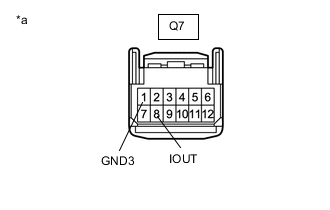
*a Front view of wire harness connector
(to Map Light Assembly)
Disconnect the map light assembly connector.
-
Measure the voltage according to the value(s) in the table below.
Standard Voltage Tester Connection Condition Q7-8 (IOUT) - Q7-1 (GND3) Immediately after theft deterrent system set Result Result Proceed to IOUT voltage is below 1 V when theft deterrent system is set A IOUT voltage is 6.5 V or higher when theft deterrent system is set B Tech Tips
With connector Q7 of the map light assembly disconnected, measure the voltage at IOUT when the theft deterrent system is set.
B 
REPLACE MAP LIGHT ASSEMBLY Click here
A
-
-
CHECK HARNESS AND CONNECTOR (MAIN BODY ECU [MULTIPLEX NETWORK BODY ECU] - MAP LIGHT ASSEMBLY)
-
Disconnect the G79 main body ECU (multiplex network body ECU) connector.
-
Disconnect the Q7 map light assembly connector.
-
Measure the resistance according to the value(s) in the table below.
Standard Resistance Tester Connection Condition Specified Condition G79-12 (ISIF) - Q7-8 (IOUT) Always Below 1 Ω G79-12 (ISIF) - Body ground Always 10 kΩ or higher Q7-8 (IOUT) - Body ground Always 10 kΩ or higher Result Proceed to OK NG
OK
REPLACE MAIN BODY ECU (MULTIPLEX NETWORK BODY ECU) Click here
NG
REPAIR OR REPLACE HARNESS OR CONNECTOR
-
-
REPLACE MAP LIGHT ASSEMBLY
-
Temporarily replace the map light assembly with a new or normally functioning one.
Result Proceed to NEXT
NEXT
-
-
CHECK FOR DTC
-
Clear the DTCs.
Body Electrical > Main Body > Clear DTCs -
Turn the ignition switch to ON, then off.
-
Set the theft deterrent system to "ARMED STATE".
-
Check that the security indicator changes from illuminated to blinking.
-
Set the theft deterrent system to "DISARMED STATE".
-
Check for DTCs.
Body Electrical > Main Body > Trouble CodesResult Proceed to DTC B2764 is not output DTC B2764 is output
DTC B2764 is not output
END (MAP LIGHT ASSEMBLY WAS DEFECTIVE)
DTC B2764 is output
REPLACE INTRUSION SENSOR (THEFT WARNING ULTRASONIC SENSOR) Click here
-