FRONT POWER SEAT CONTROL SYSTEM(w/ Memory) Power Seat Position is not Memorized
DESCRIPTION
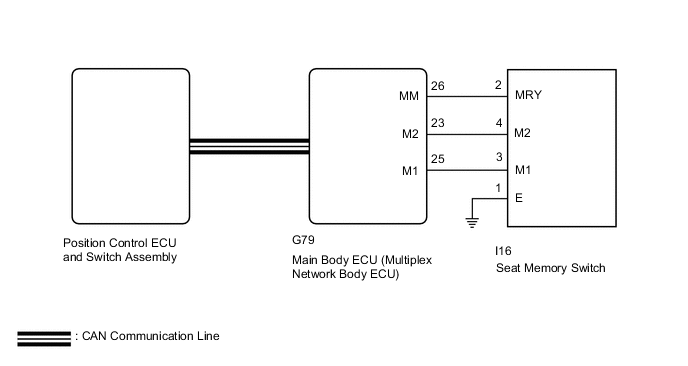
The main body ECU (multiplex network body ECU) receives seat memory switch signals from the seat memory switch via CAN communication. If the seat memory SET switch is being pressed when one of the M1 or M2 switches is pressed, or if one of the M1 or M2 switches is pressed within 3 seconds of pressing the seat memory SET switch, the main body ECU (multiplex network body ECU) sends a memory request signal to the position control ECU and switch assembly. After receiving the request signal, the position control ECU and switch assembly memorizes the location data of each motor.
WIRING DIAGRAM
Figure 1. for LHD:
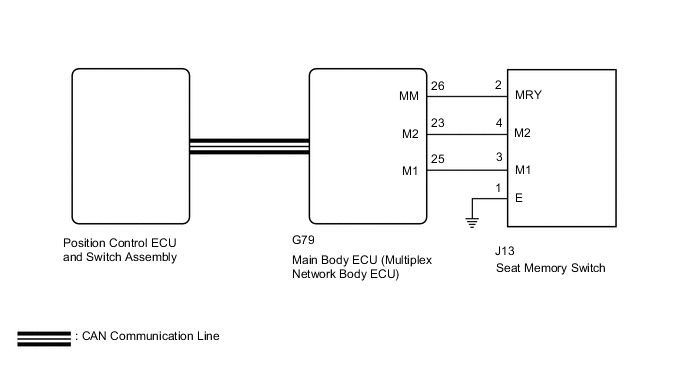
Figure 2. for RHD:
CAUTION / NOTICE / HINT
Note
-
The seat position will not be recorded if the SET switch and 2 of the seat memory switches are pressed simultaneously.
-
If a memorizing operation has failed, release all switches. The seat memory function does not operate unless the switches are released.
-
The front power seat control system (w/ Memory) uses the CAN communication system. First, confirm that there is no malfunction in the communication system by checking communication function of the CAN communication system. Refer to the How to Proceed with Troubleshooting procedure.
-
When replacing the main body ECU (multiplex network body ECU), make sure to replace it with a new one.
PROCEDURE
-
CHECK FRONT POWER SEAT CONTROL SYSTEM
-
Check that each function of the power seat operates normally by using the power seat switch.
OK Each function of the power seat operates normally using the power seat switch. Result Proceed to OK NG
NG 
GO TO PROBLEM SYMPTOMS TABLE Click here
OK 
-
-
READ VALUE USING GTS (SEAT MEMORY SWITCH)
-
Connect the GTS to the DLC3.
-
Turn the ignition switch to ON.
-
Turn the GTS on.
-
Enter the following menus: Body Electrical / Main Body / Data List.
-
Read the Data List according to the display on the GTS.
Body Electrical > Main Body > Data ListTester Display Measurement Item Range Normal Condition Diagnostic Note M1 Switch M1 switch ON or OFF ON: M1 switch on
OFF: M1 switch off
- M2 Switch M2 switch ON or OFF ON: M2 switch on
OFF: M2 switch off
- SET Switch SET switch ON or OFF ON: SET switch on
OFF: SET switch off
-
Body Electrical > Main Body > Data ListTester Display M1 Switch M2 Switch SET Switch OK ON or OFF is displayed on the GTS according to the table above. Result Proceed to OK NG
NG 
INSPECT SEAT MEMORY SWITCH Click here
OK
-
-
PERFORM ACTIVE TEST USING GTS (BUZZER)
-
Connect the GTS to the DLC3.
-
Turn the ignition switch to ON.
-
Turn the GTS on.
-
Enter the following menus: Body Electrical / Driver Seat / Active Test.
-
Read the Data List according to the display on the GTS.
Body Electrical > Driver Seat > Active TestTester Display Measurement Item Control Range Diagnostic Note Buzzer Buzzer operation OFF/ON -
Body Electrical > Driver Seat > Active TestTester Display Buzzer OK Buzzer sounds normally. Result Proceed to OK NG
NG
REPLACE POSITION CONTROL ECU AND SWITCH ASSEMBLY Click here
OK
-
-
REPLACE MAIN BODY ECU (MULTIPLEX NETWORK BODY ECU)
-
Replace the main body ECU (multiplex network body ECU).
-
for LHD: Click here
-
for RHD: Click here
Result Proceed to NEXT -
NEXT
-
-
CHECK SEAT POSITION MEMORY FUNCTION
-
Store a seat position in memory and check that the buzzer sounds to indicate that a position has been stored.
Note
-
The seat position will not be recorded if the SET switch and 2 of the seat memory switches are pressed simultaneously.
-
If a memorizing operation has failed, release all switches. The seat memory function does not operate unless the switches are released.
Result Result Proceed to Seat position memory function operates normally A Seat position memory function does not operate normally B -
A
END (MAIN BODY ECU [MULTIPLEX NETWORK BODY ECU WAS DEFECTIVE])
B
-
-
REPLACE POSITION CONTROL ECU AND SWITCH ASSEMBLY
-
Replace the position control ECU and switch assembly.
Result Proceed to NEXT
NEXT
-
-
CHECK SEAT POSITION MEMORY FUNCTION
-
Store a seat position in memory and check that the buzzer sounds to indicate that a position has been stored.
Note
-
The seat position will not be recorded if the SET switch and 2 of the seat memory switches are pressed simultaneously.
-
If a memorizing operation has failed, release all switches. The seat memory function does not operate unless the switches are released.
Result Result Proceed to Seat position memory function operates normally A Seat position memory function does not operate normally B -
A
END (POSITION CONTROL ECU AND SWITCH ASSEMBLY WAS DEFECTIVE)
B
REPLACE MAIN BODY ECU (MULTIPLEX NETWORK BODY ECU) for LHD: Click here for RHD: Click here
-
-
INSPECT SEAT MEMORY SWITCH
-
Remove the seat memory switch.
-
Inspect the seat memory switch.
Result Proceed to OK NG
NG
REPLACE SEAT MEMORY SWITCH Click here
OK
-
-
CHECK HARNESS AND CONNECTOR (MAIN BODY ECU [MULTIPLEX NETWORK BODY ECU] - SEAT MEMORY SWITCH)
-
Disconnect the G79 main body ECU (multiplex network body ECU) connector.
-
Disconnect the J13*1 or I16*2 seat memory switch connector.
-
*1: for LHD
-
*2: for RHD
-
-
Measure the resistance according to the value(s) in the table below.
Standard Resistance for LHD Tester Connection Condition Specified Condition G79-23 (M2) - J13-4 (M2) Always Below 1 Ω G79-25 (M1) - J13-3 (M1) Always Below 1 Ω G79-26 (MM) - J13-2 (MRY) Always Below 1 Ω G79-23 (M2) - Body ground Always 10 kΩ or higher G79-25 (M1) - Body ground Always 10 kΩ or higher G79-26 (MM) - Body ground Always 10 kΩ or higher for RHD Tester Connection Condition Specified Condition G79-23 (M2) - I16-4 (M2) Always Below 1 Ω G79-25 (M1) - I16-3 (M1) Always Below 1 Ω G79-26 (MM) - I16-2 (MRY) Always Below 1 Ω G79-23 (M2) - Body ground Always 10 kΩ or higher G79-25 (M1) - Body ground Always 10 kΩ or higher G79-26 (MM) - Body ground Always 10 kΩ or higher Result Proceed to OK NG
OK
REPLACE MAIN BODY ECU (MULTIPLEX NETWORK BODY ECU) for LHD: Click here for RHD: Click here
NG
REPAIR OR REPLACE HARNESS OR CONNECTOR
-