OCCUPANT CLASSIFICATION SYSTEM, Diagnostic DTC:B1785
| DTC Code | DTC Name |
|---|---|
| B1785 | Front Occupant Classification Sensor LH Collision Detection |
DESCRIPTION
DTC B1785 is stored when the occupant detection ECU receives a collision detection signal, which is sent by the front occupant classification sensor LH when an accident occurs.
DTC B1785 is also stored when the separate type front seat cushion spring assembly is subjected to a strong impact, even if an actual accident has not occurred.
However, when the occupant detection ECU outputs a collision detection signal, even if the vehicle has not been in a collision, DTC B1785 can be cleared by conducting the zero point calibration and sensitivity check.
Therefore, if DTC B1785 is output, first perform the zero point calibration and sensitivity check.
| DTC No. | Detection Item | DTC Detection Condition | Trouble Area |
|---|---|---|---|
| B1785 | Front Occupant Classification Sensor LH Collision Detection |
Either condition is met: |
|
Tech Tips
-
When DTC B1650/32 is stored as a result of troubleshooting the airbag system, perform troubleshooting for DTC B1785 of the occupant classification system.
-
Use the GTS to check for DTCs of the occupant detection ECU, otherwise the DTCs cannot be read.
WIRING DIAGRAM
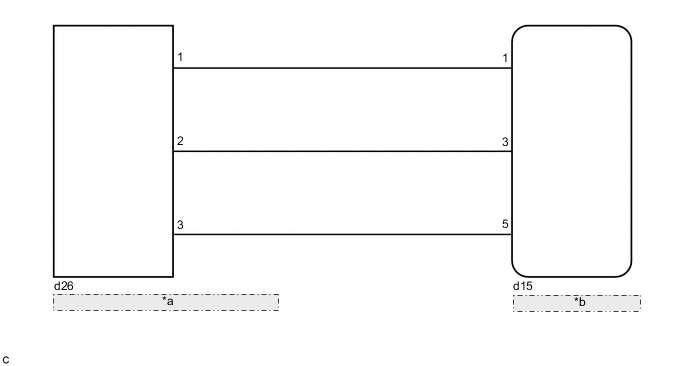
| *a | Front Occupant Classification Sensor LH |
| *b | Occupant Detection ECU |
CAUTION / NOTICE / HINT
Note
When disconnecting the cable, some systems need to be initialized after the cable is reconnected.
PROCEDURE
-
CHECK DTC
-
Turn the ignition switch to ON, and wait for at least 60 seconds.
-
Clear the DTCs.
Body Electrical > Occupant Detection > Clear DTCsTech Tips
-
First clear the DTCs stored in the occupant detection ECU, and then clear the DTCs stored in the airbag sensor assembly.
-
Use the GTS to clear the DTCs of the occupant detection ECU, otherwise the DTCs cannot be cleared.
-
-
Turn the ignition switch off.
-
Turn the ignition switch to ON, and wait for at least 60 seconds.
-
Check for DTCs.
Body Electrical > Occupant Detection > Trouble CodesResult Proceed to DTC B1785 is not output DTC B1785 is output Tech Tips
DTCs other than DTC B1785 may be output at this time, but they are not related to this check.
DTC B1785 is not output 
USE SIMULATION METHOD TO CHECK Click here
DTC B1785 is output 
-
-
PERFORM ZERO POINT CALIBRATION
-
Perform the zero point calibration.
Result Proceed to "Zero Point Calibration is complete." is displayed "Zero Point Calibration is complete." is not displayed
"Zero Point Calibration is complete." is not displayed 
REPLACE SEPARATE TYPE FRONT SEAT CUSHION SPRING ASSEMBLY (FRONT OCCUPANT CLASSIFICATION SENSOR LH) Click here
"Zero Point Calibration is complete." is displayed
-
-
PERFORM SENSITIVITY CHECK
-
Perform the sensitivity check.
Standard 27 to 33 kg (59.5 to 72.8 lb) Result Proceed to OK NG
NG
GO TO STEP 5 Click here
OK
-
-
CHECK DTC
-
Clear the DTCs.
Body Electrical > Occupant Detection > Clear DTCsTech Tips
-
First clear the DTCs stored in the occupant detection ECU, and then clear the DTCs stored in the airbag sensor assembly.
-
Use the GTS to clear the DTCs of the occupant detection ECU, otherwise the DTCs cannot be cleared.
-
-
Turn the ignition switch off.
-
Turn the ignition switch to ON, and wait for at least 60 seconds.
-
Check for DTCs.
Body Electrical > Occupant Detection > Trouble CodesResult Proceed to DTC B1785 is not output DTC B1785 is output Tech Tips
DTCs other than DTC B1785 may be output at this time, but they are not related to this check.
DTC B1785 is not output
END
DTC B1785 is output
-
-
REPLACE SEPARATE TYPE FRONT SEAT CUSHION SPRING ASSEMBLY (FRONT OCCUPANT CLASSIFICATION SENSOR LH)
-
Turn the ignition switch off.
-
Disconnect the cable from the negative (-) battery terminal, and wait for at least 90 seconds.
-
Replace the separate type front seat cushion spring assembly.
Tech Tips
Perform the inspection using parts from a normal vehicle when possible.
Result Proceed to NEXT
NEXT
-
-
PERFORM ZERO POINT CALIBRATION
-
Connect the cable to the negative (-) battery terminal, and wait for at least 2 seconds.
-
Turn the ignition switch to ON.
-
Perform the zero point calibration.
Result Proceed to "Zero Point Calibration is complete." is displayed "Zero Point Calibration is complete." is not displayed
"Zero Point Calibration is complete." is not displayed
REPLACE OCCUPANT DETECTION ECU Click here
"Zero Point Calibration is complete." is displayed
-
-
PERFORM SENSITIVITY CHECK
-
Perform the sensitivity check.
Standard 27 to 33 kg (59.5 to 72.8 lb) Result Proceed to OK NG
NG
GO TO STEP 9 Click here
OK
-
-
CHECK DTC
-
Clear the DTCs.
Body Electrical > Occupant Detection > Clear DTCsTech Tips
-
First clear the DTCs stored in the occupant detection ECU, and then clear the DTCs stored in the airbag sensor assembly.
-
Use the GTS to clear the DTCs of the occupant detection ECU, otherwise the DTCs cannot be cleared.
-
-
Turn the ignition switch off.
-
Turn the ignition switch to ON, and wait for at least 60 seconds.
-
Check for DTCs.
Body Electrical > Occupant Detection > Trouble CodesResult Proceed to DTC B1785 is not output DTC B1785 is output Tech Tips
DTCs other than DTC B1785 may be output at this time, but they are not related to this check.
DTC B1785 is not output
END (SEPARATE TYPE FRONT SEAT CUSHION SPRING ASSEMBLY [FRONT OCCUPANT CLASSIFICATION SENSOR LH] WAS DEFECTIVE)
DTC B1785 is output
-
-
REPLACE OCCUPANT DETECTION ECU
-
Turn the ignition switch off.
-
Disconnect the cable from the negative (-) battery terminal, and wait for at least 90 seconds.
-
Replace the occupant detection ECU.
Tech Tips
Perform the inspection using parts from a normal vehicle when possible.
Result Proceed to NEXT
NEXT
-
-
PERFORM ZERO POINT CALIBRATION
-
Connect the cable to the negative (-) battery terminal, and wait for at least 2 seconds.
-
Turn the ignition switch to ON.
-
Perform the zero point calibration.
Result Proceed to "Zero Point Calibration is complete." is displayed
"Zero Point Calibration is complete." is displayed
-
-
PERFORM SENSITIVITY CHECK
-
Perform the sensitivity check.
Standard 27 to 33 kg (59.5 to 72.8 lb) Result Proceed to NEXT
NEXT
END (OCCUPANT DETECTION ECU WAS DEFECTIVE)
-