CHARGING SYSTEM DATA LIST / ACTIVE TEST
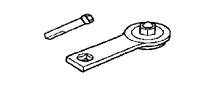 |
09820-63021 | Alternator Pulley Wrench Set |
-
DATA LIST
Tech Tips
Using the GTS to read the Data List allows the values or states of switches, sensors, actuators and other items to be read without removing any parts. This non-intrusive inspection can be very useful because intermittent conditions or signals may be discovered before parts or wiring is disturbed. Reading the Data List information early in troubleshooting is one way to save diagnostic time.
Note
In the table below, the values listed under Normal Condition are reference values. Do not depend solely on these reference values when deciding whether a part is faulty or not.
-
Warm up the engine.
-
Turn the ignition switch off.
-
Connect the GTS to the DLC3.
-
Turn the ignition switch to ON.
-
Turn the GTS on.
-
Enter the following menus: Powertrain / Engine / Data List.
-
Check the values by referring to the table below.
Powertrain > Engine > Data ListTester Display Measurement Item Range Normal Condition Diagnostic Note Battery Voltage Battery voltage Min.: 0 V, Max.: 65.535 V 11 to 14 V: Idling - # Codes(Include History) # codes Min.: 0, Max.: 255 - Number of detected DTCs Battery Current Battery current Min.: -100 A, Max.: 100 A - Charging control service date Battery Temperature Battery temperature Min.: -45°C (-49°F), Max.: 156.4°C (313°F) - Charging control service date Alternator Output Duty Generator output duty Min.: 0%, Max.: 100% - Electricity generated by alternator is output through duty ratio charging control service data Alt Vol - Non Active Test Request voltage when regulator not under forced activation Min.: 0 V, Max.: 20 V Battery electrolyte temperature varies (12.5 to 14.8 V) while driving: After engine start Alternator regulator output voltage: When performing Active Test, value is 0 V Alt Vol - Active Test Request voltage when regulator under forced activation Min.: 0 V, Max.: 20 V Request instruction voltage value: After engine start Charging control service data: When performing Active Test, value is 0 V Model Code Model code - - Identifying model code: ALA4# Engine Type Engine type - - Identifying engine type: 2ADFHV Cylinder Number Cylinder number Min.: 0, Max.: 255 - Identifying cylinder number: 4 Transmission Type Transaxle type - - Identifying transaxle type: MT Destination Destination - - Identifying destination: W Model Year Model year Min.: 1900, Max.: 2155 - Identifying model year: 201# System Identification System identification - - Identifying engine type: Diesel Tech Tips
Normal Condition: If no idling conditions are specified, the transmission gear shift lever should be in N or P, and the A/C switch and all accessory switches should be off.
-
-
ACTIVE TEST
Tech Tips
Using the GTS to perform Active Tests allows relays, VSVs, actuators and other items to be operated without removing any parts. This non-intrusive functional inspection can be very useful because intermittent operation may be discovered before parts or wiring is disturbed. Performing Active Tests early in troubleshooting is one way to save diagnostic time. Data List information can be displayed while performing Active Tests.
-
Connect the GTS to the DLC3.
-
Turn the ignition switch to ON.
-
Turn the GTS on.
-
Enter the following menus: Powertrain / Engine / Active Test.
-
Perform the Active Test by referring to the table below.
Powertrain > Engine > Active TestTester Display Measurement Item Control Range Diagnostic Note Control the Voltage of Alternator Request output voltage of generator regulator during forced activation Between 12.5 and 14.8 V Test is possible after engine start
-