PARKING ASSIST MONITOR SYSTEM(for Camera built-in ECU) CUSTOMIZE PARAMETERS
-
CUSTOMIZE PARKING ASSIST MONITOR SYSTEM
Tech Tips
The following items can be customized.
Note
-
When the customer requests a change in a function, first make sure that the function can be customized.
-
Record the current settings before customizing.
-
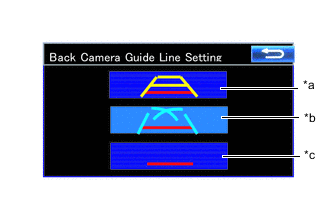
*a Estimated Guide Line Mode *b Parking Guide Line Mode *c Guide Line Deletion Mode Customizing with Multi-display
-
Turn the ignition switch to ON.
-
Enter the following menus: Setup / Vehicle / Back Camera Guide Line Setting.
-
Select the setting by referring to the table below.
Parking Assist Monitor Display Mode Estimated Guide Line Mode Parking Guide Line Mode Guide Line Deletion Mode
-
-