NAVIGATION SYSTEM(for Radio and Display Type) Data Signal Circuit between Stereo Jack Adapter and Extension Module
DESCRIPTION
The No. 1 stereo jack adapter assembly sends the sound data signal or image data signal from a USB device to the navigation ECU via this circuit.
WIRING DIAGRAM
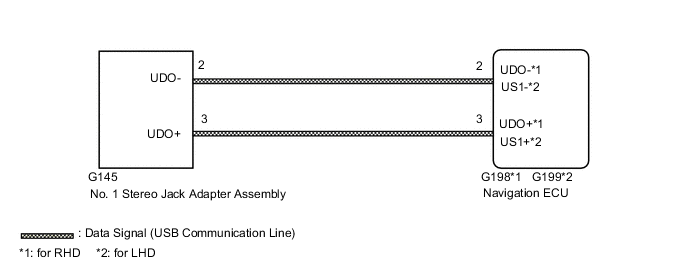
CAUTION / NOTICE / HINT
Note
Check that the wire harness is properly installed and does not have any sharp bends, pinching or loose connections.
PROCEDURE
-
CHECK HARNESS AND CONNECTOR (NAVIGATION ECU - NO. 1 STEREO JACK ADAPTER ASSEMBLY)
-
Disconnect the G198*1 or G199*2 navigation ECU connector.
-
*1: for RHD
*2: for LHD
-
-
Disconnect the G145 No. 1 stereo jack adapter assembly connector.
-
Measure the resistance according to the value(s) in the table below.
Standard Resistance for RHD: Tester Connection Condition Specified Condition G198-2 (UDO-) - G145-2 (UDO-) Always Below 1 Ω G198-3 (UDO+) - G145-3 (UDO+) Always Below 1 Ω G198-2 (UDO-) - Body ground Always 10 kΩ or higher G198-3 (UDO+) - Body ground Always 10 kΩ or higher for LHD: Tester Connection Condition Specified Condition G199-2 (US1-) - G145-2 (UDO-) Always Below 1 Ω G199-3 (US1+) - G145-3 (UDO+) Always Below 1 Ω G199-2 (US1-) - Body ground Always 10 kΩ or higher G199-3 (US1+) - Body ground Always 10 kΩ or higher Result Proceed to OK NG
OK 
PROCEED TO NEXT SUSPECTED AREA SHOWN IN PROBLEM SYMPTOMS TABLE Click here
NG
REPAIR OR REPLACE HARNESS OR CONNECTOR
-