AUDIO AND VISUAL SYSTEM(for Radio and Display Type) Touch Panel Switch does not Function
PROCEDURE
-
CHECK DISPLAY
-
Check if there is any foreign matter caught between the display and exterior frame of the display.
OK No foreign matter is caught between the display and exterior frame of the display. Tech Tips
If there is foreign matter between the display and exterior frame of the display, the touch panel will remain pressed, preventing touch switch operation.
Result Proceed to OK NG
NG 
REMOVE FOREIGN MATTER
OK 
-
-
CHECK TOUCH PANEL
-
Check for foreign matter on the display.
Result Proceed to The display is clean The display is not clean
The display is not clean
CLEAN DISPLAY AND RECHECK TOUCH PANEL
The display is clean
-
-
CHECK TOUCH SWITCH (OPERATION CHECK)
-
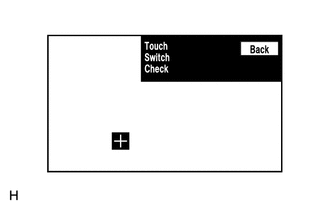
Enter the "Touch Switch Check" screen. Refer to Check Touch Switch in Operation Check.
-
Touch the display in the area where the switch malfunction occurs.
Result Proceed to A "+" mark appears at the touched position A "+" mark disappears at the touched position
A "+" mark appears at the touched position
REPLACE RADIO AND DISPLAY RECEIVER ASSEMBLY Click here
A "+" mark disappears at the touched position
PROCEED TO NEXT SUSPECTED AREA SHOWN IN PROBLEM SYMPTOMS TABLE Click here
-