STEERING LOCK SYSTEM Unable to Lock Steering Wheel
DESCRIPTION
The steering lock actuator activates the steering lock motor and moves the lock bar into the steering column to lock the steering.
When the steering lock is operating, the steering may not lock when the lock bar is not aligned with the lock hole of the steering column. In this case, the steering can be locked by turning the steering wheel a little in the same manner as is done for a vehicle with a mechanical key to change the position of the lock hole.
| Problem Symptom | Data List Item | Active Test Item |
|---|---|---|
| Unable to lock steering wheel |
Entry&Start
Main Body |
- |
WIRING DIAGRAM
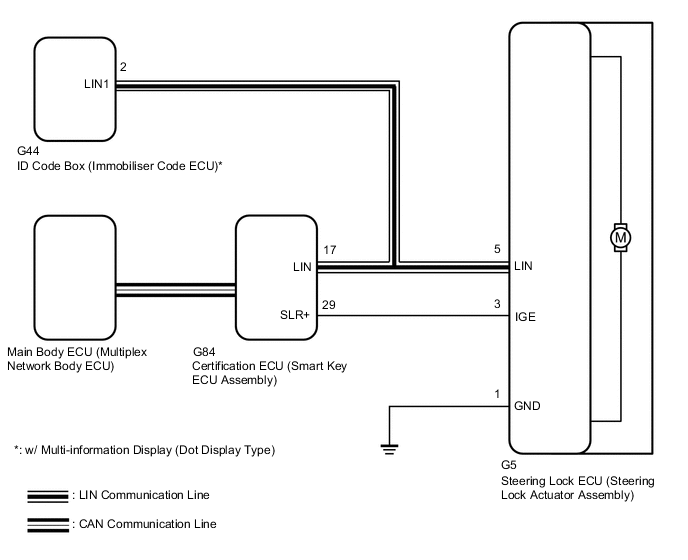
CAUTION / NOTICE / HINT
Note
-
When using the GTS with the engine switch off to troubleshoot:
Connect the GTS to the DLC3 and turn a courtesy light switch on and off at 1.5 second intervals until communication between the GTS and vehicle begins.
-
Perform either of the following operations to lock/unlock the steering:
-
To unlock the steering, carry the key and turn the engine switch on (ACC) or on (IG) with the shift lever in P (except Manual Transaxle).
-
To lock the steering, turn the engine switch off with the shift lever in P (except Manual Transaxle), and then open a door.
-
Make sure that no DTCs are output. If any DTCs are output, proceed to the Diagnostic Trouble Code Chart.
-
The steering lock system uses LIN communication. First perform the inspections in "How to Proceed with Troubleshooting" to confirm that there are no communication malfunctions before proceeding with troubleshooting.
-
When replacing the steering lock ECU (steering lock actuator assembly), certification ECU (smart key ECU assembly) or ID code box (immobiliser code ECU) (w/ Multi-information Display (Dot Display Type)), registration must be performed (refer to Service Bulletin).
-
After performing repairs, confirm that the problem does not occur.
PROCEDURE
-
CHECK DTC (ALL)
-
Using the GTS, confirm the output of DTCs for all systems.
OK No DTCs are output. Note
-
When using the GTS with the engine switch off to troubleshoot:
Connect the GTS to the DLC3 and turn a courtesy light switch on and off at 1.5 second intervals until communication between the GTS and vehicle begins.
-
Make sure that no DTCs are output. If any DTCs are output, proceed to Diagnostic Trouble Code Chart.
Result Proceed to OK NG -
NG 
REPAIR CIRCUITS INDICATED BY OUTPUT DTCS
OK 
-
-
READ VALUE USING GTS (LOCK REQUEST RECEIVE)
-
Use the Data List to check if the steering lock command is functioning properly.
Body Electrical > Entry&Start > Data ListTester Display Measurement Item Range Normal Condition Diagnostic Note Lock Request Receive Reception state of steering lock request signal by certification ECU (smart key ECU assembly) and sent to ID code box (immobiliser code ECU)*1
Reception state of steering lock request signal by certification ECU (smart key ECU assembly)*2
Tech Tips
-
The reception state is maintained for 10 seconds.
-
When 10 seconds or more elapse after receiving the signal, the item changes to "NG".
OK or NG OK: Lock request signal received for 10 sec. of any of the doors being opened with shift lever in P (except Manual Transaxle) and engine switch off.
NG: Except above
If OK is not displayed even though the steering lock conditions are met, the certification ECU (smart key ECU assembly) may be malfunctioning.
-
*1: w/ Multi-information Display (Dot Display Type)
-
*2: w/ Multi-information Display (Segment Display Type)
Body Electrical > Entry&Start > Data ListTester Display Lock Request Receive OK The certification ECU (smart key ECU assembly) receives a lock request signal within 10 seconds of turning the engine switch from on (IG) to off and opening a door with the shift lever in P (except manual transaxle), and OK is displayed on the GTS screen. Result Proceed to OK NG -
NG 
READ VALUE USING GTS (DOOR COURTESY SW) Click here
OK
-
-
CHECK HARNESS AND CONNECTOR (GROUND)
-
Make sure that there is no looseness at the locking part and the connecting part of the connector.
-
Disconnect the G5 steering lock ECU connector.
-
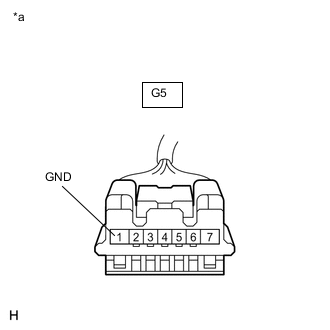
*a Front view of wire harness connector
(to Steering Lock ECU (Steering Lock Actuator Assembly))
Measure the resistance according to the value(s) in the table below.
Standard Resistance Tester Connection Condition Specified Condition G5-1 (GND) - Body ground Always Below 1 Ω Result Proceed to OK NG
NG
REPAIR OR REPLACE HARNESS OR CONNECTOR
OK
-
-
INSPECT STEERING LOCK ECU (MOTOR ACTIVATION COMMAND SIGNAL)
-
Reconnect the G5 steering lock ECU connector.
-
Turn the engine switch off, make sure that the steering is unlocked and move the shift lever to P (except Manual Transaxle).
-
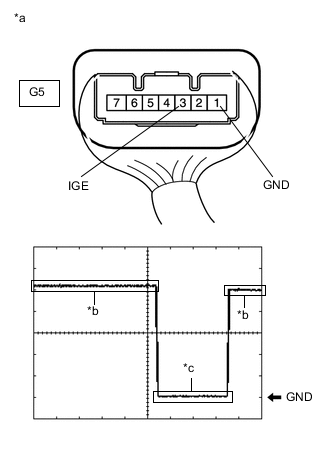
*a Component with harness connected
(Steering Lock ECU (Steering Lock Actuator Assembly))
*b Steering lock motor not operating *c Steering lock motor operating Check the signal waveform according to the condition(s) in the table below.
Standard Frequency Item Content Tester Connection G5-3 (IGE) - G5-1 (GND) Tool Setting 2 V/DIV., 200 ms./DIV. Vehicle Condition Steering lock motor not operating → Steering lock motor operating → Steering lock motor not operating Tech Tips
-
When taking measurements when the lock motor is stopped, it is not necessary to perform any operations.
-
In order to take measurements when the lock motor is operating, perform either of the following operations:
-
To unlock the steering, carry the key and turn the engine switch on (ACC) or on (IG) with the shift lever in P (except Manual Transaxle).
-
To lock the steering, turn the engine switch off with the shift lever in P (except Manual Transaxle), and then open a door.
Result Proceed to OK NG -
NG
REPAIR OR REPLACE HARNESS OR CONNECTOR
OK
-
-
CHECK HARNESS AND CONNECTOR (STEERING LOCK ECU - CERTIFICATION ECU (SMART KEY ECU ASSEMBLY))
-
Make sure that there is no looseness at the locking part and the connecting part of the connectors.
-
Disconnect the G5 steering lock ECU connector.
-
Disconnect the G84 certification ECU (smart key ECU assembly) connector.
-
Check for deformation and corrosion of the connector case and terminals.
OK There is no deformation or corrosion of the connector case or terminals. -
Measure the resistance according to the value(s) in the table below.
Standard Resistance Tester Connection Condition Specified Condition G5-3 (IGE) - G84-29 (SLR+) Always Below 1 Ω G5-3 (IGE) - Body ground 10 kΩ or higher G84-29 (SLR+) - Body ground Result Proceed to OK NG
OK
REPLACE STEERING LOCK ECU (STEERING LOCK ACTUATOR ASSEMBLY) Click here
NG
REPAIR OR REPLACE HARNESS OR CONNECTOR
-
-
READ VALUE USING GTS (DOOR COURTESY SW)
-
Using the GTS, check the following main body ECU Data List item by opening and closing the driver door to confirm the state of the front door courtesy light switch assembly.
Body Electrical > Main Body > Data ListTester Display Measurement Item Range Normal Condition Diagnostic Note FR Door Courtesy SW Front door courtesy light switch assembly RH ON or OFF OFF: Front door RH closed
ON: Front door RH open
If this item does not change according to the actual state of the driver door, there is a malfunction in the door courtesy light switch or related part. FL Door Courtesy SW Front door courtesy light switch assembly LH ON or OFF OFF: Front door LH closed
ON: Front door LH open
If this item does not change according to the actual state of the driver door, there is a malfunction in the door courtesy light switch or related part.
Body Electrical > Main Body > Data ListTester Display FR Door Courtesy SW FL Door Courtesy SW OK The Data List item changes in accordance with the opening and closing of the driver door. Result Proceed to OK (w/ Multi-information Display (Dot Display Type)) OK (w/ Multi-information Display (Segment Display Type)) NG
OK (w/ Multi-information Display (Segment Display Type))
READ VALUE USING GTS (L CODE CHECK) Click here
NG
GO TO LIGHTING SYSTEM (DOOR COURTESY SWITCH CIRCUIT) Click here
OK (w/ Multi-information Display (Dot Display Type))
-
-
READ VALUE USING GTS (S CODE CHECK)
-
Use the Data List to check if S code certification is functioning properly.
Body Electrical > Entry&Start > Data ListTester Display Measurement Item Range Normal Condition Diagnostic Note S Code Check Verification result between certification ECU (smart key ECU assembly) and ID code box (immobiliser code ECU) OK or NG OK: Verification result normal
NG: Verification result abnormal
When NG is displayed:
-
The ID code for the certification ECU (smart key ECU assembly) or ID code box (immobiliser code ECU) is not registered or the certification ECU (smart key ECU assembly) or ID code box (immobiliser code ECU) is malfunctioning.
-
The steering cannot be locked.
-
The steering cannot be unlocked (the engine cannot be started).
Body Electrical > Entry&Start > Data ListTester Display S Code Check OK OK is displayed on the GTS. Tech Tips
Reasons for verification failure:
-
The certification ECU (smart key ECU assembly) or ID code box (immobiliser code ECU) is malfunctioning.
-
There is a problem with the communication between ECUs.
-
An ECU is replaced, but is not registered.
-
An ECU is replaced with an ECU which has a code already stored in it.
Result Proceed to OK NG -
NG
REPLACE CERTIFICATION ECU (SMART KEY ECU ASSEMBLY) Click here
OK
-
-
READ VALUE USING GTS (L CODE CHECK)
-
Use the Data List to check if L code certification is functioning properly.
Body Electrical > Entry&Start > Data ListTester Display Measurement Item Range Normal Condition Diagnostic Note L Code Check Verification result between ID code box (immobiliser code ECU) and steering lock ECU (steering lock actuator assembly) OK or NG OK: Verification result normal
NG: Verification result abnormal
When NG is displayed:
-
The ID code for the ID code box (immobiliser code ECU) or steering lock ECU (steering lock actuator assembly) is not registered or the certification ECU (smart key ECU assembly) or steering lock ECU (steering lock actuator assembly) is malfunctioning.
-
The steering cannot be locked.
-
The steering cannot be unlocked (the engine cannot be started).
Body Electrical > Entry&Start > Data ListTester Display L Code Check OK OK is displayed on the GTS. Tech Tips
Reasons for verification failure:
-
The steering lock ECU (steering lock actuator assembly) or ID code box (immobiliser code ECU) is malfunctioning.
-
There is a problem with the communication between ECUs.
-
An ECU is replaced, but is not registered.
-
An ECU is replaced with an ECU which has a code already stored in it.
Result Proceed to OK NG -
NG
REPLACE STEERING LOCK ECU (STEERING LOCK ACTUATOR ASSEMBLY) Click here
OK
-
-
REPLACE STEERING LOCK ECU (STEERING LOCK ACTUATOR ASSEMBLY)
-
Replace the steering lock ECU (steering lock actuator assembly) with a new one.
-
Perform registration procedures (Refer to the Service Bulletin).
-
Turn the engine switch on (IG).
-
Turn the steering wheel and check the steering condition.
OK Steering is unlocked. Result Proceed to OK NG
OK
END
NG
REPLACE CERTIFICATION ECU (SMART KEY ECU ASSEMBLY)
-
-
REPLACE CERTIFICATION ECU (SMART KEY ECU ASSEMBLY)
-
Replace the certification ECU (smart key ECU assembly) with a new one (Refer to the Service Bulletin).
-
Perform registration procedures (Refer to the Service Bulletin).
-
Use the Data List to check if S code certification is functioning properly again.
Body Electrical > Entry&Start > Data ListTester Display Measurement Item Range Normal Condition Diagnostic Note S Code Check Verification result between certification ECU (smart key ECU assembly) and ID code box (immobiliser code ECU) OK or NG OK: Verification result normal
NG: Verification result abnormal
When NG is displayed:
-
The ID code for the certification ECU (smart key ECU assembly) or ID code box (immobiliser code ECU) is not registered or the certification ECU (smart key ECU assembly) or ID code box (immobiliser code ECU) is malfunctioning.
-
The steering cannot be locked.
-
The steering cannot be unlocked (the engine cannot be started).
Body Electrical > Entry&Start > Data ListTester Display S Code Check OK OK is displayed on the GTS. Result Proceed to OK NG -
OK
END
NG
REPLACE ID CODE BOX (IMMOBILISER CODE ECU)
-
-
REPLACE STEERING LOCK ECU (STEERING LOCK ACTUATOR ASSEMBLY)
-
Replace the steering lock ECU (steering lock actuator assembly) with a new one.
-
Perform registration procedures (Refer to the Service Bulletin).
-
Use the Data List to check if L code certification is functioning properly again.
Body Electrical > Entry&Start > Data ListTester Display Measurement Item Range Normal Condition Diagnostic Note L Code Check Verification result between ID code box (immobiliser code ECU) and steering lock ECU (steering lock actuator assembly) OK or NG OK: Verification result normal
NG: Verification result abnormal
When NG is displayed:
-
The ID code for the ID code box (immobiliser code ECU) or steering lock ECU (steering lock actuator assembly) is not registered or the certification ECU (smart key ECU assembly) or steering lock ECU (steering lock actuator assembly) is malfunctioning.
-
The steering cannot be locked.
-
The steering cannot be unlocked (the engine cannot be started).
Body Electrical > Entry&Start > Data ListTester Display L Code Check OK OK is displayed on the GTS. Result Proceed to OK NG -
OK
END
NG
REPLACE ID CODE BOX (IMMOBILISER CODE ECU)
-
-
READ VALUE USING GTS (L CODE CHECK)
-
Use the Data List to check if L code certification is functioning properly.
Body Electrical > Entry&Start > Data ListTester Display Measurement Item Range Normal Condition Diagnostic Note L Code Check Verification result between certification ECU (smart key ECU assembly) and steering lock ECU (steering lock actuator assembly) OK or NG OK: Verification result normal
NG: Verification result abnormal
When NG is displayed:
-
The ID code for the certification ECU (smart key ECU assembly) or steering lock ECU (steering lock actuator assembly) is not registered or the certification ECU (smart key ECU assembly) or steering lock ECU (steering lock actuator assembly) is malfunctioning.
-
The steering cannot be locked.
-
The steering cannot be unlocked (the engine cannot be started).
Body Electrical > Entry&Start > Data ListTester Display L Code Check OK OK is displayed on the GTS. Tech Tips
Reasons for verification failure:
-
The steering lock ECU or certification ECU (smart key ECU assembly) is malfunctioning.
-
There is a problem with the communication between ECUs.
-
An ECU is replaced, but is not registered.
-
An ECU is replaced with an ECU which has a code already stored in it.
Result Proceed to OK NG -
NG
REPLACE CERTIFICATION ECU (SMART KEY ECU ASSEMBLY) Click here
OK
-
-
REPLACE STEERING LOCK ECU (STEERING LOCK ACTUATOR ASSEMBLY)
-
Replace the steering lock ECU (steering lock actuator assembly) with a new one.
-
Perform registration procedures (refer to Service Bulletin).
-
Turn the engine switch on (IG).
-
Turn the steering wheel and check the steering condition.
OK Steering is unlocked. Result Proceed to OK NG
OK
END
NG
REPLACE CERTIFICATION ECU (SMART KEY ECU ASSEMBLY)
-
-
REPLACE CERTIFICATION ECU (SMART KEY ECU ASSEMBLY)
-
Replace the certification ECU (smart key ECU assembly) with a new one (refer to the Service Bulletin).
-
Perform registration procedures (refer to Service Bulletin).
-
Use the Data List to check if L code certification is functioning properly again.
Body Electrical > Entry&Start > Data ListTester Display Measurement Item Range Normal Condition Diagnostic Note L Code Check Verification result between certification ECU (smart key ECU assembly) and steering lock ECU (steering lock actuator assembly) OK or NG OK: Verification result normal
NG: Verification result abnormal
When NG is displayed:
-
The ID code for the certification ECU (smart key ECU assembly) or steering lock ECU (steering lock actuator assembly) is not registered or the certification ECU (smart key ECU assembly) or steering lock ECU (steering lock actuator assembly) is malfunctioning.
-
The steering cannot be locked.
-
The steering cannot be unlocked (the engine cannot be started).
Body Electrical > Entry&Start > Data ListTester Display L Code Check OK OK is displayed on the GTS. Result Proceed to OK NG -
OK
END
NG
REPLACE STEERING LOCK ECU (STEERING LOCK ACTUATOR ASSEMBLY) Click here
-