POWER STEERING SYSTEM CALIBRATION
-
ASSIST MAP WRITING (USING THE GTS)
-
Turn the ignition switch off.
-
Connect the GTS to the DLC3.
-
Turn the ignition switch to ON.
-
Turn the GTS on.
-
Enter the following menus: Chassis / EMPS / Utility / Signal Check.
Chassis > EMPS > UtilityTester Display Signal Check Tech Tips
-
Follow the instructions on the GTS to perform Signal Check.
-
With DTC C1581/26 output, performing Signal Check will cause the power steering ECU assembly to enter Test Mode and the assist map will be written automatically.
-
-
Wait for at least 5 seconds.
-
Check for DTCs Click here.
Tech Tips
After writing the assist map, if DTC C1581/26 is output, perform the troubleshooting procedure for DTC C1581/26 Click here.
-
-
ASSIST MAP WRITING (USING SST CHECK WIRE)
-
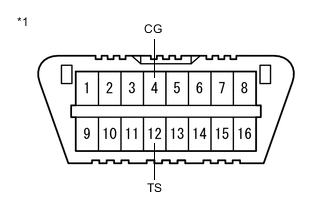
*1 DLC3 Connect the terminals correctly to avoid a malfunction.
-
Using SST, connect terminals 12 (TS) and 4 (CG) of the DLC3.
- SST
- 09843-18040
Note
Connect the terminals correctly to avoid a malfunction.
-
Turn the ignition switch to ON.
-
Wait for 5 seconds or more.
-
Check for DTCs Click here.
Tech Tips
After writing the assist map, if DTC C1581/26 is output, perform the troubleshooting procedure for DTC C1581/26 Click here.
-