NAVIGATION SYSTEM(for HDD) Portable Player cannot be Connected Manually/Automatically
CAUTION / NOTICE / HINT
Tech Tips
Some versions of "Bluetooth" compatible audio players may not function, or the function may be limited using the navigation ECU sub-assembly, even if the portable audio player itself can play files.
PROCEDURE
-
CHECK CONNECTED DEVICE SETTINGS
-
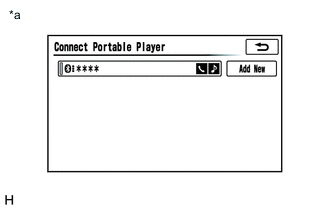
*a Example Display the "Connect Portable Player" screen.
-
Check if the portable player is registered as a connected device.
Note
If a cellular phone is used as a portable player, it must be registered independently from the registration that is performed for the hands-free system.
Tech Tips
Only 5 portable players can be registered.
Result Proceed to The portable player is registered as a connected device The portable player is not registered as a connected device
The portable player is not registered as a connected device 
REGISTER PORTABLE PLAYER AS CONNECTED DEVICE
The portable player is registered as a connected device 
-
-
CHECK SYMPTOMS
-
Check the connection condition between the portable player and navigation ECU sub-assembly.
Tech Tips
The portable player cannot be connected under any of the following conditions:
-
The portable player is connected to another device.
-
The navigation ECU sub-assembly has cleared the portable player registration.
-
The portable player is off.
Result Proceed to The portable player cannot be connected automatically The portable player cannot be connected manually -
The portable player cannot be connected manually 
GO TO STEP 4 Click here
The portable player cannot be connected automatically
-
-
CHECK AUTOMATIC CONNECTION SETTINGS
-
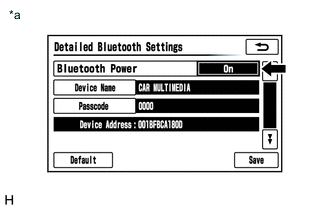
*a Example Display the "Detailed Bluetooth Settings" screen.
-
Check automatic connection settings of the "Bluetooth" audio.
-
Check if "On" is displayed for "Bluetooth Power" on the "Detailed Bluetooth Settings" screen.
Result Proceed to "On" is displayed for "Bluetooth Power" "On" is not displayed for "Bluetooth Power" -
"On" is not displayed for "Bluetooth Power"
CHANGE "Bluetooth" POWER TO "On"
"On" is displayed for "Bluetooth Power"
-
-
CHECK PORTABLE PLAYER STATUS
-
Check the status of the portable player.
-
Check that the portable player is not in standby mode.
-
Check that the portable player is not connected to another device (headphones etc.).
OK The portable player is not in standby mode and not connected to another device (headphones etc.).
Result Proceed to OK NG -
NG
TAKE PORTABLE PLAYER OUT OF STANDBY MODE AND DISCONNECT OTHER DEVICES (HEADPHONES etc.)
OK
-
-
CHECK USING ANOTHER "Bluetooth" AUDIO COMPATIBLE VEHICLE OF SAME MODEL
-
Check if the portable player can be connected manually/automatically on another "Bluetooth" audio compatible vehicle of the same model.
OK The portable player can be connected manually/automatically. Result Proceed to OK NG
NG
PORTABLE PLAYER IS NOT COMPATIBLE
OK
-
-
REMOVE ADDITIONAL DEVICES WHICH USE RADIO WAVES
-
Remove additional devices which use radio waves.
-
Check if the portable player can be connected manually/automatically.
OK The portable player can be connected manually/automatically. Result Proceed to OK NG
OK
END (ADDITIONAL DEVICES ARE DEFECTIVE)
NG
PROCEED TO NEXT SUSPECTED AREA SHOWN IN PROBLEM SYMPTOMS TABLE Click here
-