NAVIGATION SYSTEM(for HDD) Does not Play even after Bluetooth Audio Mode is Selected
CAUTION / NOTICE / HINT
Tech Tips
Even if the portable player can play audio content, it may not be able to play via the in-vehicle device. This does not necessarily indicate a malfunction of the in-vehicle device.
PROCEDURE
-
CHECK OPERATION
-
Check if the portable player operates normally.
Result Proceed to The portable player operates normally The portable player does not operates normally
The portable player does not operates normally 
MALFUNCTION IN PORTABLE PLAYER
The portable player operates normally 
-
-
CHECK AUDIO SETTINGS
-
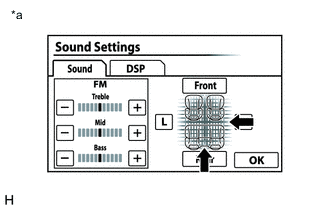
*a Example Display the "Sound Settings" screen.
-
Set volume, fader and balance to the initial values and check that sound is normal.
Tech Tips
Sound quality adjustment measures vary according to the type of the amplifier.
Result Proceed to Audio system returns to normal Audio system does not returns to normal
Audio system does not returns to normal
REPLACE NAVIGATION ECU SUB-ASSEMBLY Click here
Audio system returns to normal
-
-
CHECK USING ANOTHER "Bluetooth" AUDIO COMPATIBLE VEHICLE OF SAME MODEL
-
Check if the "Bluetooth" audio player plays normally on another "Bluetooth" audio compatible vehicle of the same model.
Result Proceed to "Bluetooth" audio player plays normally "Bluetooth" audio player does not plays normally
"Bluetooth" audio player plays normally
PROCEED TO NEXT SUSPECTED AREA SHOWN IN PROBLEM SYMPTOMS TABLE Click here
"Bluetooth" audio player does not plays normally
MALFUNCTION IN PORTABLE PLAYER
-