NAVIGATION SYSTEM(for HDD) Voice Guidance does not Function
PROCEDURE
-
CHECK VOICE GUIDANCE SETTING
-
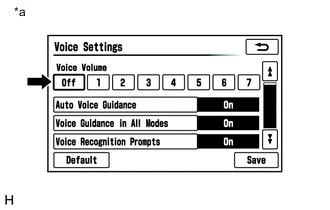
*a Example Display the "Voice Settings" screen.
-
Check that "Off" is not selected.
Result Proceed to "Off" is not selected "Off" is selected
"Off" is selected 
SELECT VOICE VOLUME SETTING OTHER THAN "Off"
"Off" is not selected 
-
-
CHECK VOICE GUIDANCE SETTING
-
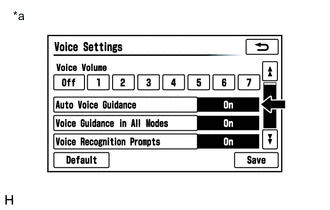
*a Example Display the "Voice Settings" screen.
-
Check that "Auto Voice Guidance" is not "Off".
Result Proceed to "Auto Voice Guidance" is not "Off" "Auto Voice Guidance" is "Off"
"Auto Voice Guidance" is "Off"
TURN AUTO VOICE GUIDANCE "On"
"Auto Voice Guidance" is not "Off"
-
-
CHECK VOICE GUIDANCE SETTING
-
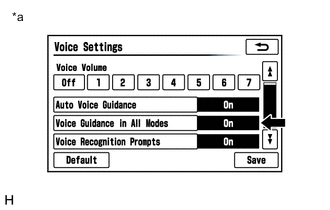
*a Example Display the "Voice Settings" screen.
-
Check that "Voice Guidance in All Modes" is not "Off".
Result Proceed to "Voice Guidance in All Modes" is not "Off" "Voice Guidance in All Modes" is "Off"
"Voice Guidance in All Modes" is "Off"
TURN VOICE GUIDANCE IN ALL MODES "On"
"Voice Guidance in All Modes" is not "Off"
-
-
CHECK AUDIO FUNCTION
-
Check that sound can be heard from a front speaker.
Result Proceed to Sound can be heard Sound cannot be heard
Sound can be heard
REPLACE NAVIGATION ECU SUB-ASSEMBLY Click here
Sound cannot be heard
PROCEED TO NEXT SUSPECTED AREA SHOWN IN PROBLEM SYMPTOMS TABLE Click here
-