DYNAMIC TORQUE CONTROL 4WD/AWD SYSTEM DTC CHECK / CLEAR

-
CHECK DTC (When Using GTS)
-
Check the DTCs.
-
Connect the GTS to the DLC3.
-
Turn the ignition switch to ON.
-
Turn the GTS on.
-
Read the DTCs following the prompts on the GTS screen. Enter the following menus: Chassis / Four Wheel Drive / Trouble Codes.
Chassis > Four Wheel Drive > Trouble Codes -
Check the details of the DTCs.
-
-
-
CLEAR DTC (When Using GTS)
-
Clear the DTCs.
-
Connect the GTS to the DLC3.
-
Turn the ignition switch to ON.
-
Turn the GTS on.
-
Operate the GTS to clear the DTCs. Enter the following menus: Chassis / Four Wheel Drive / Trouble Codes.
Chassis > Four Wheel Drive > Clear DTCs -
According to the display on the GTS, select the trouble code data display with the clear button.
-
-
-
CHECK DTC (When Using SST Check Wire)
-
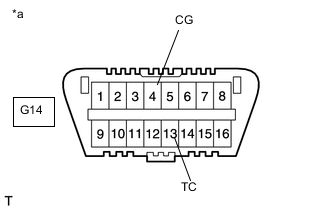
*a Front view of DLC3 Check the DTCs.
-
Using SST, connect terminals TC (13) and CG (4) of the DLC3.
- SST
- 09843-18040
-
Turn the ignition switch to ON.
-
for Segment Display Type:
Read the DTCs from the 4WD/AWD warning light on the combination meter.
for Dot Display Type:
Read the DTCs displayed on the multi-information display.
Tech Tips
-
for Segment Display Type:
-
If the 4WD/AWD warning light does not blink, perform relevant troubleshooting procedures. The relevant troubleshooting procedures are in the sections listed in the table below.
-
When the system is operating correctly, each light will blink continuously in a pattern of 0.25 seconds on, then 0.25 seconds off.
-
When one DTC is output, each light will output the same code at 4-second intervals. (For example, Code 21 would be output as 2 flashes, a 1.5-second pause, and then 1 flash).
-
When 2 or more DTCs are output, each light will output a different code at 2.5-second intervals, and when all codes have been output, there will be a 4-second pause and the sequence will repeat.
-
When multiple codes are set, they are output in order starting with the lowest DTC number.
-
for Dot Display Type:
-
If no DTCs are displayed on the multi-information display, perform the relevant troubleshooting procedures. The relevant troubleshooting procedures are in the sections listed in the table below.
-
"4WD" is displayed on the multi-information display, and the 4WD ECU assembly checks the system for malfunctions.
-
If the dynamic torque control 4WD/AWD system is normal, "4WD FF" will be displayed on the multi-information display (normal system code).
-
If the dynamic torque control 4WD/AWD system is not normal, "4WD XX (DTC)" will be displayed on the multi-information display.
-
DTCs are explained in "DIAGNOSTIC TROUBLE CODE CHART".
Section Title See Procedure 4WD Warning Light does not Come ON TC and CG Terminal Circuit
-
-
-
-
CLEAR DTC (When Using SST Check Wire)
-
Using SST, connect terminals 13 (TC) and 4 (CG) of the DLC3.
- SST
- 09843-18040
-
Turn the ignition switch to ON.
-
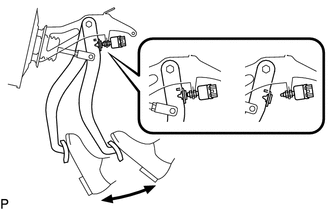
Clear the DTCs stored in the 4WD ECU assembly by depressing the brake pedal 8 times or more within 5 seconds.
-
for Segment Display Type:
Check that the warning light blinks in the normal system code pattern.
for Dot Display Type:
Check that the warning displays "4WD FF".
-
Remove SST from the terminals of the DLC3.
-
Turn the ignition switch off.
Tech Tips
DTCs cannot be cleared by disconnecting the cable from the negative (-) battery terminal or removing the ECU-IG NO. 1 fuse.
-