DYNAMIC TORQUE CONTROL 4WD/AWD SYSTEM TEST MODE PROCEDURE
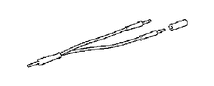 |
09843-18040 | Diagnosis Check Wire No. 2 |
-
DESCRIPTION
Tech Tips
When using a chassis dynamometer, brake tester, etc. to perform a vehicle test, activate test mode to avoid a "different tire diameter installed" incorrect judgment. Test mode does not have a 4WD/AWD parameter. Test mode is activated because it will prohibit a different tire diameter judgment.
Control Status 4WD/AWD Control Status During test mode Different tire diameter malfunction judgment (detection that tire diameter of all wheels are not same) is not performed. Other than above item, normal control is performed. -
ACTIVATE TEST MODE
Tech Tips
Activate test mode before using a chassis dynamometer, brake tester, etc. to perform a vehicle test.
-
Check that the ignition switch is off.
-
Use either of the following methods to change the 4WD ECU assembly to test mode.
-
Test mode activation by shorting the TS terminal
-
With the ignition switch off, connect the TS and CG terminals of the DLC3. Then turn the ignition switch to ON to activate test mode.
Note
-
When the ignition switch is turned from off to ON, the 4WD/AWD warning light will illuminate for 4 seconds. Then it will turn off (for Segment Display Type).
-
for Segment Display Type:
If a part of the dynamic torque control 4WD/AWD system has a defect, the 4WD/AWD warning light will illuminate.
for Dot Display Type:
If a part of the dynamic torque control AWD system has a defect, the AWD warning message is displayed on the multi-information display.
-
-
-
for Segment Display Type:
Check if the 4WD/AWD warning light has changed to the test mode display.
for Dot Display Type:
Check if the display of the multi-information display has changed to the AWD test mode display.
-
Start the engine.
-