STOP AND START SYSTEM(for 2WW) CHECK MODE PROCEDURE
Tech Tips
Compared to normal mode, check mode is more sensitive to malfunctions. Therefore, check mode can detect malfunctions that cannot be detected in normal mode.
Note
All the stored DTCs and freeze frame data are cleared if: 1) the engine stop and start ECU is switched from normal mode to check mode or vice versa; or 2) the ignition switch is turned from ON to ACC or off while in check mode. Before changing modes, always check for and note any DTCs and freeze frame data.
-
CHECK MODE PROCEDURE
-
Check and ensure the following conditions:
-
Battery voltage is 11 V or higher.
-
Shift lever in neutral position.
-
A/C switch is off.
-
-
Turn the ignition switch off.
-
Connect the GTS to the DLC3.
-
Turn the ignition switch to ON.
-
Turn the GTS on.
-
Enter the following menus: Powertrain / Stop and Start / Utility / Check Mode.
Powertrain > Stop and Start > UtilityTester Display Check Mode -
Switch the engine stop and start ECU from normal mode to check mode.
-
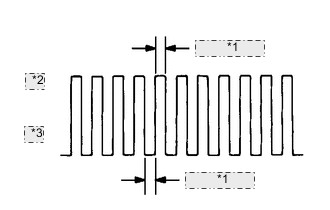
*1 0.13 seconds *2 ON *3 OFF Check that the stop and start indicator light flashes as shown in the illustration.
-
Start the engine.
-
Check that the stop and start indicator light turns off.
-
Simulate the conditions of the malfunction described by the customer.
-
Check for DTCs and freeze frame data using the GTS.
-