СИСТЕМА СМАЗКИ ПРОВЕРКА БЕЗ СНЯТИЯ С АВТОМОБИЛЯ
PROCEDURE
-
CHECK ENGINE OIL LEVEL
-
Warm up the engine and stop the engine, then wait for 5 minutes.
-
Check that the engine oil level is between the low and full level mark on the dipstick.
If the level is low, check for leakage and add oil up to the full level mark.
Note
Do not fill with engine oil above the full level mark.
-
-
CHECK ENGINE OIL QUALITY
-
Check the engine oil for deterioration, water intrusion, discoloration or thinning.
If the quality is visibly poor, replace the engine oil and oil filter element.
-
-
CHECK ENGINE OIL PRESSURE
-
Check the condition of the oil pressure warning light and oil level warning light.
Note
If the ignition switch is turned off, the warning lights do not illuminate*1 or warning message do not displayed*2 the next time the engine is started. Therefore, checking the vehicle after it has been brought in for service will not be of any use for troubleshooting. It is essential to ask the customer whether the warning lights were illuminated*1 or warning message were displayed*2, or not when the malfunction occurred.
*1: w/ multi-information display (segment LCD type)
*2: w/ multi-information display (dot LCD type)
- Condition 1 Condition 2 Condition 3 Condition 4 Oil Pressure Warning Light*1 Illuminated Illuminated Illuminated Illuminated ENGINE OIL LOW Warning message*2 Displayed Displayed Displayed Displayed Oil Level Warning Light*1 Illuminated Illuminated Not illuminated Not illuminated Engine Oil Pressure Low symbol*2 Displayed Displayed Not Displayed Not Displayed DTC Output P0524 None P0524 None MIL Illuminated Not illuminated Illuminated Not illuminated Possible Cause
-
Intake of air into an oil line due to a decrease in the amount of engine oil, or oil pressure stuck at a low value (a DTC is stored as the oil pressure does not increase when the system switches to high oil pressure control mode)
-
Clogging in an oil line (the oil strainer, etc.), or a problem with the oil pump
-
Intake of air into an oil line due to a decrease in the amount of engine oil
-
Clogging in an oil line (the oil strainer, etc.), or a problem with the oil pump
-
Oil pressure stuck at a low value (a DTC is stored as the oil pressure does not increase when the system switches to high oil pressure control mode)
-
Clogging in an oil line (the oil strainer, etc.), or a problem with the oil pump
Clogging in an oil line (the oil strainer, etc.), or a problem with the oil pump Solution to Problem
-
Add engine oil so that the oil level is within the specified range and perform an oil pressure control system check. If the results of the check are normal, it is likely that the illumination of the warning light was caused by oil consumption (if the amount of oil consumption is large, check the oil consumption and perform repairs). If the results of the check are abnormal, it is likely that the problem was caused by the oil pressure control system being stuck in low pressure oil control mode Click here.
-
Check the oil pressure. If the results are abnormal, repair the engine.
-
Perform the inspection procedure for DTC P0524 Click here.
-
Check the oil pressure. If the results are abnormal, repair the engine.
Check the oil pressure. If the results are abnormal, repair the engine. Tech Tips
-
*1: w/ multi-information display (segment LCD type)
-
*2: w/ multi-information display (dot LCD type)
-
Under normal conditions, the oil pressure warning light and oil level warning light are not illuminated.
-
When checking the oil pressure control system, if the system does not switch from high oil pressure control mode, one of the following may be the cause of the problem.
-
The sleeve valve is locked in the position for high oil pressure.
-
The oil pressure switching valve relay is malfunctioning.
-
The oil pressure switching valve is stuck off.
-
If a DTC is stored but the cause of the problem cannot be found, either of the following may be the cause of the problem.
-
Engine oil was added by the customer due to a lack of engine oil.
-
The system was temporarily stuck in low oil pressure control mode (foreign matter was stuck in the system, etc.).
-
Check the oil pressure control system using the following procedure.
-
-
Check the oil pressure control system (when using the GTS).
Reference Purpose of Check When to Perform Check To check whether the oil pressure control system is operating properly when the oil pressure switching valve is forcibly operated. When DTC P0524 is output.
-
Connect the GTS to the DLC3.
-
Start the engine and warm it up.
Tech Tips
Confirm that the engine coolant temperature is 70 to 89°C (158 to 192°F), as the oil pressure changes depending on the engine coolant temperature.
-
Enter the following menus: Powertrain / Engine and ECT / Utility / Engine Oil Pressure Control Check.
-
Referring to the following table, perform the oil pressure control system check.
Tech Tips
-
Even when the engine is warmed up, there are some instances where the oil pressure control system check cannot be performed.
-
The engine speed will increase during the oil pressure control system check.
Item Condition Content of Check System Operation Oil Pressure Control System Check
-
Engine is idling
-
Vehicle is stopped
-
Shift lever is in neutral
-
Engine coolant temperature is in specified range
-
Valve turns off (high pressure control mode)
-
Valve turns on (low pressure control mode)
-
Valve turns off (high pressure control mode)
The average oil pressure over 1 second when the valve is operated is displayed. Details:
The oil pressure is measured for 1 second when the valve is operated, and the value measured every 0.1 seconds is displayed for each valve state [(1) to (3)].
-
-
Read the "Valve off" (high pressure control mode) and "Valve on" (low pressure control mode) oil pressure values.
Reference Oil Pressure Item Specified Condition Valve Off (High Pressure Control Mode) 170 to 450 kPa (1.7 to 4.6 kgf/cm2, 25 to 65 psi)
Valve On (Low Pressure Control Mode) 120 to 230 kPa (1.2 to 2.3 kgf/cm2, 17 to 33 psi)
-
Compare the "Valve off" (high pressure control mode) and "Valve on" (low pressure control mode) oil pressure values and check the difference.
Standard 50 kPa (0.5 kgf/cm2, 7.3 psi) or higher 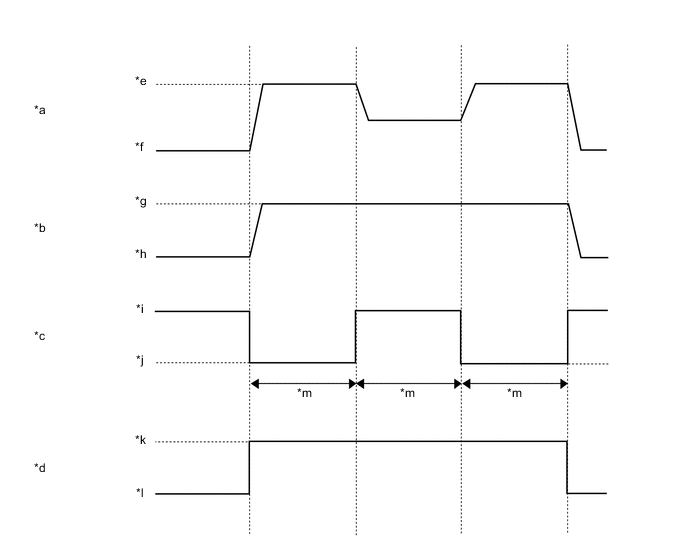
*a Oil Pressure Sensor Output *b Engine Speed *c Oil Pressure Control Mode (State of Oil Pressure Switching Valve) *d Active Test Activation Request *e High Oil Pressure *f Low Oil Pressure *g 2000 rpm *h Idle Speed *i On (Low Oil Pressure Control Mode) *j Off (High Oil Pressure Control Mode) *k On *l Off *m Approximately 5 seconds - -
-
-
Check the oil pressure control system (when not using the GTS).
Tech Tips
When not using the GTS, it is not possible to determine whether the system is stuck in high oil pressure control mode.
-
Inspect the oil pressure using the same procedure for "4. Check Engine Oil Pressure".
Standard Oil Pressure Condition Specified Condition Idling 50 kPa (0.5 kgf/cm2, 7.3 psi) or higher
Engine running at 2500 rpm 200 kPa (2.0 kgf/cm2, 29 psi) or higher
Engine running at 3500 rpm 250 kPa (2.5 kgf/cm2, 36 psi) or higher
Tech Tips
The possible cause can be determined based on the results of the oil pressure inspection (refer to the following table).
Measurement Results - Condition 1 Condition 2 Idling Normal Abnormal 2500 rpm Abnormal Abnormal 3500 rpm Abnormal Abnormal Possible Cause Oil pressure control stuck in low oil pressure control mode Clogging in an oil line (the oil strainer, etc.), or a problem with the oil pump
-
-
-
CHECK ENGINE OIL PRESSURE
-
Remove the oil pressure sender gauge assembly.
CAUTION:
Make sure the engine is cold when removing the oil pressure sender gauge assembly to prevent burns caused by hot engine oil.
-
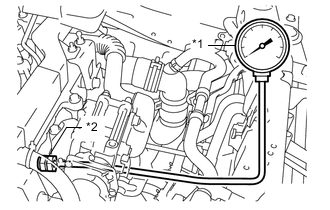
*1 Oil Pressure Gauge *2 Adapter Install an oil pressure gauge with an adapter.
-
Warm up the engine.
Tech Tips
After warming up the engine, the engine coolant temperature is 60 to 90°C (140 to 194°F).
-
Check the engine oil pressure.
Standard Oil Pressure Condition Specified Condition Idling 50 kPa (0.5 kgf/cm2, 7.3 psi) or higher
2500 rpm 200 kPa (2.0 kgf/cm2, 29 psi) or higher
3500 rpm 250 kPa (2.5 kgf/cm2, 36 psi) or higher
If the result is not as specified, check the quality of the engine oil and check the oil paths for clogging. Repair or replace if necessary. If the engine oil pressure is still not as specified, check the oil pump.
Tech Tips
When the oil pressure sender gauge assembly is removed, the oil pressure control system operates in high oil pressure control mode.
-
Remove the oil pressure gauge and adapter.
CAUTION:
Make sure the engine is cold when removing the oil pressure gauge and adapter to prevent burns caused by hot engine oil.
-
Install the oil pressure sender gauge assembly.
-
Inspect for engine oil leaks.
-