AUDIO AND VISUAL SYSTEM(for Radio and Display Type) TERMINALS OF ECU
-
RADIO AND DISPLAY RECEIVER ASSEMBLY
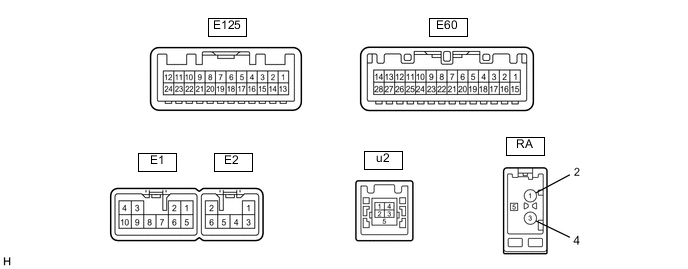
Terminal No. (Symbol) Wiring Color Terminal Description Condition Specified Condition E1-1 (FR+) - E1-7 (GND1) LG - BR Sound signal (Front Right) Audio system playing A waveform synchronized with sound signals is output E1-2 (FL+) - E1-7 (GND1) P - BR Sound signal (Front Left) Audio system playing A waveform synchronized with sound signals is output E1-3 (ACC1) - E1-7 (GND1) GR - BR Power source (ACC) Power switch off Below 1 V Power switch on (ACC) 11 to 14 V E1-4 (+B1) - E1-7 (GND1) SB - BR Power source (+B) Power switch off 11 to 14 V E1-5 (FR-) - E1-7 (GND1) L - BR Sound signal (Front Right) Audio system playing A waveform synchronized with sound signals is output E1-6 (FL-) - E1-7 (GND1) V - BR Sound signal (Front Left) Audio system playing A waveform synchronized with sound signals is output E1-7 (GND1) - Body ground BR - Body ground Ground Always Below 1 V E1-10 (ILL+) - E1-7 (GND1) G - BR Illumination signal Light control switch off Below 1 V Light control switch in tail or head position 11 to 14 V E2-1 (RR+) - E1-7 (GND1) R - BR Sound signal (Rear right) Audio system playing A waveform synchronized with sound signals is output E2-2 (RL+) - E1-7 (GND1) B - BR Sound signal (Rear Left) Audio system playing A waveform synchronized with sound signals is output E2-3 (RR-) - E1-7 (GND1) W - BR Sound signal (Rear right) Audio system playing A waveform synchronized with sound signals is output E2-6 (RL-) - E1-7 (GND1) Y - BR Sound signal (Rear Left) Audio system playing A waveform synchronized with sound signals is output E60-1 (IG) - E1-7 (GND1) L - BR Power source (IG) Power switch off Below 1 V Power switch on (IG) 11 to 14 V E60-2 (REV) - E1-7 (GND1) R - BR Reverse signal See "Check Vehicle Signal" in Operation Check
- E60-4 (MACC) - E1-7 (GND1) R - BR Microphone power supply Power switch off Below 1 V Power switch on (ACC) 4.25 to 5.25 V E60-5 (MIN+) - E1-7 (GND1) B - BR Microphone voice signal See "Check Microphone" in Operation Check
- E60-6 (SNS2) - E1-7 (GND1) G - BR Microphone connection detection signal Always Below 1 V E60-9 (CANH) G CAN communication signal - - E60-10 (CANL) W CAN communication signal - - E60-11 (AGND) - Body ground Shield - Body ground Shield ground Always Below 1 V E60-15 (PKB) - E1-7 (GND1) B - BR Parking brake signal See "Check Vehicle Signal" in Operation Check
- E60-17 (SPD) - E1-7 (GND1) V - BR Vehicle speed signal See "Check Vehicle Signal" in Operation Check
- E60-18 (SGND) - Body ground Shield - Body ground Shield ground Always Below 1 V E60-19 (MIN-) - E1-7 (GND1) W - BR Microphone voice signal See "Check Microphone" in Operation Check
- E60-21 (SW1) - E60-23 (SWG) SB - W-B Steering pad switch signal No switch pushed 2.97 to 3.56 V Seek+ switch pushed 0.27 to 0.35 V Seek- switch pushed 0.86 to 1.03 V Volume+ switch pushed 1.51 to 1.79 V Volume- switch pushed 2.22 to 2.66 V E60-22 (SW2) - E60-23 (SWG) R - W-B Steering pad switch signal No switch pushed 2.97 to 3.56 V MODE switch pushed 0.27 to 0.35 V On hook switch pushed 0.86 to 1.03 V Off hook switch pushed 1.51 to 1.79 V Voice switch pushed 2.22 to 2.66 V E60-23 (SWG) - E1-7 (GND1) W-B - BR Steering pad switch ground Always Below 1 V E60-25 (ADPG) - E1-7 (GND1) SB - BR External device connection detection signal External device connected Below 1 V External device not connected 2.1 to 3 V E60-26 (VAR+) - E60-27 (VA-) G - R Sound signal (Right) External device playing (When stereo jack used) A waveform synchronized with sound signals is output E60-27 (VA-) - E1-7 (GND1) R - BR Ground Always Below 1 V E60-28 (VAL+) - E60-27 (VA-) B - R Sound signal (Left) External device playing (When stereo jack used) A waveform synchronized with sound signals is output E125-3 (CNH1) G Local bus communication signal - - E125-4 (CNL1) GR Local bus communication signal - - E125-11 (CA+) - E1-7 (GND1) R - BR Television camera power supply Power switch on (ACC) 5.5 to 7.05 V E125-12 (V+) - E1-7 (GND1) B - BR Video signal Power switch on (IG)
Shift lever in R
Camera lens not covered, displaying an image
Pulse generation
(Refer to waveform 1)
Power switch on (IG)
Shift lever in R
Camera lens covered, blacking out screen
Pulse generation
(Refer to waveform 2)
E125-23 (CGND) - Body ground Shield - Body ground Shield ground Always Below 1 V E125-24 (V-) - E1-7 (GND1) W - BR Ground Always Below 1 V u2-1 (USV1) - Power source - - u2-2 (US1-) - Data signal - - u2-3 (US1+) - Data signal - - u2-4 (UGD1) - Ground - - u2-5 (USG1) - Shield ground - - RA-5 (ANT+) - E1-7 (GND1) - - BR Power source of antenna Power switch on (ACC)
Radio switch on and FM or AM selected
11 to 14 V
-
Reference (Oscilloscope waveform):
-
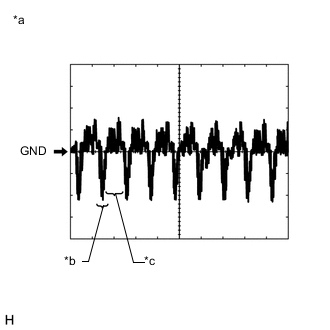
*a Waveform 1 (camera lens not covered, displaying an image) *b Synchronization Signal *c Video Waveform Waveform 1 (camera lens not covered, displaying an image)
Item Content Measurement terminal E125-12 (V+) - E1-7 (GND1) Measurement setting 200 mV/DIV., 50 μs/DIV. Condition Power switch on (IG), shift lever in R Tech Tips
The video waveform changes according to the image sent by the television camera assembly.
-
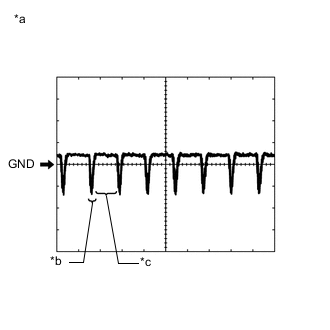
*a Waveform 2 (camera lens covered, blacking out the screen) *b Synchronization Signal *c Video Waveform Waveform 2 (camera lens covered, blacking out the screen)
Item Content Measurement terminal E125-12 (V+) - E1-7 (GND1) Measurement setting 200 mV/DIV., 50 μs/DIV. Condition Power switch on (IG), shift lever in R Tech Tips
The video waveform changes according to the image sent by the rear television camera assembly.
-
Tech Tips
Check from the rear of the connector while it is connected to the components.
-