ELECTRONICALLY CONTROLLED BRAKE SYSTEM, Diagnostic DTC:C1380/64

| DTC Code | DTC Name |
|---|---|
| C1380/64 | Stop Light Control Relay Malfunction |
DESCRIPTION
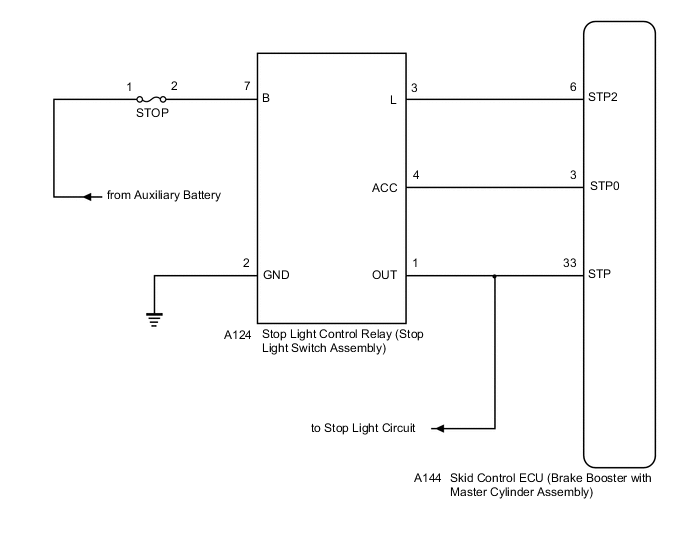
Upon receiving the hill-start assist control operating signal from the skid control ECU (brake booster with master cylinder assembly), the relay contact turns on and the stop lights come on.
| DTC No. | Detection Item | INF Code | DTC Detection Condition | Trouble Area | Note |
|---|---|---|---|---|---|
| C1380/64 | Stop Light Control Relay Malfunction | 761 762 |
|
|
VSC DTC |
WIRING DIAGRAM
CAUTION / NOTICE / HINT
Note
-
When replacing the skid control ECU (brake booster with master cylinder assembly), perform initialization and calibration of the linear solenoid valve.
-
Inspect the fuses for circuits related to this system before performing the following procedure.
Tech Tips
When C1249/49 is output together with C1380/64, inspect and repair the trouble areas indicated by C1249/49 first.
PROCEDURE
-
CHECK STOP LIGHT OPERATION
-
Check that the stop lights come on when the brake pedal is depressed and go off when the brake pedal is released.
OK Condition Illumination Condition Brake pedal depressed. On Brake pedal released. Off Result Proceed to OK NG
NG 
INSPECT LIGHTING SYSTEM (STOP LIGHT CIRCUIT) Click here
OK 
-
-
READ VALUE USING GTS (STOP LIGHT SWITCH ASSEMBLY)
-
Connect the GTS to the DLC3.
-
Turn the power switch on (IG).
-
Select the Data List on the GTS.
Chassis > ABS/VSC/TRC > Data ListTester Display Measurement Item Range Normal Condition Diagnostic Note Stop Light SW Stop light switch assembly ON or OFF ON: Brake pedal depressed
OFF: Brake pedal released
-
Chassis > ABS/VSC/TRC > Data ListTester Display Stop Light SW -
Check that the stop light switch assembly condition observed on the GTS changes according to brake pedal operation.
OK The GTS displays ON or OFF according to brake pedal operation. Result Proceed to OK NG
NG 
CHECK HARNESS AND CONNECTOR (STP TERMINAL) Click here
OK
-
-
PERFORM ACTIVE TEST USING GTS (STOP LIGHT CONTROL RELAY)
-
Select the Active Test on the GTS.
Chassis > ABS/VSC/TRC > Active TestTester Display Measurement Item Control Range Diagnostic Note Stop Light Relay Stop light control relay (Stop light switch assembly) Relay (Switch) ON/OFF Stop lights come on
Chassis > ABS/VSC/TRC > Active TestTester Display Stop Light Relay -
Perform the Active Test of the stop light control relay (stop light switch assembly) using the GTS.
-
Select the Data List on the GTS.
Chassis > ABS/VSC/TRC > Data ListTester Display Measurement Item Range Normal Condition Diagnostic Note Stop Light Relay Output Stop light control relay (Stop light switch assembly) output ON or OFF ON: Relay (Switch) output on
OFF: Relay (Switch) output off
-
Chassis > ABS/VSC/TRC > Data ListTester Display Stop Light Relay Output -
Check for stop light control relay (stop light switch assembly) operation using the Data List and stop light operation by performing the Active Test.
Result Result Proceed to Data List content and stop light operation are normal. A Data List content and stop light operation are abnormal or Data List content is normal but stop lights do not turn on or off. B
B
INSPECT STOP LIGHT SWITCH ASSEMBLY Click here
A
-
-
CHECK HARNESS AND CONNECTOR (STP TERMINAL)
-
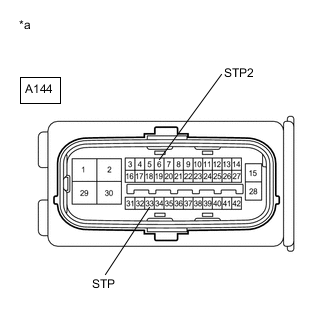
*a Front view of wire harness connector
(to Skid Control ECU (Brake Booster with Master Cylinder Assembly))
Turn the power switch off.
-
Make sure that there is no looseness at the locking part and the connecting part of the connector.
-
Disconnect the A144 skid control ECU (brake booster with master cylinder assembly) connector.
-
Measure the voltage according to the value(s) in the table below.
Standard Voltage Tester Connection Condition Specified Condition A144-6 (STP2) - Body ground Stop light switch assembly on (Brake pedal depressed) 11 to 14 V A144-6 (STP2) - Body ground Stop light switch assembly off (Brake pedal released) Below 1.5 V A144-33 (STP) - Body ground Stop light switch assembly on (Brake pedal depressed) 11 to 14 V A144-33 (STP) - Body ground Stop light switch assembly off (Brake pedal released) Below 1.5 V Result Proceed to OK NG
NG
REPAIR OR REPLACE HARNESS OR CONNECTOR (STP CIRCUIT)
OK
-
-
RECONFIRM DTC
-
Reconnect the A144 skid control ECU (brake booster with master cylinder assembly) connector.
-
Clear the DTCs.
Chassis > ABS/VSC/TRC > Clear DTCs -
Turn the power switch on (READY).
-
Perform a road test.
-
Check if the same DTC is output.
Chassis > ABS/VSC/TRC > Trouble CodesResult Result Proceed to DTC C1380/64 is not output. A DTC C1380/64 is output. B
A
USE SIMULATION METHOD TO CHECK Click here
B
REPLACE BRAKE BOOSTER WITH MASTER CYLINDER ASSEMBLY for LHD: Click here
REPLACE BRAKE BOOSTER WITH MASTER CYLINDER ASSEMBLY for RHD: Click here -
-
INSPECT STOP LIGHT SWITCH ASSEMBLY
-
Turn the power switch off.
-
Check the stop light control relay (stop light switch assembly).
OK The stop light control relay (stop light switch assembly) is normal. Result Proceed to OK NG
NG
REPLACE STOP LIGHT SWITCH ASSEMBLY Click here
OK
-
-
CHECK HARNESS AND CONNECTOR (STP0 TERMINAL)
-
Make sure that there is no looseness at the locking part and the connecting part of the connectors.
-
Disconnect the A144 skid control ECU (brake booster with master cylinder assembly) connector.
-
Turn the power switch on (IG).
-
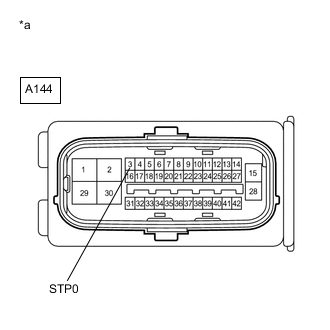
*a Front view of wire harness connector
(to Skid Control ECU (Brake Booster with Master Cylinder Assembly))
Measure the voltage according to the value(s) in the table below.
Standard Voltage Tester Connection Condition Specified Condition A144-3 (STP0) - Body ground Power switch on (IG) 11 to 14 V Result Proceed to OK NG
OK
REPLACE BRAKE BOOSTER WITH MASTER CYLINDER ASSEMBLY for LHD: Click here
REPLACE BRAKE BOOSTER WITH MASTER CYLINDER ASSEMBLY for RHD: Click hereNG
REPAIR OR REPLACE HARNESS OR CONNECTOR (STP0 CIRCUIT)
-
-
CHECK HARNESS AND CONNECTOR (STP TERMINAL)
-
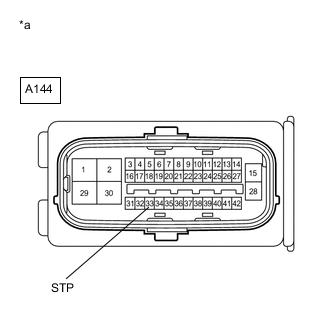
*a Front view of wire harness connector
(to Skid Control ECU (Brake Booster with Master Cylinder Assembly))
Turn the power switch off.
-
Make sure that there is no looseness at the locking part and the connecting part of the connector.
-
Disconnect the A144 skid control ECU (brake booster with master cylinder assembly) connector.
-
Measure the voltage according to the value(s) in the table below.
Standard Voltage Tester Connection Condition Specified Condition A144-33 (STP) - Body ground Stop light switch assembly on (Brake pedal depressed) 11 to 14 V A144-33 (STP) - Body ground Stop light switch assembly off (Brake pedal released) Below 1.5 V Result Proceed to OK NG
OK
REPLACE BRAKE BOOSTER WITH MASTER CYLINDER ASSEMBLY for LHD: Click here
REPLACE BRAKE BOOSTER WITH MASTER CYLINDER ASSEMBLY for RHD: Click hereNG
REPAIR OR REPLACE HARNESS OR CONNECTOR (STP CIRCUIT)
-