HV BATTERY REMOVAL

PROCEDURE
-
PRECAUTION
-
CHECK FOR DTC
-
Check for DTCs.
Note
Confirm that P0AA6 (Hybrid Battery Voltage System Isolation Fault) is not output before removing or installing the HV battery. If this DTC is output, perform troubleshooting for this DTC first.
-
-
REMOVE SERVICE PLUG GRIP
-
REMOVE DECK BOARD ASSEMBLY (w/ Deck Board)
-
REMOVE REAR FLOOR MAT ASSEMBLY
-
REMOVE REAR DECK FLOOR BOX (w/ Deck Floor Box)
-
REMOVE DECK FLOOR BOX LH (w/ Deck Floor Box)
-
REMOVE REAR SEAT CUSHION ASSEMBLY
-
REMOVE REAR SEAT HEADREST ASSEMBLY
-
REMOVE REAR SEATBACK ASSEMBLY LH
-
REMOVE REAR UNDER SIDE COVER LH
-
REMOVE REAR UNDER SIDE COVER RH
-
REMOVE REAR UNDER COVER
-
REMOVE REAR SEAT CUSHION LEG SUB-ASSEMBLY
-
REMOVE INVERTER COVER
-
CHECK TERMINAL VOLTAGE
-
INSTALL INVERTER COVER
-
REMOVE REAR DOOR SCUFF PLATE LH
-
REMOVE REAR DOOR OPENING TRIM WEATHERSTRIP LH
-
REMOVE REAR SEATBACK HINGE SUB-ASSEMBLY LH
-
REMOVE REAR SEAT SIDE GARNISH LH
-
REMOVE BATTERY COOLING BLOWER ASSEMBLY
-
REMOVE HYBRID BATTERY COVER SUB-ASSEMBLY RH
CAUTION:
Wear insulated gloves.
-
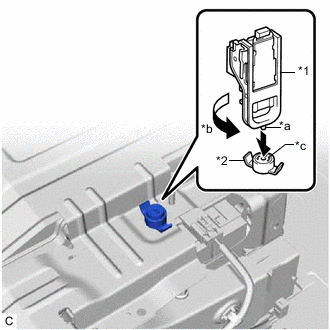
*1 Service Plug Grip *2 Battery Cover Lock Striker *a Projection *b Turn *c Button Using the service plug grip, remove the battery cover lock striker.
Tech Tips
Insert the projection of the service plug grip, turn the button of the battery cover lock striker counterclockwise, and release the lock.
-
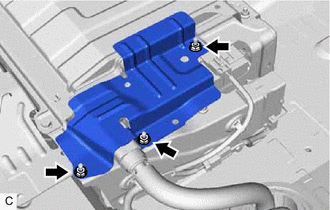
Remove the 3 nuts and hybrid battery cover sub-assembly RH.
-
-
DISCONNECT FRAME WIRE
CAUTION:
Wear insulated gloves.
Note
Insulate the disconnected connectors with insulating tape.
-
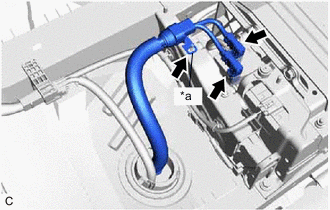
*a Shielded Wire Ground Disconnect the 2 frame wire connectors from the hybrid battery junction block assembly.
-
Disconnect the shielded wire ground and frame wire.
-
-
DISCONNECT WIRE HARNESS
-
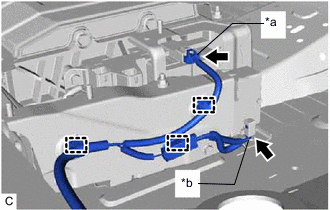
*a Hybrid Battery Junction Block Assembly Connector *b EV Battery Plug Connector Disconnect the hybrid battery junction block assembly connector, EV battery plug connector and 3 clamps.
-
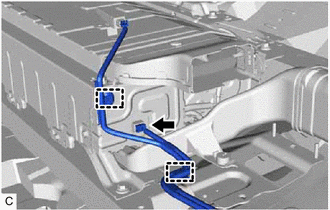
Disconnect the battery voltage sensor connector and 2 clamps.
-
-
REMOVE NO. 2 INDOOR ELECTRICAL KEY ANTENNA ASSEMBLY
-
REMOVE NO. 2 HYBRID BATTERY INTAKE DUCT
-
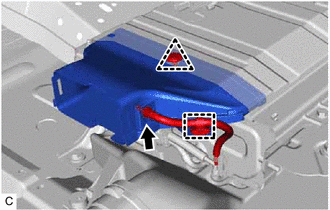
Disconnect the clamp from the No. 2 hybrid battery intake duct.
-
Disconnect the HV battery thermistor from the No. 2 hybrid battery intake duct.
-
Remove the clip and No. 2 hybrid battery intake duct from the HV battery.
-
-
REMOVE NO. 1 HYBRID BATTERY EXHAUST DUCT
-
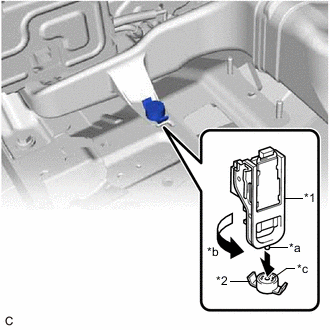
*1 Service Plug Grip *2 Battery Cover Lock Striker *a Projection *b Turn *c Button Using the service plug grip, remove the battery cover lock striker.
Tech Tips
Insert the projection of the service plug grip, turn the button of the battery cover lock striker counterclockwise, and release the lock.
-
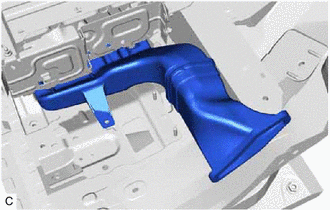
Remove the No. 1 hybrid battery exhaust duct from the HV battery.
-
-
REMOVE NO. 2 HYBRID BATTERY EXHAUST DUCT
-
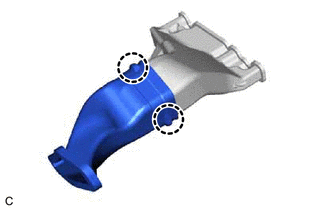
Disengage the 2 claws and remove the No. 2 hybrid battery exhaust duct from the No. 1 hybrid battery exhaust duct.
-
-
REMOVE HV BATTERY
CAUTION:
Wear insulated gloves.
-
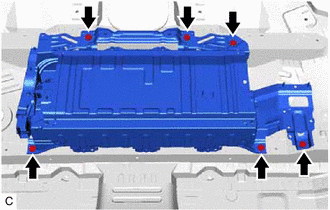
Remove the 6 bolts and HV battery.
Note
-
Since the HV battery is very heavy, 2 people are needed to remove the HV battery. When removing the HV battery, do not damage the parts around it.
-
When removing/installing/moving the HV battery, make sure not to tilt it more than 80°.
-
To prevent the wire harness from being caught, make sure to bundle the wire harness using insulating tape or equivalent.
-
Use cardboard or other similar material to protect the HV battery and vehicle body from damage.
-
While lowering the HV battery from the vehicle, do not allow it to contact the vehicle.
-
When moving the hybrid battery assembly, make sure to use an engine lifter.
Tech Tips
Attach tape to the feet and edges of the HV battery to protect tools and the vehicle body.
-
-
-
REMOVE NO. 1 HYBRID VEHICLE BATTERY COVER PANEL LH
CAUTION:
Wear insulated gloves.
-
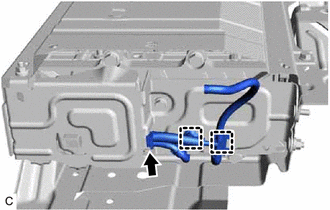
Disconnect the battery voltage sensor connector and 2 clamps.
-
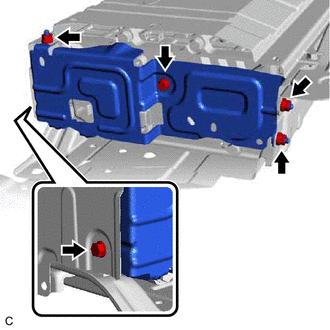
Remove the 2 bolts, 3 nuts and No. 1 hybrid vehicle battery cover panel LH.
-
-
REMOVE BATTERY VOLTAGE SENSOR
-
REMOVE NO. 2 HYBRID VEHICLE BATTERY SHIELD PANEL
CAUTION:
Wear insulated gloves.
-
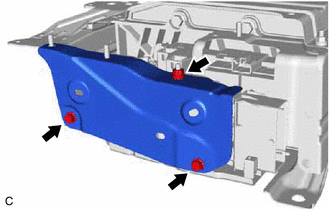
Remove the 2 bolts, nut and No. 2 hybrid vehicle battery shield panel.
-
-
REMOVE UPPER HYBRID BATTERY COVER SUB-ASSEMBLY
CAUTION:
Be sure to wear insulated gloves and protective goggles.
-
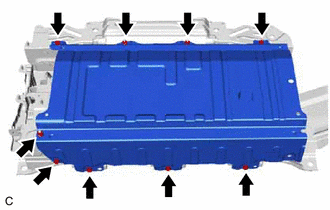
Remove the 6 bolts, 3 nuts and upper hybrid battery cover sub-assembly.
-
-
REMOVE NO. 2 HYBRID BATTERY SHIELD SUB-ASSEMBLY
CAUTION:
Be sure to wear insulated gloves and protective goggles.
-
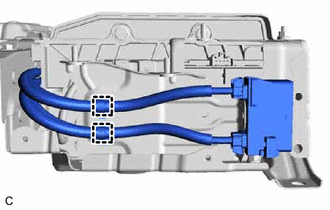
Disconnect the 2 clamps from the No. 2 hybrid battery shield sub-assembly.
-
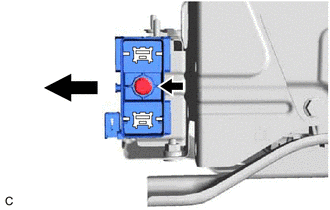
Remove the bolt and EV battery plug from the No. 2 hybrid battery shield sub-assembly as shown in the illustration.
-
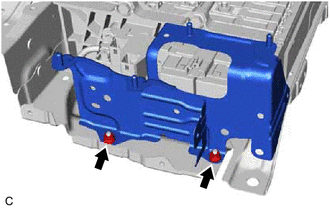
Remove the 2 nuts and No. 2 hybrid battery shield sub-assembly from the HV battery.
-
-
REMOVE HYBRID BATTERY JUNCTION BLOCK ASSEMBLY
-
REMOVE NO. 3 HV BATTERY CARRIER BRACKET SUB-ASSEMBLY
CAUTION:
Be sure to wear insulated gloves and protective goggles.
-
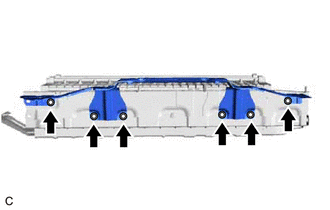
Remove the 6 nuts and No. 3 HV battery carrier bracket sub-assembly from the No. 1 hybrid vehicle battery shield panel.
-
-
REMOVE NO. 1 HYBRID VEHICLE BATTERY SHIELD PANEL
CAUTION:
Be sure to wear insulated gloves and protective goggles.
-
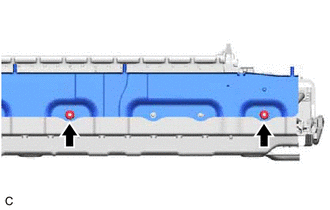
Remove the 2 bolts and No. 1 hybrid vehicle battery shield panel from the HV battery.
-