POWER MIRROR CONTROL SYSTEM (w/ Memory) Wireless Transmitter Memory Function does not Operate
DESCRIPTION
Key IDs can be registered(linked) with either the M1 or M2 seat memory switches. The key ID registration procedure should be performed while the electrical key transmitter sub-assembly is in the vehicle, the engine switch is on (IG), and the driver door is closed. When registration is completed, the buzzer will sound as an answerback.
INSPECTION PROCEDURE
PROCEDURE
-
CHECK POWER DOOR LOCK OPERATION
-
Check the power door lock operation Click here.
OK Power door lock operation is normal.
NG 
GO TO POWER DOOR LOCK CONTROL SYSTEM (PROBLEM SYMPTOMS TABLE) Click here
OK 
-
-
CHECK SMART ENTRY AND START SYSTEM (ENTRY FUNCTION)
-
Check the smart entry and start system (entry function) Click here.
OK Smart entry and start system (entry function) in normal.
NG
GO TO SMART ENTRY AND START SYSTEM (PROBLEM SYMPTOMS TABLE) Click here
OK
-
-
CHECK MEMORY AND REACTIVATION FUNCTION
-
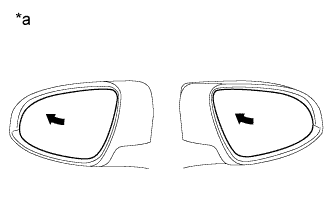
Text in Illustration *a Turn to Left Fully Turn the engine switch on (IG).
-
Using the outer mirror switch assembly, turn the mirror surface to the fully left position.
-
Press the M1 switch while the SET switch is being pressed.
-
Check that the buzzer sounds for 0.5 seconds and the mirror surface position is stored.
-
Using the outer mirror assembly, turn the mirror surface to the fully right position.
-
Press the M1 switch.
-
Check that the buzzer sounds for 0.1 seconds and the outer mirror automatically moves to the stored fully left position.
Result Result Proceed to Memory and reactivation function is normal A Memory function is not normal B Reactivation function is not normal C
B
GO TO OTHER DIAGNOSIS PROCEDURE (Power Mirror Surface Position is not Memorized) Click here
C
GO TO OTHER DIAGNOSIS PROCEDURE (Power Mirrors do not Return to Memorized Position) Click here
A
-
-
READ VALUE USING GTS
-
Connect the GTS to the DLC3.
-
Turn the engine switch on (IG).
-
Turn the GTS on.
-
Enter the following menus: Body Electrical / Main Body / Data List.
-
Read the Data List according to the display on the GTS.
Main Body Tester Display Measurement Item/Range Normal Condition Diagnostic Note FL Door Courtesy Front door courtesy light switch LH signal/ON or OFF ON: Front door LH closed
OFF: Front door LH open
- OK On the GTS screen, ON or OFF is displayed accordingly.
NG
GO TO LIGHTING SYSTEM (Door Courtesy Switch Circuit) Click here
OK
-
-
PERFORM ELECTRICAL KEY TRANSMITTER SUB-ASSEMBLY RECOGNITION CODE REGISTRATION
-
With the engine switch on (IG) and the driver door closed, press and hold the M1 or M2 switch. The main body ECU (multiplex network body ECU) will enter electrical key transmitter sub-assembly recognition code registration mode to allow a key to be linked to mirror surface memory position.
Tech Tips
If the memory switch is released before entering registration mode, the memory switch will not enter registration mode.
-
When the manual door lock switch is pressed, check that the buzzer of the front power seat switch LH sounds once (0.5 seconds).
OK The buzzer sounds when registration is completed.
NG 
PERFORM ACTIVE TEST USING GTS Click here
OK
-
-
PERFORM MEMORY DELETION
-
Enter the following menus: Body Electrical / Main Body / Data List.
-
After performing any of the following procedures to cut the link between the key and switch, check that the Data List for the applicable key changes to NONE.
-
With the engine switch on (IG) and the driver door closed, press and hold the SET switch. The main body ECU (multiplex network body ECU) will enter electrical key transmitter sub-assembly recognition code deletion mode.
Tech Tips
If the memory switch is released before entering deletion mode, the memory switch will not enter deletion mode.
-
When the manual door lock switch is pressed, check that the buzzer of the front power seat switch LH sounds twice (0.1 seconds each time).
Main Body Tester Display Measurement Item/Range Normal Condition Diagnostic Note Mem SW No. w/KeyID1 Switch linked with key ID1 / NONE, MEM SW1, MEM SW2, or MEM SW3* NONE: No switches linked with key ID1
MEM SW1: M1 linked with key ID1
MEM SW2: M2 linked with key ID1
MEM SW3: M3 linked with key ID1*
- Mem SW No. w/KeyID2 Switch linked with key ID2 / NONE, MEM SW1, MEM SW2, or MEM SW3* NONE: No switches linked with key ID2
MEM SW1: M1 linked with key ID2
MEM SW2: M2 linked with key ID2
MEM SW3: M3 linked with key ID2*
- Mem SW No. w/KeyID3 Switch linked with key ID3 / NONE, MEM SW1, MEM SW2, or MEM SW3* NONE: No switches linked with key ID3
MEM SW1: M1 linked with key ID3
MEM SW2: M2 linked with key ID3
MEM SW3: M3 linked with key ID3*
- Mem SW No. w/KeyID4 Switch linked with key ID4 / NONE, MEM SW1, MEM SW2, or MEM SW3* NONE: No switches linked with key ID4
MEM SW1: M1 linked with key ID4
MEM SW2: M2 linked with key ID4
MEM SW3: M3 linked with key ID4*
- Mem SW No. w/KeyID5 Switch linked with key ID5 / NONE, MEM SW1, MEM SW2, or MEM SW3* NONE: No switches linked with key ID5
MEM SW1: M1 linked with key ID5
MEM SW2: M2 linked with key ID5
MEM SW3: M3 linked with key ID5*
- Mem SW No. w/KeyID6 Switch linked with key ID6 / NONE, MEM SW1, MEM SW2, or MEM SW3* NONE: No switches linked with key ID6
MEM SW1: M1 linked with key ID6
MEM SW2: M2 linked with key ID6
MEM SW3: M3 linked with key ID6*
- Mem SW No. w/KeyID7 Switch linked with key ID7 / NONE, MEM SW1, MEM SW2, or MEM SW3* NONE: No switches linked with key ID7
MEM SW1: M1 linked with key ID7
MEM SW2: M2 linked with key ID7
MEM SW3: M3 linked with key ID7*
-
-
*: Although the item is displayed on the GTS, it is not applicable to this vehicle.
OK The Data List display for the applicable key changes to NONE. -
NG
REPLACE MAIN BODY ECU (MULTIPLEX NETWORK BODY ECU) Click here
OK
-
-
PERFORM MEMORY REGISTRATION
-
After performing any of the following procedures to link the key and a switch, check the Data List to confirm that the key and switch have been linked.
-
With the engine switch on (IG) and the driver door closed, press and hold the M1 or M2 switch. The main body ECU (multiplex network body ECU) will enter electrical key transmitter sub-assembly recognition code registration mode to allow a key to be linked to mirror surface memory position.
Tech Tips
If the memory switch is released before entering registration mode, the memory switch will not enter registration mode.
-
When the manual door lock switch is pressed, check that the buzzer of the front power seat switch LH sounds once (0.5 seconds).
Main Body Tester Display Measurement Item/Range Normal Condition Diagnostic Note Mem SW No. w/KeyID1 Switch linked with key ID1 / NONE, MEM SW1, MEM SW2, or MEM SW3* NONE: No switches linked with key ID1
MEM SW1: M1 linked with key ID1
MEM SW2: M2 linked with key ID1
MEM SW3: M3 linked with key ID1*
- Mem SW No. w/KeyID2 Switch linked with key ID2 / NONE, MEM SW1, MEM SW2, or MEM SW3* NONE: No switches linked with key ID2
MEM SW1: M1 linked with key ID2
MEM SW2: M2 linked with key ID2
MEM SW3: M3 linked with key ID2*
- Mem SW No. w/KeyID3 Switch linked with key ID3 / NONE, MEM SW1, MEM SW2, or MEM SW3* NONE: No switches linked with key ID3
MEM SW1: M1 linked with key ID3
MEM SW2: M2 linked with key ID3
MEM SW3: M3 linked with key ID3*
- Mem SW No. w/KeyID4 Switch linked with key ID4 / NONE, MEM SW1, MEM SW2, or MEM SW3* NONE: No switches linked with key ID4
MEM SW1: M1 linked with key ID4
MEM SW2: M2 linked with key ID4
MEM SW3: M3 linked with key ID4*
- Mem SW No. w/KeyID5 Switch linked with key ID5 / NONE, MEM SW1, MEM SW2, or MEM SW3* NONE: No switches linked with key ID5
MEM SW1: M1 linked with key ID5
MEM SW2: M2 linked with key ID5
MEM SW3: M3 linked with key ID5*
- Mem SW No. w/KeyID6 Switch linked with key ID6 / NONE, MEM SW1, MEM SW2, or MEM SW3* NONE: No switches linked with key ID6
MEM SW1: M1 linked with key ID6
MEM SW2: M2 linked with key ID6
MEM SW3: M3 linked with key ID6*
- Mem SW No. w/KeyID7 Switch linked with key ID7 / NONE, MEM SW1, MEM SW2, or MEM SW3* NONE: No switches linked with key ID7
MEM SW1: M1 linked with key ID7
MEM SW2: M2 linked with key ID7
MEM SW3: M3 linked with key ID7*
-
-
*: Although the item is displayed on the GTS, it is not applicable to this vehicle.
OK Data List shows that the key ID has been linked to a switch (M1 or M2). -
NG
REPLACE MAIN BODY ECU (MULTIPLEX NETWORK BODY ECU) Click here
OK
-
-
CHECK MEMORY CALL FUNCTION
-
Perform a wireless door unlock operation and check that opening the driver door causes the following:
-
The buzzer sounds for 0.1 seconds.
-
The mirror surface position automatically moves to a stored position.
OK Memory call function is normal.
-
NG
GO TO OTHER DIAGNOSIS PROCEDURE Click here
OK 
USE SIMULATION METHOD TO CHECK Click here
-
-
PERFORM ACTIVE TEST USING GTS
-
Enter the following menus: Body Electrical / Driver Seat / Active Test.
-
Perform Active Test according to the display on the GTS.
Driver Seat Tester Display Test Part Control Range Diagnostic Note Buzzer Buzzer built into the position control ECU and switch ON or OFF - OK The buzzer sounds.
NG
REPLACE FRONT POWER SEAT SWITCH LH Click here
OK
-
-
REPLACE MAIN BODY ECU (MULTIPLEX NETWORK BODY ECU)
-
Replace the main body ECU (multiplex network body ECU) Click here.
NEXT
-
-
PERFORM MEMORY REGISTRATION
-
After performing any of the following procedures to link the key and a switch, check the Data List to confirm that the key and switch have been linked.
-
With the engine switch on (IG) and the driver door closed, press and hold the M1 or M2 switch. The main body ECU (multiplex network body ECU) will enter electrical key transmitter sub-assembly recognition code registration mode to allow a key to be linked to mirror surface memory position.
Tech Tips
If the memory switch is released before entering registration mode, the memory switch will not enter registration mode.
-
When the manual door lock switch is pressed, check that the buzzer of the front power seat switch LH sounds once (0.5 seconds).
Main Body Tester Display Measurement Item/Range Normal Condition Diagnostic Note Mem SW No. w/KeyID1 Switch linked with key ID1 / NONE, MEM SW1, MEM SW2, or MEM SW3* NONE: No switches linked with key ID1
MEM SW1: M1 linked with key ID1
MEM SW2: M2 linked with key ID1
MEM SW3: M3 linked with key ID1*
- Mem SW No. w/KeyID2 Switch linked with key ID2 / NONE, MEM SW1, MEM SW2, or MEM SW3* NONE: No switches linked with key ID2
MEM SW1: M1 linked with key ID2
MEM SW2: M2 linked with key ID2
MEM SW3: M3 linked with key ID2*
- Mem SW No. w/KeyID3 Switch linked with key ID3 / NONE, MEM SW1, MEM SW2, or MEM SW3* NONE: No switches linked with key ID3
MEM SW1: M1 linked with key ID3
MEM SW2: M2 linked with key ID3
MEM SW3: M3 linked with key ID3*
- Mem SW No. w/KeyID4 Switch linked with key ID4 / NONE, MEM SW1, MEM SW2, or MEM SW3* NONE: No switches linked with key ID4
MEM SW1: M1 linked with key ID4
MEM SW2: M2 linked with key ID4
MEM SW3: M3 linked with key ID4*
- Mem SW No. w/KeyID5 Switch linked with key ID5 / NONE, MEM SW1, MEM SW2, or MEM SW3* NONE: No switches linked with key ID5
MEM SW1: M1 linked with key ID5
MEM SW2: M2 linked with key ID5
MEM SW3: M3 linked with key ID5*
- Mem SW No. w/KeyID6 Switch linked with key ID6 / NONE, MEM SW1, MEM SW2, or MEM SW3* NONE: No switches linked with key ID6
MEM SW1: M1 linked with key ID6
MEM SW2: M2 linked with key ID6
MEM SW3: M3 linked with key ID6*
- Mem SW No. w/KeyID7 Switch linked with key ID7 / NONE, MEM SW1, MEM SW2, or MEM SW3* NONE: No switches linked with key ID7
MEM SW1: M1 linked with key ID7
MEM SW2: M2 linked with key ID7
MEM SW3: M3 linked with key ID7*
-
-
*: Although the item is displayed on the GTS, it is not applicable to this vehicle.
OK The Data List shows that the key ID has been linked to a switch (M1 or M2). -
NG
REPLACE CERTIFICATION ECU (SMART KEY ECU ASSEMBLY)
OK
END (MAIN BODY ECU (MULTIPLEX NETWORK BODY ECU) WAS DEFECTIVE)
-