LUGGAGE COMPARTMENT DOOR (for TMC, TMMR Made) REASSEMBLY
-
INSTALL LICENSE PLATE LIGHT ASSEMBLY LH
-
Engage the 2 claws to install the license plate light assembly.
-
Connect the connector.
-
-
INSTALL LICENSE PLATE LIGHT ASSEMBLY RH
Tech Tips
Use the same procedure as for the LH side.
-
INSTALL LUGGAGE COMPARTMENT DOOR OUTSIDE GARNISH SUB-ASSEMBLY
-
Install 5 new gaskets to the luggage compartment door outside garnish sub-assembly.
-
Install a new clip (back door outside garnish clip) and 2 new clips to the luggage compartment door outside garnish sub-assembly.
-
Engage the 3 clips to install the luggage compartment door outside garnish sub-assembly.
-
Install the 5 nuts.
-
w/ Rear View Monitor System:
-
Connect the connector.
-
-
w/ Smart Entry and Start System:
-
Connect the connector.
-
-
-
INSTALL REAR LIGHT ASSEMBLY LH
-
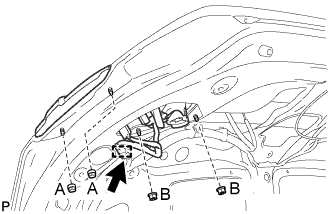
Install the rear light assembly with the 4 nuts.
- Torque:
- Nut (A)
- 3.6 N*m { 37 kgf*cm, 32 in.*lbf }
- Nut (B)
- 4.1 N*m { 42 kgf*cm, 36 in.*lbf }
-
Engage the clamp.
-
Connect the connector.
-
-
INSTALL REAR LIGHT ASSEMBLY RH
Tech Tips
Use the same procedure as for the LH side.
-
INSTALL LUGGAGE COMPARTMENT DOOR LOCK ASSEMBLY
-
Apply MP grease to the sliding parts of the luggage compartment door lock assembly.
-
Engage the luggage door lock control cable sub-assembly.
-
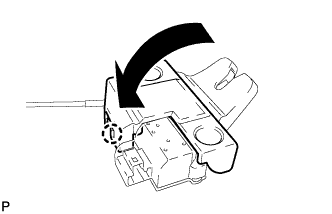
Engage the claw as shown in the illustration.
-
Install the luggage compartment door lock assembly with the 2 bolts.
- Torque:
- 5.5 N*m { 56 kgf*cm, 49 in.*lbf }
-
Connect the connector.
-
-
INSTALL LUGGAGE COMPARTMENT DOOR ASSIST GRIP
-
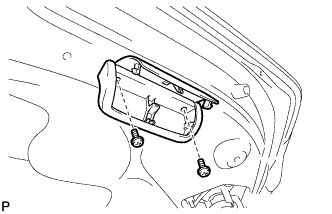
Install the 2 screws.
-
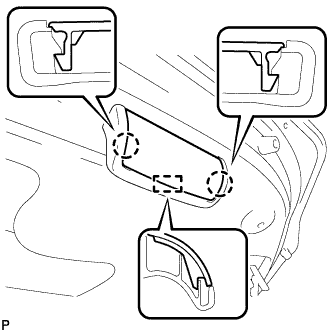
Engage the guide and 2 claws and install the luggage compartment door assist grip.
-
-
INSTALL LUGGAGE COMPARTMENT DOOR HINGE COVER LH
-
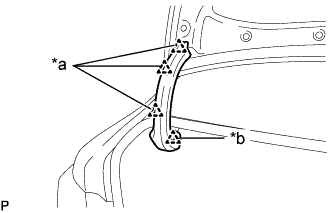
Text in Illustration *a Clip (A) *b Clip (B) Engage the clip (B).
-
Install the luggage compartment door hinge cover LH with the 3 clips (A).
-
-
INSTALL LUGGAGE COMPARTMENT DOOR HINGE COVER RH
Tech Tips
Use the same procedure as for the LH side.
-
INSTALL LUGGAGE COMPARTMENT DOOR CUSHION
-
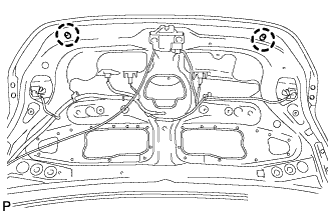
Engage the 2 claws and install 2 new luggage compartment door cushions.
-
-
INSTALL LUGGAGE COMPARTMENT DOOR COVER
-
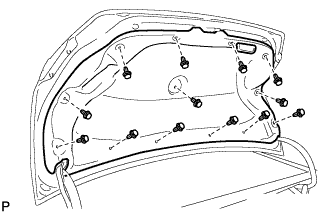
Install the luggage compartment door cover with the 13 clips.
-
-
ADJUST REAR TELEVISION CAMERA ASSEMBLY OPTICAL AXIS (w/ Parking Assist Monitor System)