WIRELESS DOOR LOCK CONTROL SYSTEM (w/o Smart Entry and Start System) REGISTRATION
Tech Tips
-
Register a new recognition code when replacing the door control transmitter module sub-assembly or the door control receiver.
-
Add mode is used to retain the already registered codes while registering a new recognition code. This mode is used when adding a door control transmitter module sub-assembly.
-
Rewrite mode is used to clear all the previously registered codes and register only new recognition codes. This mode is used when exchanging the door control transmitter module sub-assembly or the door control receiver for new one.
-
Confirmation mode is used to confirm how many recognition codes have already been registered before an additional registration of a recognition code.
-
Prohibition mode is used to clear all the registered codes and cancel the wireless door lock function. Use this mode when the door control transmitter module sub-assembly is lost.
-
All of the steps in the following registration procedure must be performed in sequential order continuously.
-
REGISTRATION OF RECOGNITION CODE (USING INTELLIGENT TESTER)
-
Connect an intelligent tester to the DLC3.
-
Turn the ignition switch to ON.
-
Turn the intelligent tester on.
-
Enter the following menus: Body / Main Body / Utility / Wireless Code Registration.
-
Press both LOCK and UNLOCK switches within 1 to 1.5 seconds.
-
Press either switch for more than 1 second within 3 seconds.
-
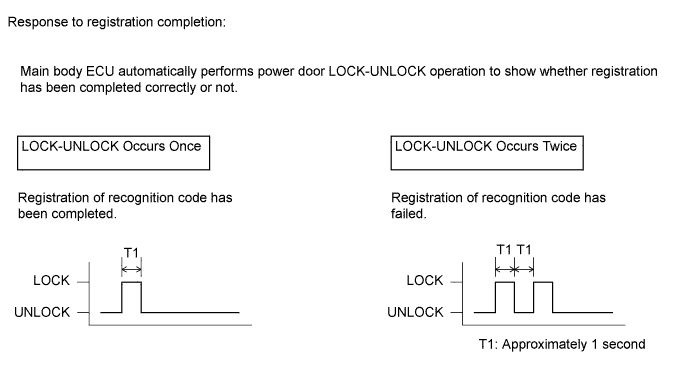
Check the response to the registration completion.
Tech Tips
-
If the LOCK-UNLOCK operation occurs twice, the registration of recognition code has failed. Perform the registration procedures again from the beginning.
-
If registering another transmitter, repeat the procedures after the tester operation. All 4 recognition codes can be registered consecutively.
-
-
Perform either of the following to complete the registration of recognition codes:
-
Use an intelligent tester to send a completion command.
-
Disconnect the intelligent tester.
-
-