BLIND SPOT MONITOR MAIN SWITCH REMOVAL
-
REMOVE NO. 1 SWITCH HOLE BASE
-

Text in Illustration *1 Protective Tape Apply protective tape to the areas shown in the illustration.
-
Using a moulding remover, disengage the 4 claws and 2 guides as shown in the illustration.
-
Disconnect the connector and remove the No. 1 switch hole base.
-
-
REMOVE BLIND SPOT MONITOR MAIN SWITCH ASSEMBLY (WARNING CANCELING SWITCH ASSEMBLY)
-
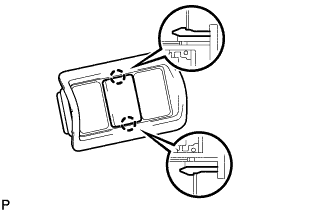
Disengage the 2 claws to remove the blind spot monitor main switch assembly (warning canceling switch assembly).
-