NAVIGATION ANTENNA (for Instrument Panel Side) REMOVAL
-
REMOVE INSTRUMENT PANEL SAFETY PAD ASSEMBLY
-
REMOVE NO. 1 HEATER TO REGISTER DUCT (except LHD with Ion Generator)
-
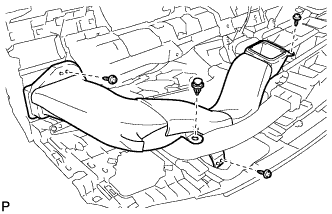
Remove the clip.
-
Remove the 3 screws <D> and No. 1 heater to register duct.
-
-
REMOVE HEATER TO REGISTER DUCT ASSEMBLY (for LHD with Ion Generator)
-
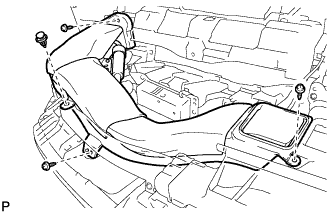
Remove the clip.
-
Remove the 3 screws <D>.
-
Disengage the heater to register duct assembly from the ion generator assembly, to remove the heater to register duct.
-
-
REMOVE NO. 3 HEATER TO REGISTER DUCT (for LHD)
-
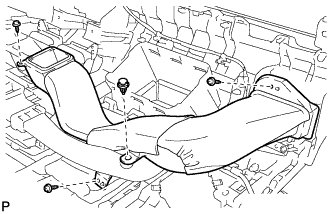
Remove the clip.
-
Remove the 3 screws <D> and No. 3 heater to register duct.
-
-
REMOVE HEATER TO REGISTER DUCT ASSEMBLY (for RHD)
-
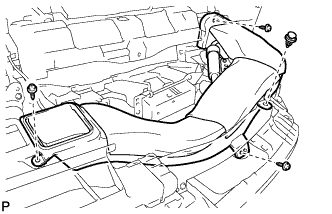
Remove the clip.
-
Remove the 3 screws <D>.
-
Disengage the heater to register duct assembly from the ion generator assembly, to remove the heater to register duct.
-
-
REMOVE NO. 1 SIDE DEFROSTER NOZZLE DUCT
-
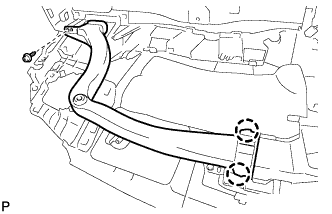
Remove the screw <D>.
-
Disengage the 2 claws to remove the No. 1 side defroster nozzle duct.
-
-
REMOVE NO. 2 SIDE DEFROSTER NOZZLE DUCT
-
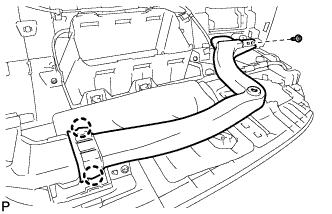
Remove the screw <D>.
-
Disengage the 2 claws to remove the No. 2 side defroster nozzle duct.
-
-
REMOVE DEFROSTER NOZZLE ASSEMBLY
-
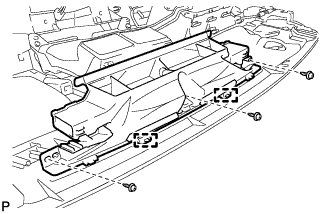
Remove the 3 screws <D>.
-
Disengage the 2 guides to remove the defroster nozzle assembly.
-
-
REMOVE NAVIGATION ANTENNA ASSEMBLY
-
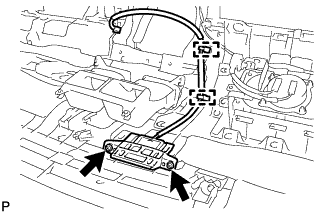
Remove the 2 screws.
-
Disengage the 2 clamps and remove the navigation antenna assembly.
-