RADIO RECEIVER (for TMC, TMMR Made) INSTALLATION
-
INSTALL RADIO RECEIVER ASSEMBLY (for Radio Receiver Type)
-
INSTALL RADIO AND DISPLAY RECEIVER ASSEMBLY (for Radio and Display Type)
-
INSTALL NAVIGATION COMPUTER ASSEMBLY WITH WIRE (w/ Navigation System)
-
Connect the 3 connectors to install the navigation computer assembly with wire.
-
-
INSTALL AIR CONDITIONING CONTROL ASSEMBLY
-
Engage the 4 clips to install the air conditioning control assembly.
-
-
INSTALL NO. 1 RADIO BRACKET
-
w/o Navigation System:
-
Install the No. 1 radio bracket with the 4 screws.
-
-
w/ Navigation System:
-
Install the No. 1 radio bracket with the 6 screws.
-
-
-
INSTALL NO. 2 RADIO BRACKET
-
w/o Navigation System:
-
Install the No. 2 radio bracket with the 4 screws.
-
-
w/ Navigation System:
-
Install the No. 2 radio bracket with the 6 screws.
-
-
-
INSTALL RADIO RECEIVER ASSEMBLY WITH AIR CONDITIONING CONTROL ASSEMBLY
-
Connect each connector.
-
Engage the 6 clips to the vehicle body to temporarily install the radio receiver assembly with air conditioning control assembly.
-
Install the radio receiver assembly with air conditioning control assembly with the 4 bolts.
-
-
INSTALL FRONT CONSOLE UPPER PANEL GARNISH
-
for Blank Type:
-
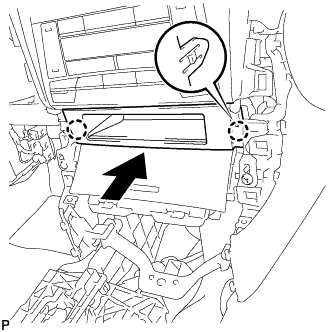
Engage the 2 claws to install the front console upper panel garnish as shown in the illustration.
-
-
for 3 Switch Hole Type:
-
Connect each connector.
-
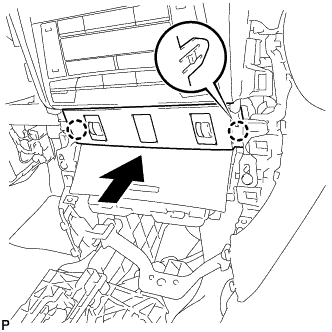
Engage the 2 claws to install the front console upper panel garnish as shown in the illustration.
-
-
-
INSTALL NO. 2 INSTRUMENT PANEL REGISTER ASSEMBLY
-
Connect the connector.
-
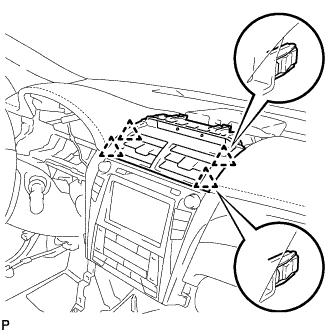
Engage the 4 clips to install the No. 2 instrument panel register assembly.
Note
When installing the No. 2 instrument panel register assembly, check that the wire harness is not caught between the No. 2 instrument panel register assembly and duct.
-
-
INSTALL CENTER INSTRUMENT CLUSTER FINISH PANEL SUB-ASSEMBLY
-
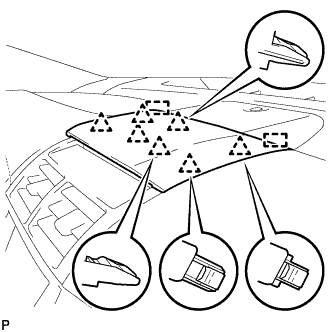
Engage the 7 clips and 2 guides to install the center instrument cluster finish panel sub-assembly.
-
-
INSTALL FRONT PANEL GARNISH LH
-
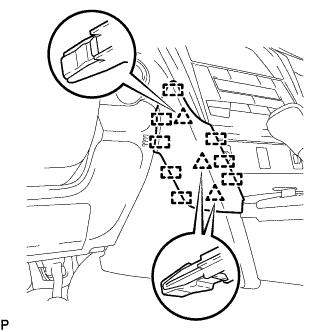
Engage the 3 clips and 8 guides to install the front panel garnish LH.
-
-
INSTALL FRONT PANEL GARNISH RH
-
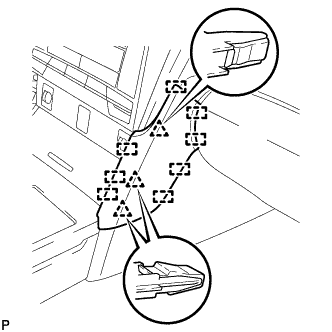
Engage the 3 clips and 8 guides to install the front panel garnish RH.
-