LUGGAGE COMPARTMENT DOOR OUTSIDE GARNISH (for TMC, TMMR Made) INSTALLATION
-
INSTALL BACK DOOR GARNISH MOULDING PROTECTOR LH
-
Clean the luggage compartment door outside garnish.
-
Remove any remaining double-sided tape from the luggage compartment door outside garnish.
-
Wipe off any tape adhesive residue with cleaner.
-
-
Install a new back door garnish moulding protector LH.
-
Remove the release paper from a new back door garnish moulding protector LH.
Tech Tips
After removing the release paper, keep the exposed adhesive free from foreign matter.
-
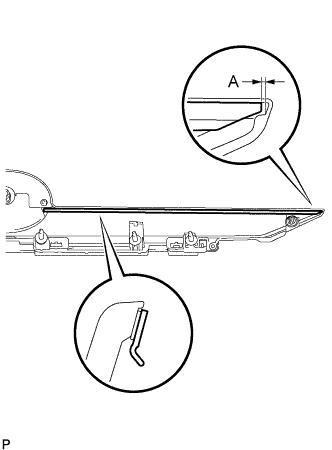
Install the back door garnish moulding protector LH as shown in the illustration.
Standard Measurement Area Measurement A 1.5 mm (0.0591 in.)
-
-
-
INSTALL BACK DOOR GARNISH MOULDING PROTECTOR RH
Tech Tips
Use the same procedure as for the LH side.
-
INSTALL UPPER BACK DOOR GARNISH MOULDING PROTECTOR
-
Clean the luggage compartment door outside garnish.
-
Remove any remaining double-sided tape from the luggage compartment door outside garnish.
-
Wipe off any tape adhesive residue with cleaner.
-
-
Install a new upper back door garnish moulding protector.
-
Remove the release paper from a new upper back door garnish moulding protector.
Tech Tips
After removing the release paper, keep the exposed adhesive free from foreign matter.
-
Install the upper back door garnish moulding protector.
-
-
-
INSTALL NO. 2 LUGGAGE COMPARTMENT DOOR OUTSIDE GARNISH
-
Engage the 4 claws.
-
Install the No. 2 luggage compartment door outside garnish with the 2 screws.
-
-
INSTALL REAR TELEVISION CAMERA ASSEMBLY (w/ Rear View Monitor System)
-
INSTALL LUGGAGE COMPARTMENT DOOR EMBLEM
-
INSTALL LUGGAGE ELECTRICAL KEY SWITCH COVER (w/o Smart Entry and Start System)
-
Install the luggage electrical key switch cover.
-
-
INSTALL LUGGAGE DOOR OPENING SWITCH ASSEMBLY (w/ Smart Entry and Start System)
-
INSTALL LUGGAGE COMPARTMENT DOOR OUTSIDE GARNISH SUB-ASSEMBLY
-
Install 5 new gaskets to the luggage compartment door outside garnish sub-assembly.
-
Install a new clip (back door outside garnish clip) and 2 new clips to the luggage compartment door outside garnish sub-assembly.
-
Engage the 3 clips to install the luggage compartment door outside garnish sub-assembly.
-
Install the 5 nuts.
-
w/ Rear View Monitor System:
-
Connect the connector.
-
-
w/ Smart Entry and Start System:
-
Connect the connector.
-
-
-
INSTALL REAR LIGHT ASSEMBLY LH
-
INSTALL REAR LIGHT ASSEMBLY RH
Tech Tips
Use the same procedure as for the LH side.
-
INSTALL LUGGAGE COMPARTMENT DOOR COVER
-
ADJUST REAR TELEVISION CAMERA ASSEMBLY OPTICAL AXIS (w/ Parking Assist Monitor System)