AFS OFF SWITCH REMOVAL
-
CUSTOMIZE POWER TILT AND POWER TELESCOPIC STEERING COLUMN SYSTEM (for Power Tilt and Power Telescopic Steering Column)
-
Disable the auto away/return function by changing the customize parameter Click here.
Note
Record the current customize parameter setting (whether the auto away/return function is enabled or disabled) in order to restore the current setting after finishing this operation.
-
Turn the ignition switch on (IG). Operate the tilt and telescopic switch to fully extend and lower the steering column assembly.
-
-
DISCONNECT FRONT DOOR OPENING TRIM WEATHERSTRIP
-
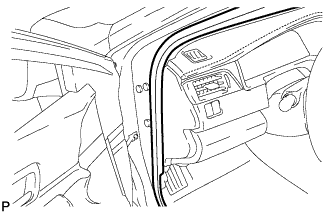
Disconnect the front door opening trim weatherstrip LH.
-
-
REMOVE INSTRUMENT SIDE PANEL
-
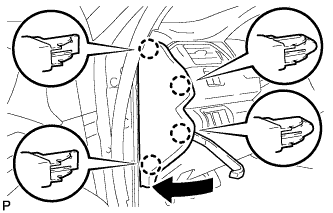
Using a moulding remover, disengage the 4 claws as shown in the illustration.
-
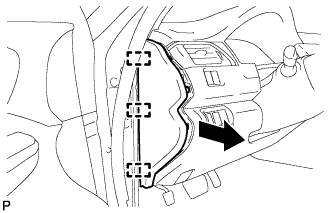
Disengage the 3 guides and remove the instrument side panel LH as shown in the illustration.
-
-
REMOVE NO. 1 INSTRUMENT PANEL REGISTER ASSEMBLY
-
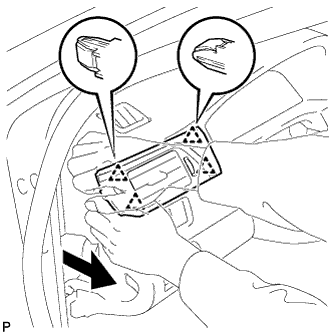
Disengage the 4 clips to remove the No. 1 instrument panel register assembly as shown in the illustration.
-
-
REMOVE INSTRUMENT CLUSTER FINISH PANEL ASSEMBLY
-
for Manual Tilt and Manual Telescopic Steering Column:
-
Operate the tilt and telescopic lever to fully extend and lower the steering column assembly.
-
-
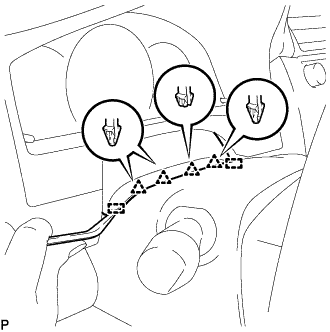
Using a moulding remover, disengage the 4 clips and 2 guides.
-
for LHD:
-
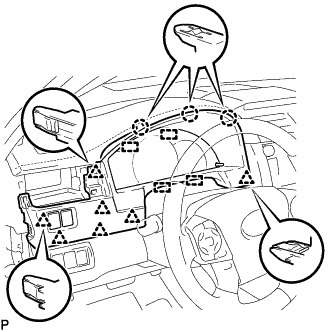
Disengage the 3 claws, 7 clips and 4 guides.
-
-
for RHD:
-
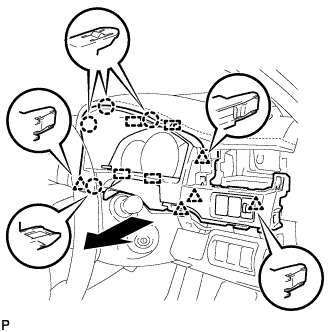
Disengage the 4 claws, 5 clips and 4 guides as shown in the illustration.
-
-
Disconnect each connector.
-
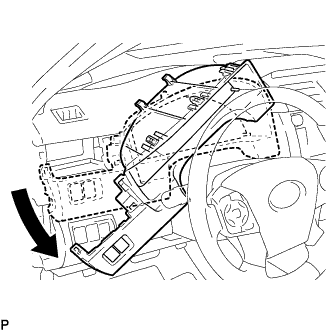
Remove the instrument cluster finish panel assembly as shown in the illustration.
-
-
REMOVE HEADLIGHT SWIVEL MAIN SWITCH (AFS OFF SWITCH)
-
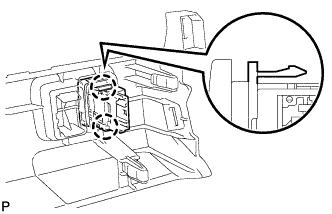
Disengage the 2 claws and remove the headlight swivel main switch (AFS OFF switch).
-