LIGHTING SYSTEM CUSTOMIZE PARAMETERS
-
CUSTOMIZE LIGHTING SYSTEM (EXT)
Note
-
When the customer requests a change in a function, first make sure that the function can be customized.
-
Be sure to make a note of the current settings before customizing.
-
When troubleshooting a function, first make sure that the function is set to the default setting.
Tech Tips
The following items can be customized.
-
Customizing with the GTS
-
Connect the GTS to the DLC3.
-
Turn the ignition switch to ON.
-
Turn the GTS on.
-
Enter the following menus: Body Electrical / Main Body / Utility / Customize / Light Control.
-
Select the setting by referring to the table below.
Light ControlTester Display Description Default Setting ECU Response Time Changes the delay timing of lighting the taillights when going into a tunnel when the light control switch is in the AUTO position. Normal 0:Normal,1:Long Main Body ECU (Multiplex Network Body ECU) Disp Ex ON Sen Changes the ambient brightness level required to dim the lights such as the indicator lights of the combination meter, A/C indicator light and clock.*A NORMAL 000:NORMAL,001:DARK2,010:DARK1,011:LIGHT1,100:LIGHT2 Main Body ECU (Multiplex Network Body ECU) Disp Ex OFF Sen Changes the ambient brightness level required to cancel the dimming of the lights such as the indicator lights of the combination meter, A/C indicator light and clock.*B NORMAL 000:NORMAL,001:DARK2,010:DARK1,011:LIGHT1,100:LIGHT2 Main Body ECU (Multiplex Network Body ECU) Sensitivity Adjusts the sensitivity of the automatic light control system.*C Normal 000:Normal,001:Dark2,010:Dark1,011:Light1,100:Light2 Main Body ECU (Multiplex Network Body ECU) Follow Me Home Lighting Time Sets the headlight lighting time after the ignition switch is turned off. 30 s 00:30 s,01:60 s,10:90 s,11:120 s Main Body ECU (Multiplex Network Body ECU) Tech Tips
The sensitivity adjustment may be difficult to confirm. Check by driving the vehicle.
-
*A
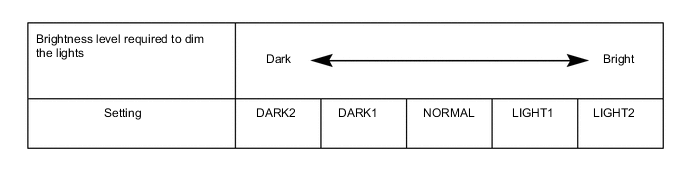
-
*B
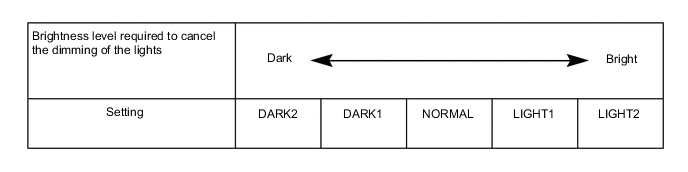
-
*C
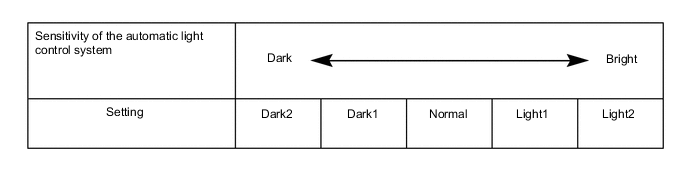
-
-
-
Customizing with the Multi-display
-
Turn the ignition switch to ON.
-
Enter the following menus: SETUP / Vehicle / Vehicle settings.
-
Select the setting by referring to the table below.
Vehicle settings Tester Display Description Default Setting ECU Light sensor sensitivity Adjusts the sensitivity of the automatic light control system.*A 0 -2, -1, 0, +1 or +2 Main Body ECU (Multiplex Network Body ECU) Tech Tips
The sensitivity adjustment may be difficult to confirm. Check by driving the vehicle.
-
*A
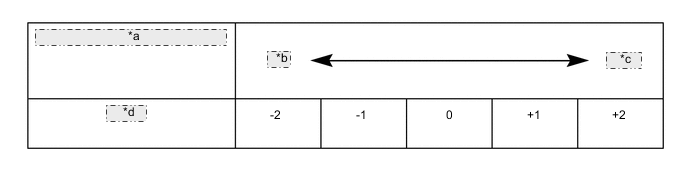
*a Sensitivity of the automatic light control system *b Dark *c Bright *d Setting
-
-
-