ROOF HEADLINING(for Wagon) REASSEMBLY
PROCEDURE
-
INSTALL NO. 1 ROOF WIRE (for Standard Roof)
-
Align the positioning tape on the front part of the No. 1 roof wire with the front tab of the roof headlining.
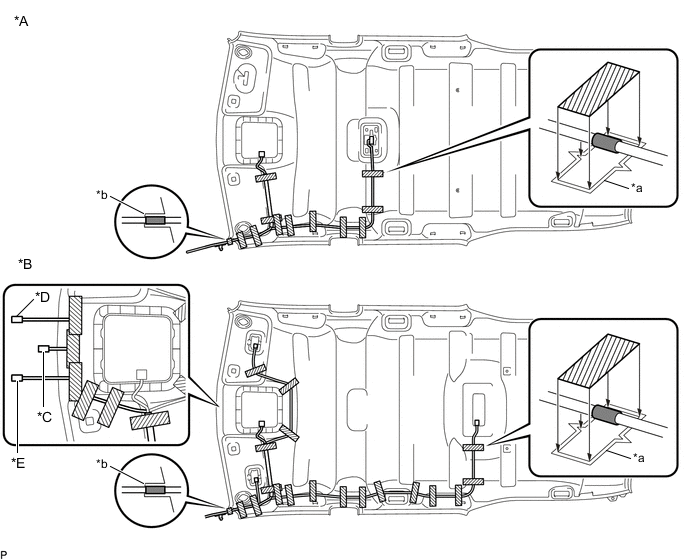
*A w/o Vanity Light *B w/ Vanity Light *C w/ EC Mirror *D for LHD with Rain Sensor *E for RHD with Rain Sensor - - *a Marking *b Front Tab 
Positioning Tape 
Adhesive Tape -
Align the positioning tape on the No. 1 roof wire with the markings of the roof headlining.
-
Install the No. 1 roof wire onto the roof headlining with adhesive tape.
Note
-
Apply the tape securely in place.
-
Do not touch the adhesive surface when applying the tape to prevent adhesion failure.
-
-
-
INSTALL NO. 1 ROOF WIRE (for Glass Roof)
-
Align the positioning tape on the front part of the No. 1 roof wire with the front tab of the roof headlining.
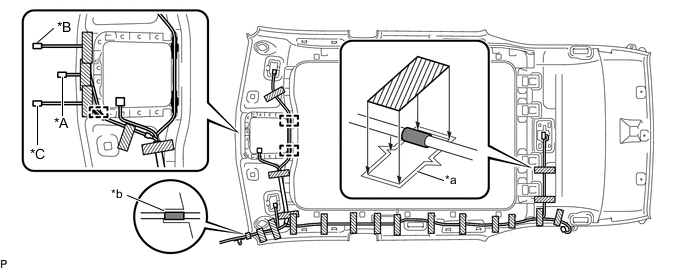
*A w/ EC Mirror *B for LHD with Rain Sensor *C for RHD with Rain Sensor - - *a Marking *b Front Tab Positioning Tape Adhesive Tape -
Engage each clamp.
-
Align the positioning tape on the No. 1 roof wire with the markings of the roof headlining.
-
Install the No. 1 roof wire onto the roof headlining with adhesive tape.
Note
-
Apply the tape securely in place.
-
Do not touch the adhesive surface when applying the tape to prevent adhesion failure.
-
-
-
INSTALL CENTER ROOF HEADLINING PAD (for Standard Roof with Vanity Light)
-
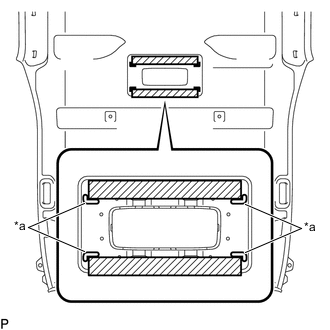
*a Marking Remove the release paper from 2 new center roof headlining pads.
Tech Tips
After removing the release paper, keep the exposed adhesive free from foreign matter.
-
Align the 2 center roof headlining pads with the markings on the roof headlining assembly and install the pads as shown in the illustration.
-
-
INSTALL NO. 2 ROOF SILENCER PAD (for Standard Roof)
-
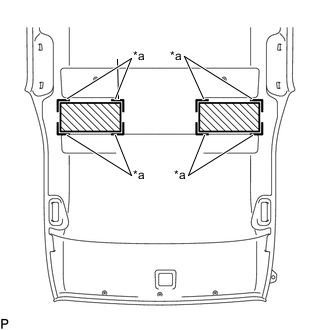
*a Marking Align the 2 No. 2 roof silencer pads with the markings on the roof headlining assembly and install the pads using hot-melt glue as shown in the illustration.
-
-
INSTALL NO. 1 ROOF SILENCER PAD (for Standard Roof)
-
Align the 5 No. 1 roof silencer pads with the markings on the roof headlining assembly and install the pads using hot-melt glue as shown in the illustration.
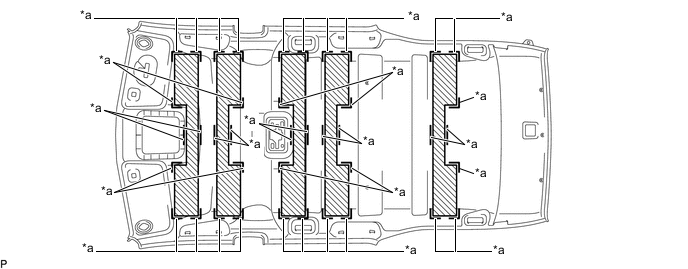
*a Marking - -
-
-
INSTALL NO. 3 ANTENNA CORD SUB-ASSEMBLY
-
INSTALL VANITY LIGHT ASSEMBLY (w/ Vanity Light)
-
INSTALL NO. 1 ROOM LIGHT ASSEMBLY (for Push Switch Type)