SIMPLE INTELLIGENT PARKING ASSIST SYSTEM SYSTEM DESCRIPTION
-
GENERAL
-
The simple intelligent parking assist system is a system that assists parallel parking operations by detecting a parking space and operating the steering wheel automatically. The No. 2 ultrasonic sensors (front side LH/RH) detect a space which the vehicle can be parked. After the detection, the parking assist operation starts when the shift lever is moved to R.
-
-
SYSTEM FUNCTION
-
The simple intelligent parking assist system has the following modes:
Mode Outline Parking Space Detection Mode Obstructions such as parked vehicles, curbs and walls are detected by the No. 2 ultrasonic sensors (front side LH/RH) installed on the sides of the front bumper and whether the vehicle can be parked between two parked vehicles or in the space behind one parked vehicle is judged. Automatic Steering Mode After a parking space is detected, the steering wheel is operated automatically when the shift lever is moved to R. During automatic steering mode, the Toyota parking assist-sensor system operates and obstructions such as parked vehicles, curbs and walls are detected. Based oh the Toyota parking assist-sensor system detection results, the multi-information display is changed and the No. 1 and No. 2 clearance warning buzzers are sounded to inform the driver to operate the shift lever.
-
-
FUNCTION OF COMPONENTS
-
The simple intelligent parking assist system consists of the following components:
Component Function Clearance Warning ECU Assembly
-
Controls the functions of the simple intelligent parking assist system based on signals from the ultrasonic sensors, switches and ECUs.
-
Determines if enough parking space is available based on signals from the No. 2 ultrasonic sensors (front side LH/RH).
-
Sends a message display request signal or buzzer sound signal to the combination meter assembly in accordance with the operation condition and state of the simple intelligent parking assist system.
-
Controls the Toyota parking assist-sensor system during automatic steering mode, and sends a display request signal to the combination meter assembly or a buzzer sound signal to each clearance warning buzzer, in accordance with the position of an obstruction or the distance from the vehicle to the obstruction.
No. 2 Ultrasonic Sensor
-
Detect parked vehicles, curbs and walls, send information to the clearance warning ECU assembly.
-
Detect the distance between the vehicle and an obstruction and send information to the clearance warning ECU assembly.
-
No. 1 Ultrasonic Sensor
-
No. 3 Ultrasonic Sensor
Detect the distance between the vehicle and an obstruction and send information to the clearance warning ECU assembly. IPA Main Switch Assembly Operating this switch allows the operation of the simple intelligent parking assist system to be enabled or disabled. No. 1 Clearance Warning Buzzer Sounds a buzzer in accordance with the distance to the obstruction in front of the vehicle to inform the driver. No. 2 Clearance Warning Buzzer Sounds a buzzer in accordance with the distance to the obstruction behind the vehicle to inform the driver. Back-up Light Switch Assembly*1 Sends the reverse signal to the clearance warning ECU assembly. Spiral Cable with Sensor Sub-assembly Detects the angle of the steering wheel and sends the resulting signals to the clearance warning ECU assembly via CAN communication. Brake Actuator Assembly
-
Skid Control ECU
Sends the following signals to the clearance warning ECU assembly via CAN communication.
-
Vehicle speed signal
-
VSC OFF switch operation signal
-
ABS/TRC/VSC operation signal
ECM Sends the following signals to the clearance warning ECU assembly via CAN communication.
-
Shift position signal*2
-
Engine speed signal
-
ENG/HV flag signal
Combination Meter Assembly
-
Displays information on the multi-information display in accordance with the operation condition and state of the simple intelligent parking assist system, based on the received display request signal.
-
Displays the position of an obstruction and the distance between the vehicle and the obstruction on the multi-information display.
-
Displays information such as a malfunction of the ultrasonic sensor on the multi-information display to inform the driver.
-
Sends turn signal switch signal to the clearance warning ECU assembly.
-
The automatic steering mode indicator illuminates on the multi-information display when automatic steering is started while the simple intelligent parking assist system is operating.
-
Sounds the buzzer in accordance with the operation condition and state of the simple intelligent parking assist system, based on the received buzzer sound signal.
Main Body ECU (Multiplex Network Body ECU) Sends the vehicle information (LHD/RHD) signal to the clearance warning ECU assembly via CAN communication. Engine Stop and Start ECU*3
-
Sends the stop and start system operation condition signal to the clearance warning ECU assembly via CAN communication.
-
Receives the simple intelligent parking assist system operation signal from the clearance warning ECU assembly via CAN communication.
-
Starts the engine when a simple intelligent parking assist system operation signal is received while the engine is stopped by the stop and start system.
-
Prohibits stop and start system operation during simple intelligent parking assist system operation when a simple intelligent parking assist system operation signal is received.
Air Conditioning Amplifier Assembly Sends ambient temperature signal to the clearance warning ECU assembly via CAN communication to adjust the distance rate from the ultrasonic sensors. Power Steering ECU Assembly
-
Performs steering control upon receiving signals such as the steering control signal from the clearance warning ECU assembly.
-
Sends vehicle condition signals such as the EPS fail-safe signal and steering control status signal to the clearance warning ECU assembly.
-
*1: for MT or MMT
-
*2: for CVT
-
*3: w/ Stop and Start System
-
-
-
OPERATION DESCRIPTION
-
Parking Space Detection Mode
-
When all of the following conditions are met, pressing the IPA main switch assembly changes the multi-information display to parking assist detection mode and the simple intelligent parking assist system starts operating.
-
The engine has been started.
-
The shift lever is in a position other than R.
-
The VSC OFF switch assembly is not pressed.
-
The vehicle speed is 30 km/h (19 mph) or less.
Figure 1. except Sedan
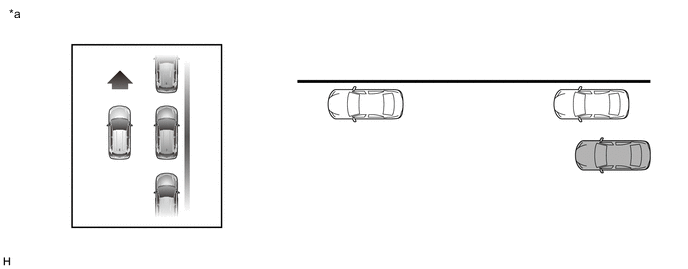
*a Example - - Figure 2. for Sedan
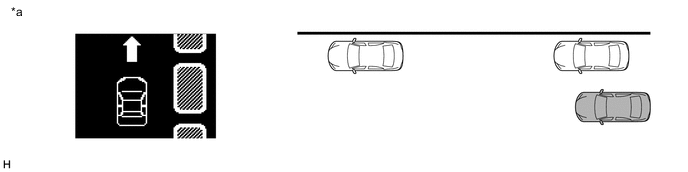
*a Example - - Tech Tips
The simple intelligent parking assist system detects parking spaces on the front passenger side of the vehicle and assists with parking in a detected space. If parking in a space on the driver side of the vehicle, move the turn signal switch to indicate turning on the driver side. Leave the turn signal switch in that position until automatic steering begins.
-
-
Drive the vehicle while maintaining a distance of approximately 1 m (3.28 ft.) from the parked vehicles.
Figure 3. except Sedan
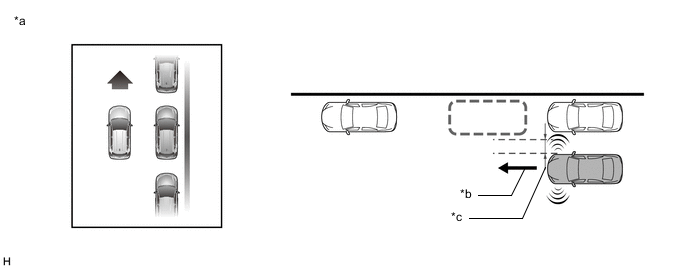
*a Example *b Vehicle Speed of 30 km/h (19 mph) or Less *c Approximately 1 m (3.28 ft.) - - Figure 4. for Sedan
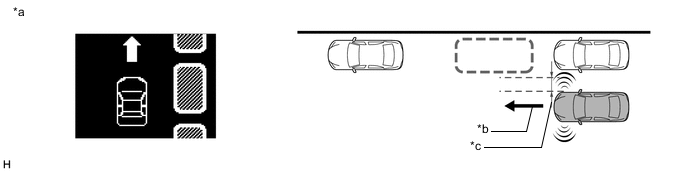
*a Example *b Vehicle Speed of 30 km/h (19 mph) or Less *c Approximately 1 m (3.28 ft.) - - Tech Tips
-
Drive the vehicle as parallel to the parked vehicles and curb as possible.
-
The required length for a parking space to be detected is the total vehicle length plus approximately 1 m (3.28 ft.).
-
The No. 2 ultrasonic sensors (front side LH/RH) may not be able to detect a parking space depending on vehicle speed, or vehicle distance or angle to a parking space or parked vehicles.
-
The No. 2 ultrasonic sensors (front side LH/RH) may not be able to detect a parking space depending on the shape, position and angle of a vehicle parked near the parking space.
-
A parking space may not be detected by the No. 2 ultrasonic sensors (front side LH/RH) depending on the conditions around the target parking space. For details, refer to Precaution.
-
-
When the parking space is detected, the multi-information display changes. Reduce the vehicle speed and move the vehicle forward slowly until the buzzer sounds.
Figure 5. except Sedan
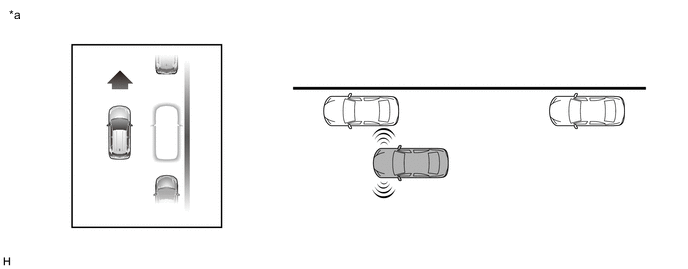
*a Example - - Figure 6. for Sedan
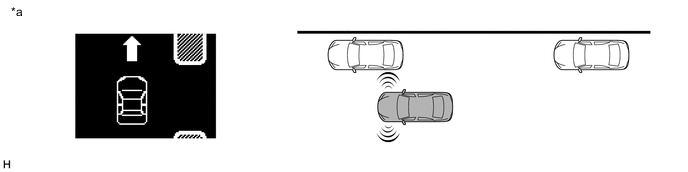
*a Example - - -
Stop the vehicle when the buzzer sounds. The multi-information display changes.
Figure 7. except Sedan
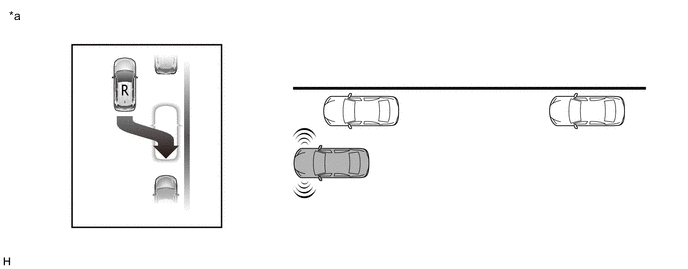
*a Example - - Figure 8. for Sedan
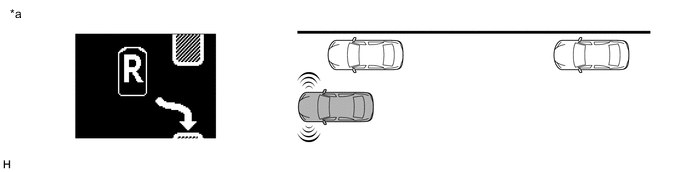
*a Example - - Tech Tips
If the vehicle moves 10 m (32.81 ft.) or more after the buzzer sounds, detection of a new parking space begins.
-
-
Automatic Steering Mode
-
Move the shift lever to R.
-
The multi-information display changes and automatic steering starts. While taking care not to catch your hands on the steering wheel and checking the safety of the surrounding area, reverse the vehicle slowly by operating the accelerator and brake pedals.
Tech Tips
-
When automatic steering is started, the automatic steering mode indicator is displayed on the multi-information display.
-
During automatic steering, maintain a vehicle speed of 6 km/h (4 mph) or less.
Figure 9. except Sedan
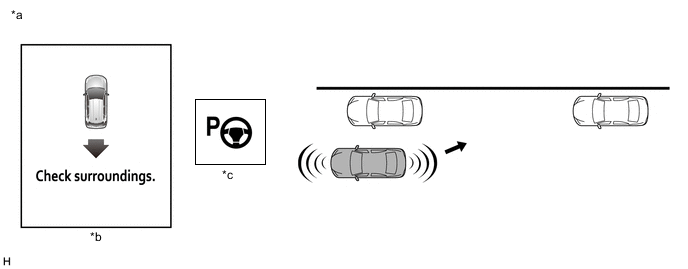
*a Example *b The illustrations shown are examples only. The illustrations may differ from the actual vehicle screens. *c Automatic Steering Mode Indicator - - Figure 10. for Sedan
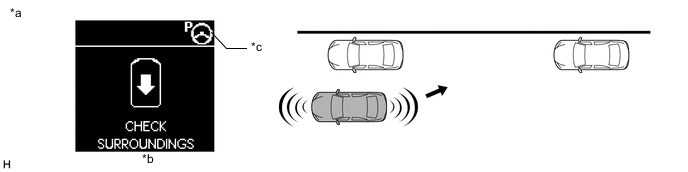
*a Example *b The illustrations shown are examples only. The illustrations may differ from the actual vehicle screens. *c Automatic Steering Mode Indicator - - -
-
When the multi-information display changes, reduce the vehicle speed. While checking the safety of the area behind the vehicle, reverse the vehicle slowly.
Figure 11. except Sedan
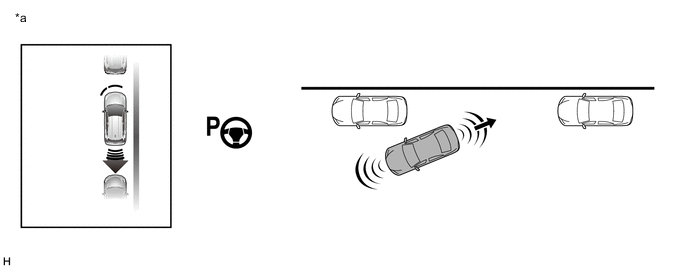
*a Example - - Figure 12. for Sedan
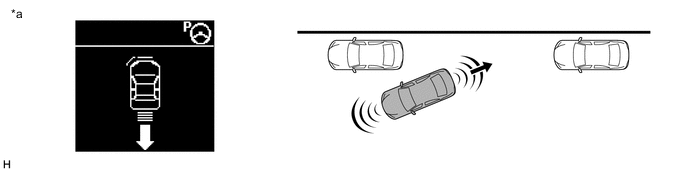
*a Example - - -
When the No. 2 clearance warning buzzer sounds continuously, completely stop the vehicle immediately. The multi-information display changes when the warning buzzer starts sounding continuously. (Procedure A)
Figure 13. except Sedan
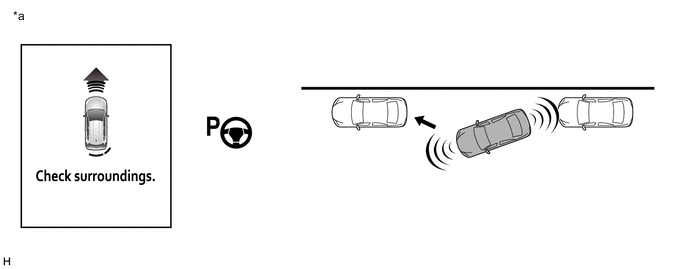
*a Example - - Figure 14. for Sedan
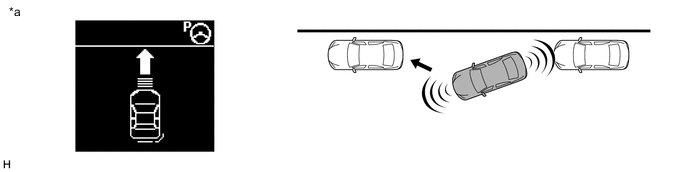
*a Example - - -
When the shift lever is moved to D*1 or 1*2, automatic steering starts. (Procedure B)
-
*1: for CVT
-
*2: for MT or MMT
Tech Tips
While the steering wheel is turning, keep the vehicle at a complete stop.
-
-
When the steering wheel stops turning, move the vehicle forward slowly while checking the safety of the area in front of the vehicle. (Procedure C)
-
When the No. 1 clearance warning buzzer sounds continuously, completely stop the vehicle immediately. The multi-information display changes when the warning buzzer starts sounding continuously. (Procedure D)
Figure 15. except Sedan
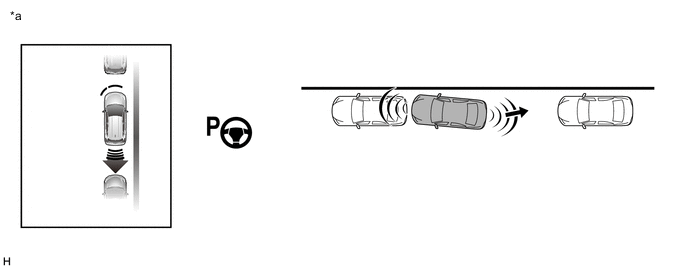
*a Example - - Figure 16. for Sedan
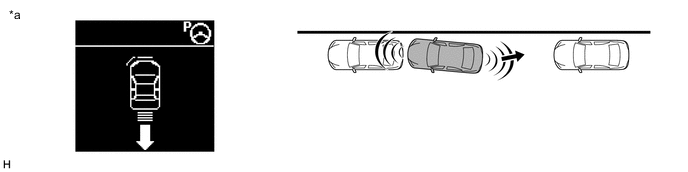
*a Example - - -
When the shift lever is moved to R, automatic steering starts. (Procedure E)
Tech Tips
While the steering wheel is turning, keep the vehicle at a complete stop.
-
When the steering wheel stops turning, reverse the vehicle slowly while checking the safety of the area behind the vehicle. (Procedure F)
-
Repeat (Procedure A) through (Procedure F) until the parking assist operation has completed. When the parking assist operation has completed, the buzzer sounds and the multi-information display changes.
Tech Tips
Adjust the vehicle position and/or angle as necessary to complete parking the vehicle.
Figure 17. except Sedan
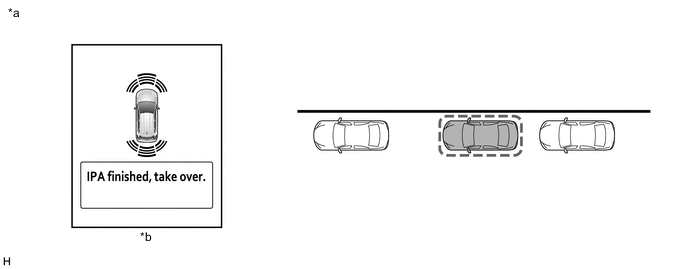
*a Example *b The illustrations shown are examples only. The illustrations may differ from the actual vehicle screens. Figure 18. for Sedan
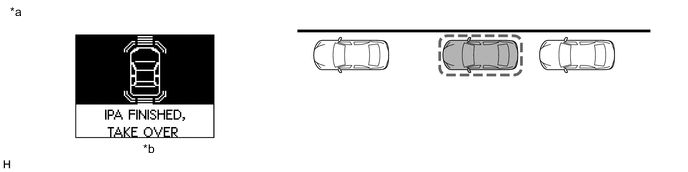
*a Example *b The illustrations shown are examples only. The illustrations may differ from the actual vehicle screens.
-
-