NAVIGATION SYSTEM, Diagnostic DTC:B1579
| DTC Code | DTC Name |
|---|---|
| B1579 | Voice Recognition Microphone Disconnected |
DESCRIPTION
The radio and display receiver assembly and map light assembly (telephone microphone assembly) are connected to each other using the microphone connection detection signal lines.
This DTC is stored when a microphone connection detection signal line is disconnected.
| DTC No. | Detection Item | DTC Detection Condition | Trouble Area |
|---|---|---|---|
| B1579 | Voice Recognition Microphone Disconnected | Microphone signal is lost |
|
-
*: w/ Manual (SOS) Switch
WIRING DIAGRAM
Figure 1. w/o Manual (SOS) Switch
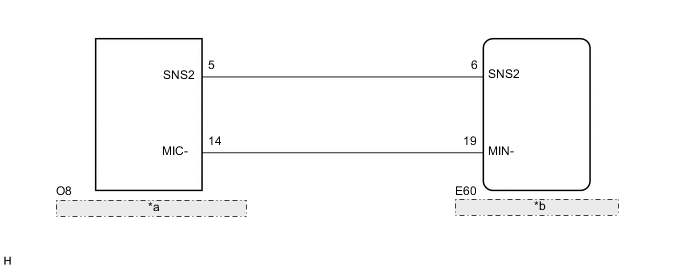
| *a | Map Light Assembly (Telephone Microphone Assembly) |
| *b | Radio and Display Receiver Assembly |
Figure 2. w/ Manual (SOS) Switch
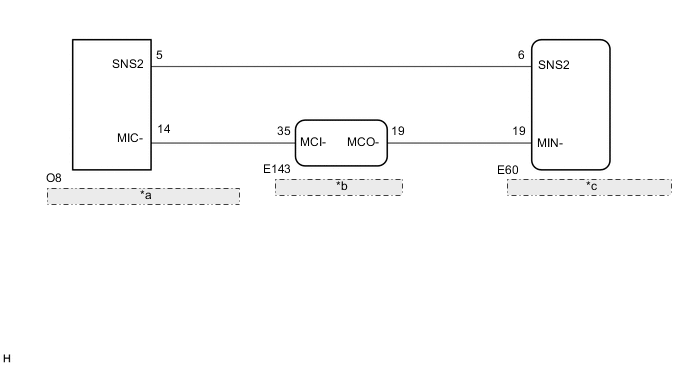
| *a | Map Light Assembly (Telephone Microphone Assembly) |
| *b | Telematics Transceiver |
| *c | Radio and Display Receiver Assembly |
PROCEDURE
-
INSPECT RADIO AND DISPLAY RECEIVER ASSEMBLY
-
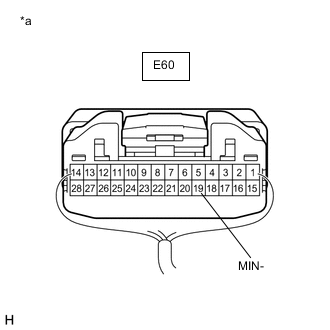
*a Component with harness connected
(Radio and Display Receiver Assembly)
Measure the resistance according to the value(s) in the table below.
Standard Resistance Tester Connection Condition Specified Condition E60-19 (MIN-) - Body ground Always Below 1 Ω Result Result Proceed to OK
(w/o Manual (SOS) Switch)
A OK
(w/ Manual (SOS) Switch)
B NG C
B 
CHECK HARNESS AND CONNECTOR (TELEMATICS TRANSCEIVER - MAP LIGHT ASSEMBLY (TELEPHONE MICROPHONE ASSEMBLY)) Click here
C 
REPLACE RADIO AND DISPLAY RECEIVER ASSEMBLY for Sedan: Click here
REPLACE RADIO AND DISPLAY RECEIVER ASSEMBLY for Hatchback, Wagon: Click hereA 
-
-
CHECK HARNESS AND CONNECTOR (RADIO AND DISPLAY RECEIVER ASSEMBLY - MAP LIGHT ASSEMBLY (TELEPHONE MICROPHONE ASSEMBLY))
-
Disconnect the E60 radio and display receiver assembly connector.
-
Disconnect the O8 map light assembly (telephone microphone assembly) connector.
-
Measure the resistance according to the value(s) in the table below.
Standard Resistance Tester Connection Condition Specified Condition E60-6 (SNS2) - O8-5 (SNS2) Always Below 1 Ω E60-19 (MIN-) - O8-14 (MIC-) Always Below 1 Ω E60-6 (SNS2) or O8-5 (SNS2) - Body ground Always 10 kΩ or higher E60-19 (MIN-) or O8-14 (MIC-) - Body ground Always 10 kΩ or higher Result Proceed to OK NG
NG
REPAIR OR REPLACE HARNESS OR CONNECTOR
OK
-
-
INSPECT MAP LIGHT ASSEMBLY
-
Remove the map light assembly (telephone microphone assembly).
-
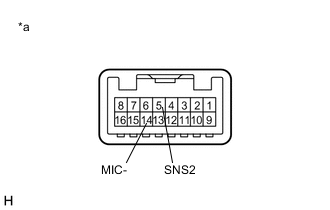
*a Component without harness connected
(Map Light Assembly (Telephone Microphone Assembly))
Measure the resistance according to the value(s) in the table below.
Standard Resistance Tester Connection Condition Specified Condition 5 (SNS2) - 14 (MIC-) Always Below 1 Ω Result Proceed to OK NG
OK
REPLACE RADIO AND DISPLAY RECEIVER ASSEMBLY for Sedan: Click here
REPLACE RADIO AND DISPLAY RECEIVER ASSEMBLY for Hatchback, Wagon: Click hereNG
-
-
REPLACE TELEPHONE MICROPHONE ASSEMBLY
-
Replace the telephone microphone assembly with a new or known good one.
-
Clear the DTCs.
Body Electrical > Navigation System > Clear DTCs -
Recheck for DTCs and check that no DTCs are output.
Body Electrical > Navigation System > Trouble CodesOK No DTCs are output. Result Proceed to OK NG
OK
END
NG
REPLACE MAP LIGHT ASSEMBLY Click here
-
-
CHECK HARNESS AND CONNECTOR (TELEMATICS TRANSCEIVER - MAP LIGHT ASSEMBLY (TELEPHONE MICROPHONE ASSEMBLY))
-
Disconnect the E143 telematics transceiver connector.
-
Disconnect the O8 map light assembly (telephone microphone assembly) connector.
-
Measure the resistance according to the value(s) in the table below.
Standard Resistance Tester Connection Condition Specified Condition E143-35 (MCI-) - O8-14 (MIC-) Always Below 1 Ω E143-35 (MCI-) or O8-14 (MIC-) - Body ground Always 10 kΩ or higher Result Proceed to OK NG
NG
REPAIR OR REPLACE HARNESS OR CONNECTOR
OK
-
-
CHECK HARNESS AND CONNECTOR (RADIO AND DISPLAY RECEIVER ASSEMBLY - TELEMATICS TRANSCEIVER)
-
Disconnect the E60 radio and display receiver assembly connector.
-
Disconnect the E143 telematics transceiver connector.
-
Measure the resistance according to the value(s) in the table below.
Standard Resistance Tester Connection Condition Specified Condition E60-19 (MIN-) - E143-19 (MCO-) Always Below 1 Ω E60-19 (MIN-) or E143-19 (MCO-) - Body ground Always 10 kΩ or higher Result Proceed to OK NG
NG
REPAIR OR REPLACE HARNESS OR CONNECTOR
OK
-
-
CHECK HARNESS AND CONNECTOR (RADIO AND DISPLAY RECEIVER ASSEMBLY - MAP LIGHT ASSEMBLY (TELEPHONE MICROPHONE ASSEMBLY))
-
Disconnect the E60 radio and display receiver assembly connector.
-
Disconnect the O8 map light assembly (telephone microphone assembly) connector.
-
Measure the resistance according to the value(s) in the table below.
Standard Resistance Tester Connection Condition Specified Condition E60-6 (SNS2) - O8-5 (SNS2) Always Below 1 Ω E60-6 (SNS2) or O8-5 (SNS2) - Body ground Always 10 kΩ or higher Result Proceed to OK NG
NG
REPAIR OR REPLACE HARNESS OR CONNECTOR
OK
-
-
INSPECT TELEMATICS TRANSCEIVER
-
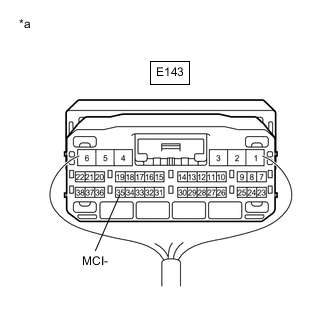
*a Component with harness connected
(Telematics Transceiver)
Measure the resistance according to the value(s) in the table below.
Standard Resistance Tester Connection Condition Specified Condition E143-35 (MCI-) - Body ground Always Below 1 Ω Result Proceed to OK NG
NG
REPLACE TELEMATICS TRANSCEIVER Click here
OK
-
-
INSPECT MAP LIGHT ASSEMBLY (TELEPHONE MICROPHONE ASSEMBLY)
-
Remove the map light assembly (telephone microphone assembly).
-
*a Component without harness connected
(Map Light Assembly (Telephone Microphone Assembly))
Measure the resistance according to the value(s) in the table below.
Standard Resistance Tester Connection Condition Specified Condition 5 (SNS2) - 14 (MIC-) Always Below 1 Ω Result Proceed to OK NG
OK
REPLACE RADIO AND DISPLAY RECEIVER ASSEMBLY Click here
NG
-
-
REPLACE TELEPHONE MICROPHONE ASSEMBLY
-
Replace the telephone microphone assembly with a new or known good one.
-
Clear the DTCs.
Body Electrical > Navigation System > Clear DTCs -
Recheck for DTCs and check that no DTCs are output.
Body Electrical > Navigation System > Trouble CodesOK No DTCs are output. Result Proceed to OK NG
OK
END
NG
REPLACE MAP LIGHT ASSEMBLY Click here
-