PARKING BRAKE CABLE INSTALLATION
PROCEDURE
-
INSTALL NO. 1 PARKING BRAKE CABLE CLAMP
-
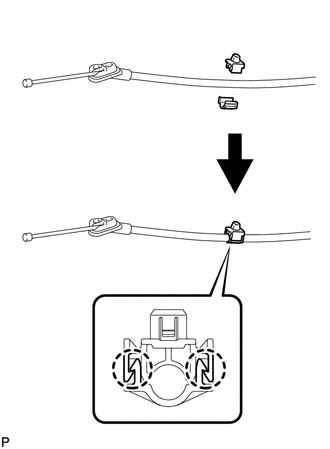
Engage the 2 claws to install a new No. 1 parking brake cable clamp to the No. 3 parking brake cable assembly.
Tech Tips
Even if a one-piece type No. 1 parking brake cable clamp was originally installed, make sure to install a separate type No. 1 parking brake clamp.
-
-
INSTALL NO. 3 PARKING BRAKE CABLE ASSEMBLY (for Torsion Beam Type Suspension)
-
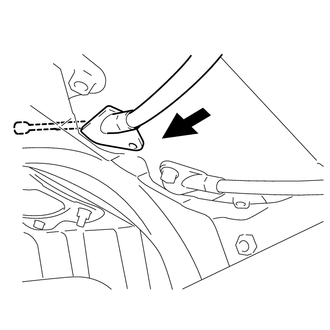
Insert the No. 3 parking brake cable assembly into the body.
-
Install the No. 3 parking brake cable assembly with the 5 bolts.
- Torque:
- 6.0 N*m { 61 kgf*cm, 53 in.*lbf }
-
Engage the clamp to install the No. 3 parking brake cable assembly.
Note
Securely install the clamp.
-
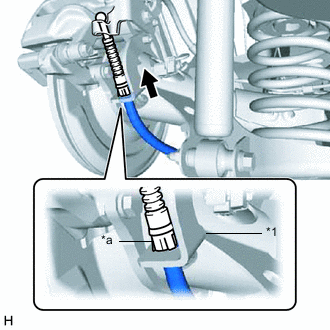
*1 Rear Disc Brake Cylinder Assembly *a Clip Engage the clip to install the No. 3 parking brake cable assembly to the rear disc brake cylinder assembly.
Note
Be sure to engage the clip to the rear disc brake cylinder assembly as shown in the illustration.
-
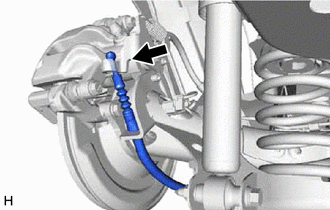
Connect the No. 3 parking brake cable assembly to the rear disc brake cylinder assembly.
-
-
INSTALL NO. 3 PARKING BRAKE CABLE ASSEMBLY (for Double Wishbone Type Suspension)
-
Insert the No. 3 parking brake cable assembly into the body.
-
Install the No. 3 parking brake cable assembly with the 5 bolts.
- Torque:
- 6.0 N*m { 61 kgf*cm, 53 in.*lbf }
-
Engage the clamp to install the No. 3 parking brake cable assembly.
Note
Securely install the clamp.
-
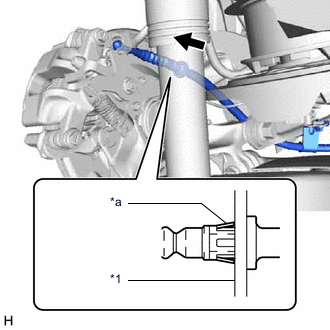
*1 Rear Disc Brake Cylinder Assembly *a Clip Engage the clip to install the No. 3 parking brake cable assembly to the rear disc brake cylinder assembly.
Note
Be sure to engage the clip to the rear disc brake cylinder assembly as shown in the illustration.
-
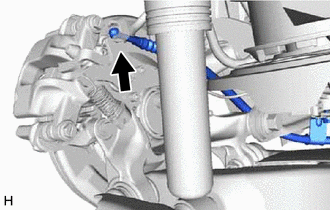
Connect the No. 3 parking brake cable assembly to the rear disc brake cylinder assembly.
-
-
INSTALL PARKING BRAKE LEVER PROTECTOR (for Double Wishbone Type Suspension)
-
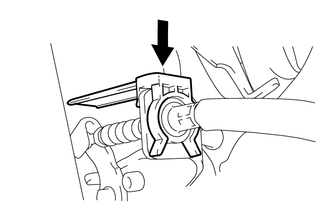
Install the parking brake lever protector.
-
-
INSTALL REAR FLOOR SIDE MEMBER COVER LH (for LH Side)
for Torsion Beam Type Suspension (w/ Cover): Click here
for Double Wishbone Type Suspension: Click here
-
INSTALL REAR FLOOR SIDE MEMBER COVER RH (for RH Side)
for Torsion Beam Type Suspension (w/ Cover): Click here
for Double Wishbone Type Suspension: Click here
-
INSTALL FRONT NO. 2 FLOOR HEAT INSULATOR
-
Install the front No. 2 floor heat insulator with the 3 nuts.
- Torque:
- 5.5 N*m { 56 kgf*cm, 49 in.*lbf }
-
-
INSTALL FRONT NO. 1 FLOOR HEAT INSULATOR
-
Install the front No. 1 floor heat insulator with the 3 nuts.
- Torque:
- 5.5 N*m { 56 kgf*cm, 49 in.*lbf }
-
-
INSTALL FRONT EXHAUST PIPE ASSEMBLY
for 1ND-TV: Click here
for 1WW: Click here
-
INSTALL CENTER EXHAUST PIPE ASSEMBLY (for Front Side)
for 1NR-FE: Click here
-
INSTALL FRONT EXHAUST PIPE ASSEMBLY (TWC: Front and Rear Catalyst)
for 1ZR-FAE: Click here
for 1ZR-FE: Click here
for 2ZR-FE: Click here
-
INSTALL FRONT EXHAUST PIPE ASSEMBLY (TWC: Rear Catalyst)
for 8NR-FTS: Click here
-
INSTALL NO. 1 PARKING BRAKE CABLE ASSEMBLY
-
Pass the No. 1 parking brake cable assembly through the parking brake lever sub-assembly.
-
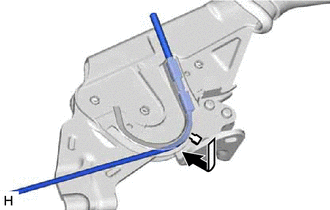
Bend down the parking brake lever sub-assembly claw.
-
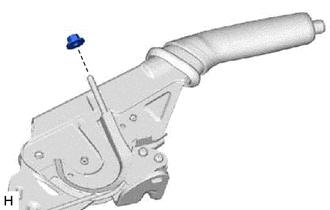
Temporarily install the No. 2 wire adjusting nut to the No. 1 parking brake cable assembly.
-
-
INSTALL PARKING BRAKE CABLE END STOPPER
-
Install the parking brake cable end stopper.
-
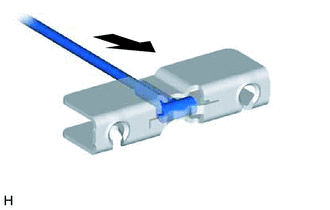
Insert the No. 1 parking brake cable assembly into the parking brake equalizer.
-
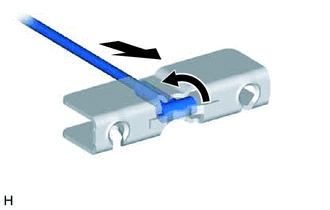
Push the No. 1 parking brake cable assembly and rotate the cable end 90° to install the No. 1 parking brake cable assembly.
-
-
INSTALL PARKING BRAKE LEVER SUB-ASSEMBLY