VEHICLE STABILITY CONTROL SYSTEM, Diagnostic DTC:C1429

| DTC Code | DTC Name |
|---|---|
| C1429 | Open or Short in Brake Pedal Load Sensing Switch |
DESCRIPTION
The brake pedal load sensing switch turns on when the brake pedal is depressed with a force exceeding a predetermined level. The skid control ECU (brake actuator assembly) uses this circuit to detect if the brake pedal is depressed or not. (for 1AD-FTV)
| DTC No. | Detection Item | DTC Detection Condition | Trouble Area |
|---|---|---|---|
| C1429 | Open or Short in Brake Pedal Load Sensing Switch | An open or short in the brake pedal load sensing switch circuit continues for 0.5 seconds or more. |
|
WIRING DIAGRAM
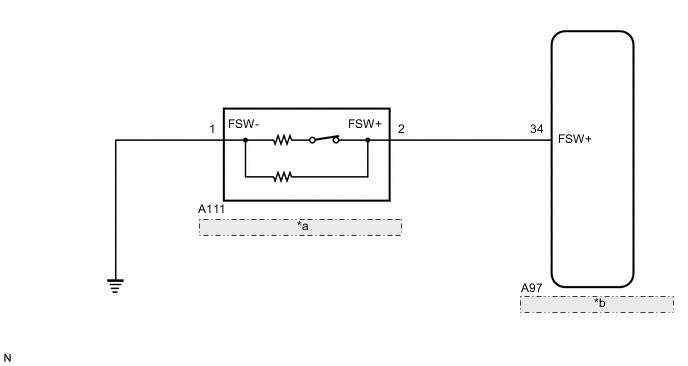
| *a | Brake Pedal Load Sensing Switch (Brake Pedal Support Assembly) |
| *b | Skid Control ECU (Brake Actuator Assembly) |
CAUTION / NOTICE / HINT
Note
-
When replacing the skid control ECU (brake actuator assembly), perform system variant learning.
Tech Tips
When C1249, C1425 and/or C1426 is output together with C1429, inspect and repair the trouble areas indicated by C1249, C1425 and/or C1426 first.
for C1249: Click here
for C1425: Click here
for C1426: Click here
PROCEDURE
-
READ VALUE USING GTS (BRAKE PEDAL LOAD SENSING SWITCH)
-
Connect the GTS to the DLC3.
-
Turn the ignition switch to ON.
-
Select the Data List using the GTS.
Chassis > ABS/VSC/TRC > Data ListTester Display Measurement Item Range Normal Condition Diagnostic Note Brake Pedal Load Sensing SW Brake pedal load sensing switch ON or OFF ON: Brake pedal depressed beyond a specified point
OFF: Brake pedal not depressed beyond a specified point
-
Chassis > ABS/VSC/TRC > Data ListTester Display Brake Pedal Load Sensing SW -
Check that the brake pedal load sensing switch display observed on the GTS changes according to brake pedal operation.
OK The GTS displays ON or OFF according to brake pedal operation. Result Proceed to OK NG
NG 
INSPECT BRAKE PEDAL LOAD SENSING SWITCH Click here
OK 
-
-
RECONFIRM DTC
-
Turn the ignition switch off.
-
Clear the DTCs.
Chassis > ABS/VSC/TRC > Clear DTCs -
Turn the ignition switch off.
-
Start the engine.
-
Perform a road test.
-
Check if the same DTC is output.
Chassis > ABS/VSC/TRC > Trouble CodesResult Result Proceed to DTC C1429 is not output. A DTC C1429 is output. B
A 
USE SIMULATION METHOD TO CHECK Click here
B
REPLACE BRAKE ACTUATOR ASSEMBLY Click here
-
-
INSPECT BRAKE PEDAL LOAD SENSING SWITCH
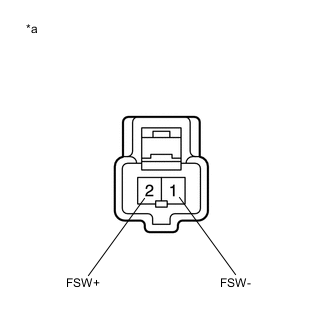
*a Component without harness connected
(Brake Pedal Load Sensing Switch (Brake Pedal Support Assembly))
-
Turn the ignition switch off.
-
Make sure that there is no looseness at the locking part and the connecting part of the connector.
-
Disconnect the A111 brake pedal load sensing switch connector.
Note
-
Do not remove the brake pedal load sensing switch from the brake pedal support assembly.
-
When there is a malfunction in the brake pedal load sensing switch, replace the brake pedal support assembly.
-
-
Measure the resistance according to the value(s) in the table below.
Standard Resistance Tester Connection Condition Specified Condition 2 (FSW+) - 1 (FSW-) Switch OFF
(Brake pedal depressed)
950 to 1050 Ω 2 (FSW+) - 1 (FSW-) Switch ON
(Brake pedal released)
203 to 223 Ω Result Proceed to OK NG
NG
REPLACE BRAKE PEDAL SUPPORT ASSEMBLY for LHD: Click here
REPLACE BRAKE PEDAL SUPPORT ASSEMBLY for RHD: Click hereOK
-
-
CHECK HARNESS AND CONNECTOR (BRAKE ACTUATOR ASSEMBLY - BRAKE PEDAL LOAD SENSING SWITCH)
-
Make sure that there is no looseness at the locking part and the connecting part of the connector.
-
Disconnect the A97 skid control ECU (brake actuator assembly) connector.
-
Measure the resistance according to the value(s) in the table below.
Standard Resistance Tester Connection Condition Specified Condition A97-34 (FSW+) - A111-2 (FSW+) Always Below 1 Ω A97-34 (FSW+) or A111-2 (FSW+) - Body ground Always 10 kΩ or higher A111-1 (FSW-) - Body ground Always Below 1 Ω Result Proceed to OK NG
OK
REPLACE BRAKE ACTUATOR ASSEMBLY Click here
NG
REPAIR OR REPLACE HARNESS OR CONNECTOR
-