ANTI-LOCK BRAKE SYSTEM(for Type B), Diagnostic DTC:C1425

| DTC Code | DTC Name |
|---|---|
| C1425 | Open in Stop Light Switch Circuit |
DESCRIPTION
The skid control ECU (brake actuator assembly) receives stop light switch signals and uses them to determine whether or not the brakes are applied.
The skid control ECU (brake actuator assembly) has a detection circuit that it uses to detect an open in the stop light input line.
If the skid control ECU (brake actuator assembly) detects an open in this circuit, it will store this DTC.
| DTC No. | Detection Item | DTC Detection Condition | Trouble Area |
|---|---|---|---|
| C1425 | Open in Stop Light Switch Circuit | When IG1 terminal voltage is 9.5 V or more, an open in the stop light switch input line continues for 0.3 seconds or more. |
|
Tech Tips
Even after the trouble areas are repaired, the ABS warning light will not go off unless the following operations are performed:
-
Turn the ignition switch to ON.
-
Depress the brake pedal.
-
Clear the DTCs.
WIRING DIAGRAM
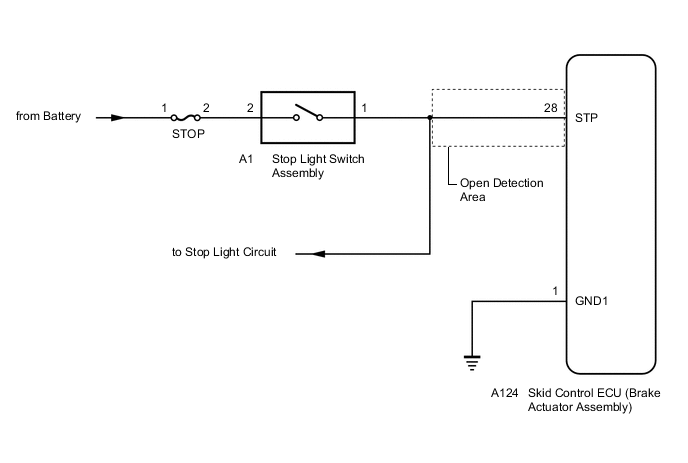
CAUTION / NOTICE / HINT
Note
Inspect the fuses for circuits related to this system before performing the following procedure.
PROCEDURE
-
CHECK STOP LIGHT SWITCH OPERATION
-
Check that the stop lights come on when the brake pedal is depressed, and go off when the brake pedal is released.
OK Condition Illumination Condition Brake pedal depressed. On Brake pedal released. Off Result Proceed to OK NG
NG 
CHECK HARNESS AND CONNECTOR (POWER SOURCE TERMINAL) Click here
OK 
-
-
READ VALUE USING GTS (STOP LIGHT SWITCH ASSEMBLY)
-
Connect the GTS to the DLC3.
-
Turn the ignition switch to ON.
-
Select the Data List using the GTS.
Chassis > ABS/VSC/TRC > Data ListTester Display Measurement Item Range Normal Condition Diagnostic Note Stop Light SW Stop light switch assembly ON or OFF ON: Brake pedal depressed
OFF: Brake pedal released
-
Chassis > ABS/VSC/TRC > Data ListTester Display Stop Light SW -
Check that the stop light switch display observed on the GTS changes according to brake pedal operation.
OK The GTS displays ON or OFF according to brake pedal operation. Result Proceed to OK NG
NG
CHECK HARNESS AND CONNECTOR (STP TERMINAL) Click here
OK
-
-
RECONFIRM DTC
-
Turn the ignition switch off.
-
Clear the DTCs.
Chassis > ABS/VSC/TRC > Clear DTCs -
Turn the ignition switch off.
-
Start the engine.
-
Depress the brake pedal several times to test the stop light circuit.
-
Check if the same DTC is output.
Chassis > ABS/VSC/TRC > Trouble CodesResult Result Proceed to DTC C1425 is not output. A DTC C1425 is output. B Tech Tips
If troubleshooting has been carried out according to Problem Symptoms Table, refer back to the table and proceed to the next step before replacing parts.
A 
USE SIMULATION METHOD TO CHECK Click here
B
REPLACE BRAKE ACTUATOR ASSEMBLY Click here
-
-
CHECK HARNESS AND CONNECTOR (STP TERMINAL)
-
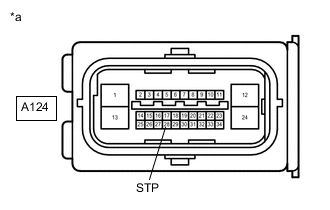
*a Front view of wire harness connector
(to Skid Control ECU (Brake Actuator Assembly))
Turn the ignition switch off.
-
Make sure that there is no looseness at the locking part and the connecting part of the connector.
-
Disconnect the A124 skid control ECU (brake actuator assembly) connector.
-
Measure the voltage according to the value(s) in the table below.
Standard Voltage Tester Connection Condition Specified Condition A124-28 (STP) - Body ground Stop light switch ON (Brake pedal depressed) 11 to 14 V A124-28 (STP) - Body ground Stop light switch OFF (Brake pedal released) Below 1.5 V Result Proceed to OK NG Tech Tips
If troubleshooting has been carried out according to Problem Symptoms Table, refer back to the table and proceed to the next step before replacing parts.
OK
REPLACE BRAKE ACTUATOR ASSEMBLY Click here
NG
REPAIR OR REPLACE HARNESS OR CONNECTOR (STP CIRCUIT)
-
-
CHECK HARNESS AND CONNECTOR (POWER SOURCE TERMINAL)
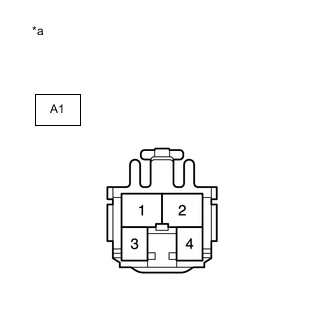
*a Front view of wire harness connector
(to Stop Light Switch Assembly)
-
Make sure that there is no looseness at the locking part and the connecting part of the connector.
-
Disconnect the A1 stop light switch assembly connector.
-
Measure the voltage according to the value(s) in the table below.
Standard Voltage Tester Connection Condition Specified Condition A1-2 - Body ground Always 11 to 14 V Result Proceed to OK NG
NG
REPAIR OR REPLACE HARNESS OR CONNECTOR (POWER SOURCE CIRCUIT)
OK
-
-
INSPECT STOP LIGHT SWITCH ASSEMBLY
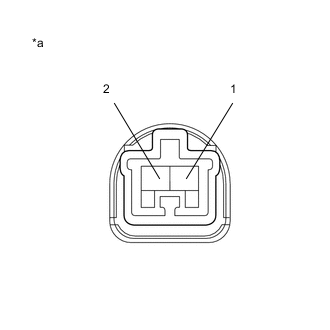
*a Component without harness connected
(Stop Light Switch Assembly)
-
Measure the resistance according to the value(s) in the table below.
Standard Resistance Tester Connection Condition Specified Condition 1 - 2 Switch pin free Below 1 Ω 1 - 2 Switch pin pushed in 10 kΩ or higher Result Proceed to OK NG
NG
REPLACE STOP LIGHT SWITCH ASSEMBLY Click here
OK
-
-
CHECK HARNESS AND CONNECTOR (STP TERMINAL)
-
*a Front view of wire harness connector
(to Skid Control ECU (Brake Actuator Assembly))
Reconnect the A1 stop light switch assembly connector.
-
Make sure that there is no looseness at the locking part and the connecting part of the connector.
-
Disconnect the A124 skid control ECU (brake actuator assembly) connector.
-
Measure the voltage according to the value(s) in the table below.
Standard Voltage Tester Connection Condition Specified Condition A124-28 (STP) - Body ground Stop light switch ON (Brake pedal depressed) 11 to 14 V A124-28 (STP) - Body ground Stop light switch OFF (Brake pedal released) Below 1.5 V Result Proceed to OK NG
NG
REPAIR OR REPLACE HARNESS OR CONNECTOR (STP CIRCUIT)
OK
-
-
RECONFIRM DTC
-
Reconnect the A124 skid control ECU (brake actuator assembly) connector.
-
Clear the DTCs.
Chassis > ABS/VSC/TRC > Clear DTCs -
Turn the ignition switch off.
-
Start the engine.
-
Depress the brake pedal several times to test the stop light circuit.
-
Check if the same DTC is output.
Chassis > ABS/VSC/TRC > Trouble CodesResult Result Proceed to DTC C1425 is not output. A DTC C1425 is output. B Tech Tips
-
If the lighting system is normal but the DTC is still output, replace the skid control ECU (brake actuator assembly).
-
If troubleshooting has been carried out according to Problem Symptoms Table, refer back to the table and proceed to the next step before replacing parts.
-
A
USE SIMULATION METHOD TO CHECK Click here
B
INSPECT LIGHTING SYSTEM (STOP LIGHT CIRCUIT) Click here
-