SFI SYSTEM Fuel Pump Control Circuit
DESCRIPTION
When the engine is cranked, the ST NO. 1 relay drive signal is input to the STA terminal of the ECM, and NE signal generated by the crankshaft position sensor is also input to the NE+ terminal. Thus, the ECM interprets that the engine has been cranked, and turns the transistor in the ECM internal circuit on. The current flows to the C/OPN relay by turning the transistor on. Then, the fuel pump operates.
While the NE signal is input to the ECM with the engine running, the ECM turns the transistor on continuously.
WIRING DIAGRAM
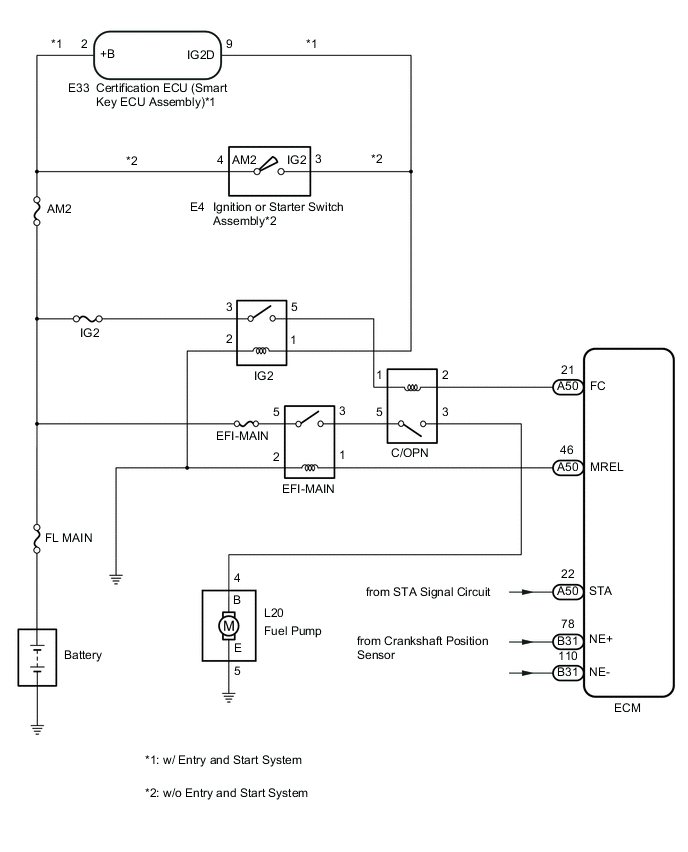
CAUTION / NOTICE / HINT
Note
Inspect the fuses for circuits related to this system before performing the following procedure.
PROCEDURE
-
PERFORM ACTIVE TEST USING GTS (CONTROL THE FUEL PUMP/SPEED)
-
Connect the GTS to the DLC3.
-
Turn the ignition switch to ON.
-
Turn the GTS on.
-
Enter the following menus: Powertrain / Engine and ECT / Active Test / Control the Fuel Pump / Speed.
Powertrain > Engine and ECT > Active TestTester Display Control the Fuel Pump / Speed -
Check whether the fuel pump operating sound occurs when performing the Active Test on the GTS.
Result Result Proceed to Fuel pump operating sound does not occur A Fuel pump operating sound occurs B
B 
READ VALUE USING GTS (STARTER SIGNAL) Click here
A 
-
-
CHECK HARNESS AND CONNECTOR (C/OPN RELAY - ECM)
-
Remove the C/OPN relay from the engine room relay block and junction block assembly.
-
Disconnect the ECM connector.
-
Measure the resistance according to the value(s) in the table below.
Standard Resistance Tester Connection Condition Specified Condition 2 (C/OPN relay) - A50-21 (FC) Always Below 1 Ω 2 (C/OPN relay) or A50-21 (FC) - Body ground Always 10 kΩ or higher Result Proceed to OK NG
NG 
REPAIR OR REPLACE HARNESS OR CONNECTOR
OK
-
-
CHECK HARNESS AND CONNECTOR (C/OPN RELAY - FUEL PUMP - BODY GROUND)
-
Remove the C/OPN relay from the engine room relay block and junction block assembly.
-
Disconnect the fuel pump connector.
-
Measure the resistance according to the value(s) in the table below.
Standard Resistance Tester Connection Condition Specified Condition 3 (C/OPN relay) - L20-4 (B) Always Below 1 Ω L20-5 (E) - Body ground Always Below 1 Ω 3 (C/OPN relay) or L20-4 (B) - Body ground Always 10 kΩ or higher Result Proceed to OK NG
NG
REPAIR OR REPLACE HARNESS OR CONNECTOR
OK
-
-
INSPECT FUEL PUMP
-
Inspect fuel pump.
Result Proceed to OK NG
NG
REPLACE FUEL PUMP Click here
OK
-
-
CHECK HARNESS AND CONNECTOR (IG2 RELAY - C/OPN RELAY)
-
Remove the IG2 relay from the engine room relay block and junction block assembly.
-
Remove the C/OPN relay from the engine room relay block and junction block assembly.
-
Measure the resistance according to the value(s) in the table below.
Standard Resistance Tester Connection Condition Specified Condition 5 (IG2 relay) - 1 (C/OPN relay) Always Below 1 Ω Result Proceed to OK NG
NG
REPAIR OR REPLACE HARNESS OR CONNECTOR
OK
-
-
CHECK HARNESS AND CONNECTOR (EFI-MAIN RELAY - C/OPN RELAY)
-
Remove the EFI-MAIN relay from the engine room relay block and junction block assembly.
-
Remove the C/OPN relay from the engine room relay block and junction block assembly.
-
Measure the resistance according to the value(s) in the table below.
Standard Resistance Tester Connection Condition Specified Condition 3 (EFI-MAIN relay) - 5 (C/OPN relay) Always Below 1 Ω Result Proceed to OK NG
OK
REPLACE C/OPN RELAY
NG
REPAIR OR REPLACE HARNESS OR CONNECTOR
-
-
READ VALUE USING GTS (STARTER SIGNAL)
-
Connect the GTS to the DLC3.
-
Turn the ignition switch to ON.
-
Turn the GTS on.
-
Enter the following menus: Powertrain / Engine and ECT / Data List / All Data / Starter Signal.
Powertrain > Engine and ECT > Data ListTester Display Starter Signal -
Check the value when the ignition switch is turned to the ON and START positions.
OK Switch Position Starter Signal ON OFF START ON Result Proceed to OK NG
NG
CHECK STARTER SIGNAL CIRCUIT Click here
OK
-
-
READ VALUE USING GTS (ENGINE SPEED)
-
Connect the GTS to the DLC3.
-
Turn the ignition switch to ON.
-
Turn the GTS on.
-
Enter the following menus: Powertrain / Engine and ECT / Data List / All Data / Engine Speed.
Powertrain > Engine and ECT > Data ListTester Display Engine Speed -
Read the values displayed on the GTS while cranking.
OK Values are displayed continuously. Result Proceed to OK NG
OK
PROCEED TO NEXT SUSPECTED AREA SHOWN IN PROBLEM SYMPTOMS TABLE Click here
NG
CHECK CRANKSHAFT POSITION SENSOR CIRCUIT Click here
-