PRE-COLLISION SYSTEM Laser Sensor Inspection
DESCRIPTION
The pre-collision city sensor determines the distance between this vehicle and a preceding vehicle using the laser sensor.
CAUTION / NOTICE / HINT
Note
-
When replacing the pre-collision city sensor, replace it with a new one and be sure to initialize the settings. If a pre-collision city sensor which was installed to another vehicle is used, the information stored in the pre-collision city sensor will not match the information from the vehicle and, as a result, a DTC may be stored.
-
If the pre-collision city sensor has been replaced, or the windshield glass has been replaced or removed/installed, be sure to perform Pre-collision City Sensor Learning Click here.
PROCEDURE
-
READ VALUE USING GTS
-
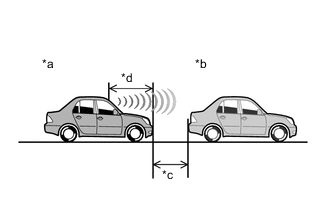
Text in Illustration *a This Vehicle *b Preceding Vehicle *c 1.33 m (4.36 ft.) *d 1.67 m (5.48 ft.) Position this vehicle and another vehicle as shown in the illustration, and then measure the distance between this vehicle and the preceding vehicle.
Note
Perform the measurement indoors in an area where sunlight will not shine directly on the pre-collision city sensor.
Tech Tips
-
The distance between the pre-collision city sensor (laser sensor) and the rear bumper of the preceding vehicle should be approximately 3 m (9.84 ft.).
-
The distance between the pre-collision city sensor (laser sensor) and the front bumper of this vehicle is 1.67 m (5.48 ft.).
-
The distance between the pre-collision city sensor (laser sensor) and the preceding vehicle is displayed in the Data List.
-
Do not use a modified car as a preceding vehicle.
-
-
Connect the GTS to the DLC3.
-
Turn the ignition switch to ON.
-
Turn the GTS on.
-
Enter the following menus: Chassis / PCS/LDA/RSA/LVN / Data List.
-
Read the Data List according to the display on the GTS.
Chassis > PCS/LDA/RSA/LVN > Data List Tester Display Measurement Item/Range Normal Condition Diagnostic Note Lidar Detect Target Distance Displays the distance to the preceding vehicle detected by the laser sensor (pre-collision city sensor). / 0 to 51.0 m Distance between the vehicle and a preceding vehicle When no preceding vehicle is detected, "0 m" (0 ft.) is displayed Tech Tips
If "0 m" (0 ft.) is displayed, the pre-collision city sensor (laser sensor) is malfunctioning.
OK Distance displayed is within 3.0 m (9.84 ft.) +/- 0.5 m (1.64 ft.)
OK 
PROCEED TO NEXT SUSPECTED AREA SHOWN IN PROBLEM SYMPTOMS TABLE Click here
NG
REPLACE PRE-COLLISION CITY SENSOR Click here
-