TRANSMITTER BATTERY(w/o Entry and Start System) REPLACEMENT
PROCEDURE
-
REMOVE TRANSMITTER HOUSING COVER
-
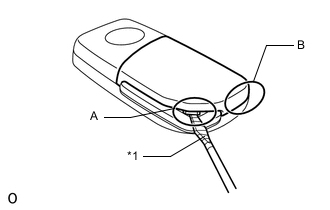
Text in Illustration *1 Protective Tape Insert a precision screwdriver into the gap within area A, and push the screwdriver downwards to open the cover. Then, insert the screwdriver into the gap within area B, push the screwdriver downwards and remove the transmitter housing cover.
Tech Tips
Tape the screwdriver tip before use.
-
-
REMOVE TRANSMITTER BATTERY
-
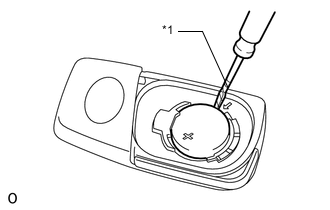
Text in Illustration *1 Protective Tape Insert a precision screwdriver into the gap and gently remove the transmitter battery (lithium battery: CR2016).
Note
-
When replacing the transmitter battery, before starting work, remove static electricity that has built up in the body by touching, for example, the vehicle to prevent the door control transmitter module set from being damaged.
-
Do not push the terminals with your finger.
-
Do not forcibly pry up the transmitter battery. The terminals may be damaged.
-
Do not touch the transmitter battery with wet hands. Water may cause rust.
-
Do not touch or move any components inside the transmitter. It may interfere with proper operation.
Tech Tips
Tape the screwdriver tip before use.
-
-
-
INSTALL TRANSMITTER BATTERY
-
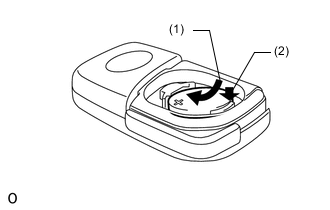
Install a new battery (lithium battery: CR2016) with the positive (+) side facing upward as shown in the illustration.
Note
-
When replacing the transmitter battery, before starting work, remove static electricity that has built up in the body by touching, for example, the vehicle to prevent the door control transmitter module set from being damaged.
-
Do not bend the transmitter battery electrode during insertion.
-
Keep the transmitter cover interior free of dust and oil.
-
-
-
INSTALL TRANSMITTER HOUSING COVER
-
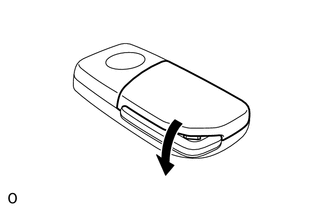
Install the transmitter housing cover by pressing down on it as shown in the illustration.
-