GENERATOR DISASSEMBLY
PROCEDURE
-
REMOVE GENERATOR PULLEY CAP
-
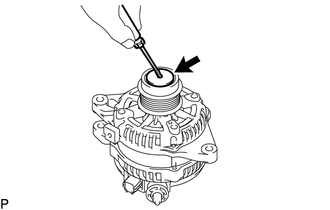
Using a screwdriver, puncture the center of the generator pulley cap and pry it off.
Note
Do not reuse the generator pulley cap.
-
-
REMOVE GENERATOR PULLEY WITH CLUTCH
-
Mount the generator assembly in a vise between aluminum plates.
-
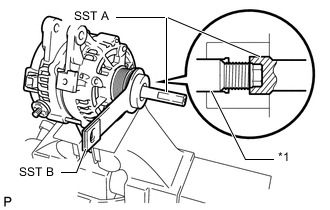
Text in Illustration *1 Rotor Shaft Install SST A and B to the generator pulley with clutch as shown in the illustration.
- SST
- 09820-63021
Note
Securely attach SST to the generator pulley with clutch and rotor shaft.
-
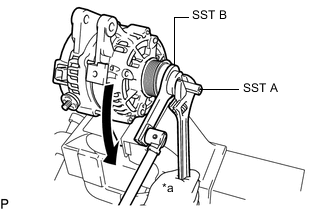
Text in Illustration *a Hold 
Turn Using a wrench to hold SST A, turn SST B counterclockwise to loosen the generator pulley with clutch.
Note
Be careful as the generator pulley with clutch or rotor shaft may be damaged if the position of SST is not securely maintained while performing this operation.
-
Remove SST from the generator assembly.
-
Remove the generator pulley with clutch from the rotor shaft.
-
-
REMOVE GENERATOR REAR END COVER
-
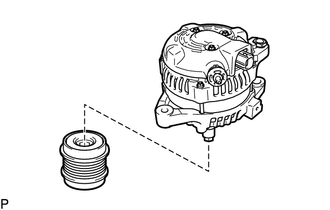
Place the generator assembly on the generator pulley with clutch.
-
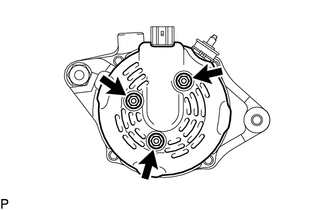
Remove the 3 bolts and generator rear end cover.
-
-
REMOVE TERMINAL INSULATOR
-
Remove the terminal insulator from the generator coil assembly.
-
-
REMOVE GENERATOR BRUSH HOLDER ASSEMBLY
-
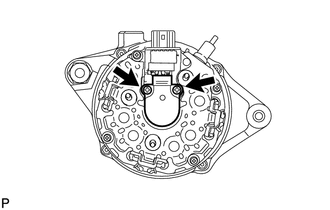
Remove the 2 screws and generator brush holder assembly from the generator coil assembly.
-
-
REMOVE GENERATOR COIL ASSEMBLY
-
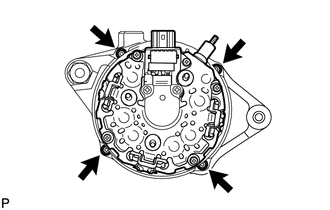
Remove the 4 bolts.
-
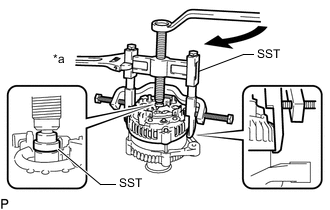
Text in Illustration *a Hold Turn Using SST, remove the generator coil assembly.
- SST
- 09950-40011 ( 09951-04020, 09952-04010, 09953-04020, 09954-04010, 09955-04071, 09957-04010, 09958-04011 )
-
-
REMOVE BEARING COVER PACKING
-
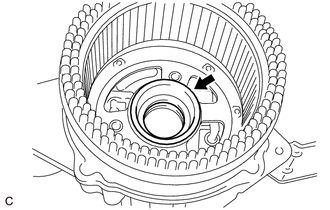
Remove the bearing cover packing.
Note
If the bearing cover packing breaks, remove all broken pieces.
Tech Tips
The bearing cover packing may be installed on the generator rotor assembly.
-
-
REMOVE GENERATOR ROTOR ASSEMBLY
-
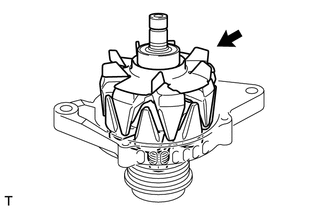
Remove the generator rotor assembly.
-
-
INSPECT GENERATOR DRIVE END FRAME BEARING
-
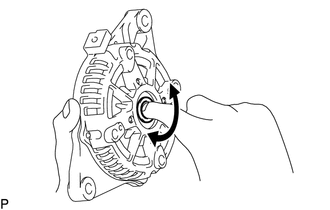
Check that the bearing is not rough or worn and that it rotates smoothly.
If necessary, replace the generator drive end frame bearing.
-
-
REMOVE GENERATOR DRIVE END FRAME BEARING
-
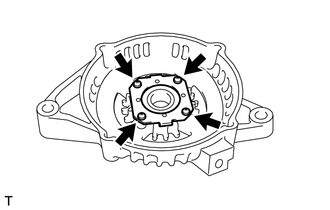
Remove the 4 screws and retainer plate from the generator drive end frame assembly.
-
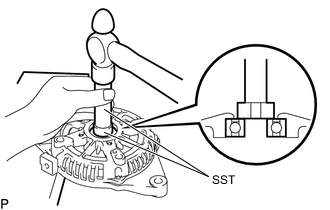
Using SST and a hammer, tap out the generator drive end frame bearing from the generator drive end frame assembly.
- SST
- 09950-60010 ( 09951-00250 )
- 09950-70010 ( 09951-07100 )
-