ECM INSTALLATION
PROCEDURE
-
INSTALL ECM
-
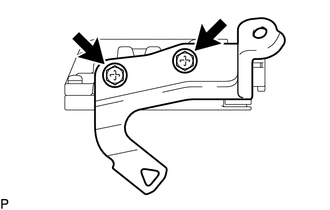
Install the No. 2 ECM bracket to the ECM with the 2 screws.
- Torque:
- 3.0 N*m { 31 kgf*cm, 27 in.*lbf }
-
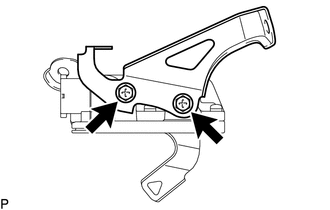
Install the No. 1 ECM bracket to the ECM with the 2 screws.
- Torque:
- 3.0 N*m { 31 kgf*cm, 27 in.*lbf }
-
Install the ECM with the 2 bolts.
- Torque:
- 8.0 N*m { 82 kgf*cm, 71 in.*lbf }
-
Connect the 2 ECM connectors and lock with the 2 levers.
Note
-
When connecting the connectors, make sure that dirt, water or other foreign matter does not get caught between the connectors and other parts.
-
Make sure that the 2 levers are securely lowered.
-
-
Attach the wire harness clamp.
-
-
CONNECT NO. 2 AIR CLEANER INLET
-
Connect the No. 2 air cleaner inlet to the vehicle body with the bolt.
- Torque:
- 7.0 N*m { 71 kgf*cm, 62 in.*lbf }
-
-
INSTALL NO. 1 AIR CLEANER INLET
-
Attach the 2 claws to install the No. 1 air cleaner inlet.
-
Install the clip.
-
-
INSTALL AIR CLEANER CASE SUB-ASSEMBLY
-
Install the air cleaner case with the 3 bolts.
- Torque:
- 7.0 N*m { 71 kgf*cm, 62 in.*lbf }
-
Attach the wire harness clamp to the air cleaner case.
-
-
INSTALL AIR CLEANER FILTER ELEMENT SUB-ASSEMBLY
-
INSTALL AIR CLEANER CAP SUB-ASSEMBLY
-
INSTALL NO. 2 CYLINDER HEAD COVER
-
CONNECT CABLE TO NEGATIVE BATTERY TERMINAL
Note
When disconnecting the cable, some systems need to be initialized after the cable is reconnected Click here.
-
INSTALL RADIATOR SUPPORT OPENING COVER
-
PERFORM INITIALIZATION
-
RESET MEMORY (for CVT)
-
When replacing the ECM, perform the Reset Memory procedure (initialization) Click here.
-