INSTRUMENT PANEL SAFETY PAD DISASSEMBLY
CAUTION / NOTICE / HINT
Tech Tips
-
Use the same procedure for RHD and LHD vehicles.
-
The procedure listed below is for LHD vehicles.
PROCEDURE
-
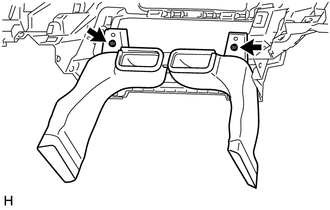
REMOVE REAR NO. 1 AIR DUCT
-
Remove the 2 screws and rear No. 1 air duct.
-
-
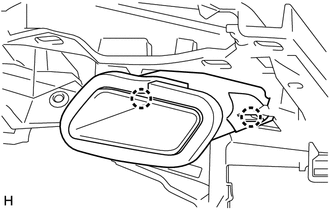
REMOVE NO. 1 SIDE DEFROSTER NOZZLE
-
Detach the 2 claws and remove the No. 1 side defroster nozzle.
-
-
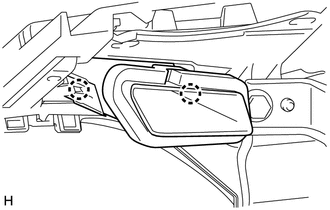
REMOVE NO. 2 SIDE DEFROSTER NOZZLE
-
Detach the 2 claws and remove the No. 2 side defroster nozzle.
-
-
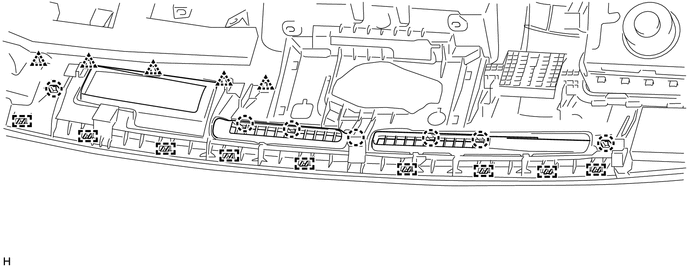
REMOVE DEFROSTER NOZZLE ASSEMBLY
-
Detach the 7 claws, 5 clips and 9 guides and remove the defroster nozzle assembly.
-
-
REMOVE NO. 2 INSTRUMENT PANEL WIRE (PASSENGER AIRBAG)
-
REMOVE INSTRUMENT PANEL PASSENGER WITHOUT DOOR AIRBAG ASSEMBLY
-
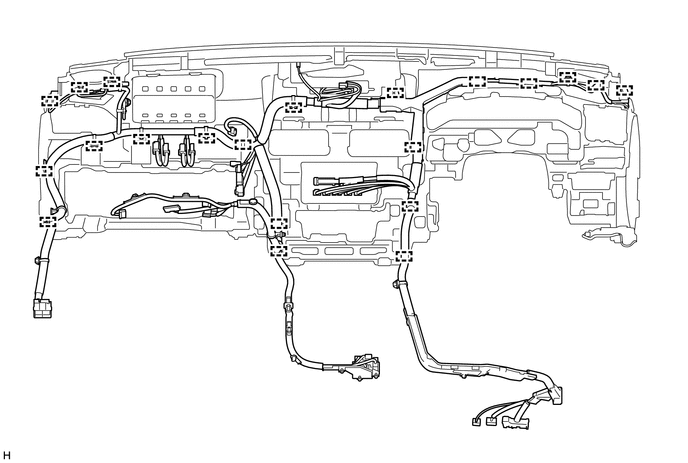
REMOVE NO. 2 INSTRUMENT PANEL WIRE
-
Detach the clamps and remove the No. 2 instrument panel wire.
-
-
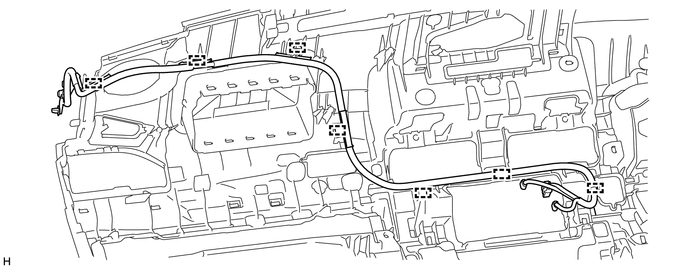
REMOVE ANTENNA CORD SUB-ASSEMBLY
-
Detach the clamps and remove the antenna cord sub-assembly.
-
-
REMOVE NAVIGATION ANTENNA ASSEMBLY
-
REMOVE NO. 2 INSTRUMENT PANEL REGISTER ASSEMBLY
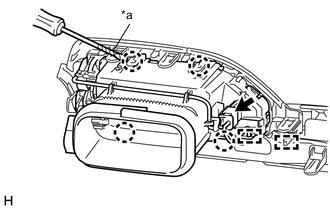
Text in Illustration *a Protective Tape
-
Disconnect the connector and detach the clamps.
-
Using a screwdriver, detach the 4 claws and remove the No. 2 instrument panel register assembly.
Tech Tips
Tape the screwdriver tip before use.
-
-
REMOVE NO. 3 INSTRUMENT PANEL REGISTER ASSEMBLY
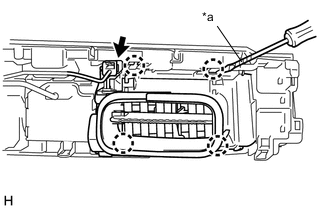
Text in Illustration *a Protective Tape
-
Disconnect the connector.
-
Using a screwdriver, detach the 4 claws and remove the No. 3 instrument panel register assembly.
Tech Tips
Tape the screwdriver tip before use.
-
-
REMOVE NO. 4 INSTRUMENT PANEL REGISTER ASSEMBLY
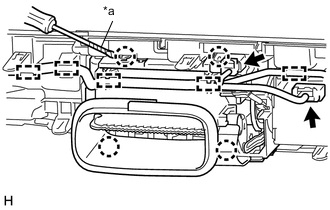
Text in Illustration *a Protective Tape
-
Disconnect the connector and detach the clamps.
-
Using a screwdriver, detach the 4 claws and remove the No. 4 instrument panel register assembly.
Tech Tips
Tape the screwdriver tip before use.
-
-
REMOVE MAIN SWITCH ASSEMBLY
-
REMOVE INSTRUMENT PANEL HOLE COVER RETAINER
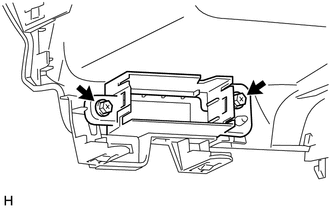
-
Remove the 2 screws and instrument panel hole cover retainer.
-
-
REMOVE METER HOOD SPACER
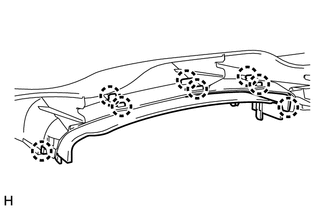
-
Detach the 8 claws and remove the meter hood spacer.
-
-
REMOVE NO. 2 SWITCH HOLE BASE
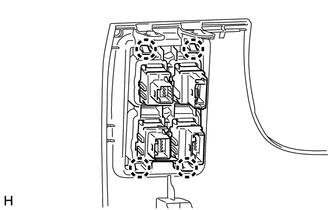
-
Detach the 4 claws and remove the No. 2 switch hole base.
-
-
REMOVE GLOVE BOX LIGHT ASSEMBLY
-
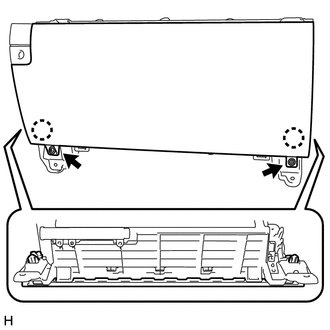
REMOVE GLOVE COMPARTMENT DOOR SUB-ASSEMBLY
-
Remove the 2 screws.
-
Detach the 2 claws and remove the glove compartment door sub-assembly.
-
-
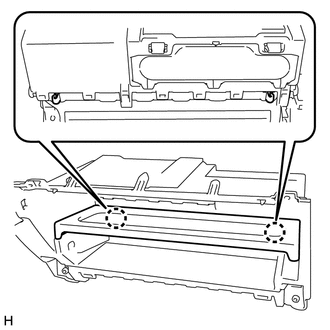
REMOVE GLOVE COMPARTMENT PLATE
-
Detach the 2 claws and remove the glove compartment plate.
-
-
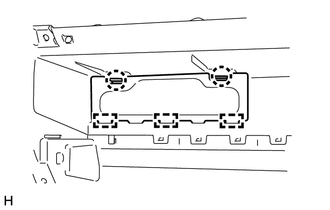
REMOVE LOWER INSTRUMENT COVER LH
-
Detach the 2 claws and 3 guides and remove the lower instrument cover LH.
-
-
REMOVE CONSOLE COMPARTMENT DOOR CUSHION
Tech Tips
Use the same procedure for both console compartment door cushions.
-
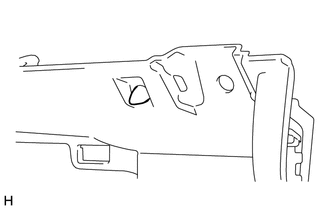
Remove the console compartment door cushion.
-
-
REMOVE GLOVE COMPARTMENT DOOR LOCK ASSEMBLY
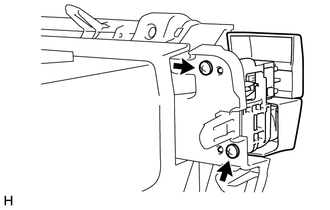
-
Remove the 2 screws and glove compartment door lock assembly.
-
-
REMOVE GLOVE COMPARTMENT DOOR LOCK COVER
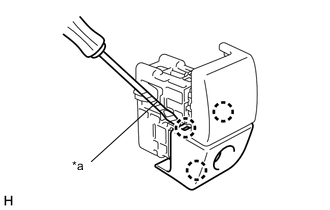
Text in Illustration *a Protective Tape
-
Using a screwdriver, detach the 3 claws and remove the glove compartment door lock cover.
Tech Tips
Tape the screwdriver tip before use.
-
-
REMOVE GLOVE COMPARTMENT DOOR LOCK PIN
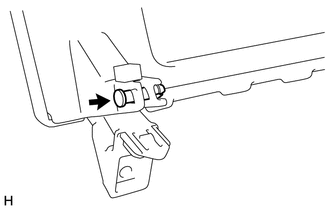
-
Remove the glove compartment door lock pin.
-