SEAT BELT WARNING SYSTEM Driver Side Seat Belt Warning Light does not Operate
DESCRIPTION
When the engine switch on (IG), the center airbag sensor assembly transmits front seat inner belt state signals to the combination meter assembly through the CAN. If the driver seat belt is not fastened, the combination meter assembly blinks the driver side seat belt warning light. If the seat belt is fastened, the warning light goes off.
WIRING DIAGRAM
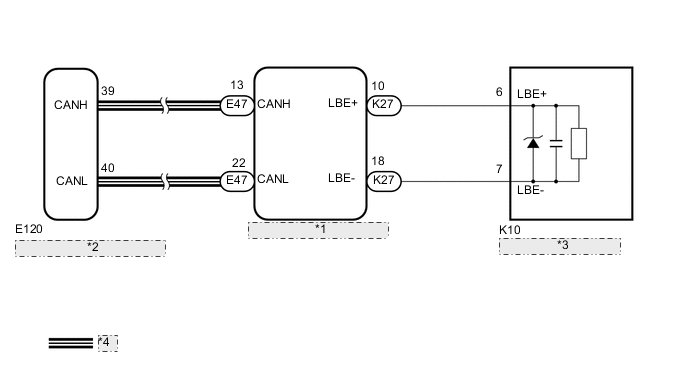
| *1 | Center Airbag Sensor Assembly |
| *2 | Combination Meter Assembly |
| *3 | Front Seat Inner Belt |
| *4 | CAN Communication Line |
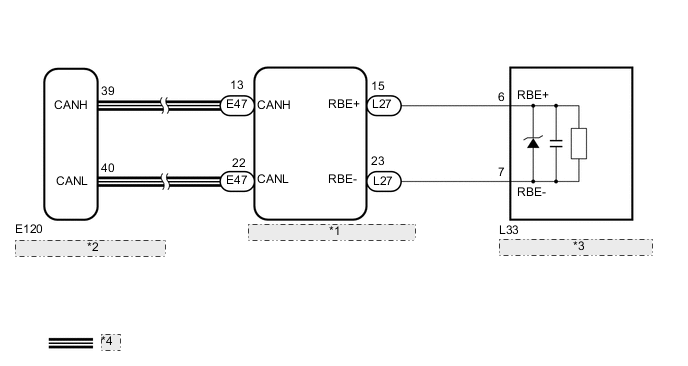
| *1 | Center Airbag Sensor Assembly |
| *2 | Combination Meter Assembly |
| *3 | Front Seat Inner Belt Assembly RH |
| *4 | CAN Communication Line |
PROCEDURE
-
CHECK VEHICLE TYPE
-
Check the vehicle type.
Result Result Proceed to for LHD A for RHD B
B 
CHECK FOR DTC Click here
A 
-
-
CHECK FOR DTC
-
Check for DTCs.
Result Result Proceed to DTC is not output A CAN communication system DTC is output (for LHD) B Airbag system DTC is output C
B 
Go to CAN COMMUNICATION SYSTEM Click here
C
Go to AIRBAG SYSTEM Click here
A
-
-
READ VALUE USING GTS (DRIVER SIDE BUCKLE SWITCH)
-
Check the Data List for proper functioning of the driver side seat belt buckle switch.
SRS Airbag Tester Display Measurement Item/Range Normal Condition Diagnostic Note Driver Buckle SW Driver side seat belt / Set, Unset or NG Set: Driver side seat belt is fastened
Unset: Driver side seat belt is unfastened
NG: Data is not determined Result Result Proceed to Set or Unset is displayed on the GTS screen according to the driver side seat belt condition A Set or Unset is not displayed normally on the GTS screen according to the driver side seat belt condition B NG is displayed on the GTS screen C
B
REPLACE FRONT SEAT INNER BELT ASSEMBLY (for Driver Side) Click here
C
REPLACE CENTER AIRBAG SENSOR ASSEMBLY Click here
A
-
-
CHECK DRIVER SIDE SEAT BELT WARNING LIGHT
-
Check the driver side seat belt warning light function Click here.
OK Driver side seat belt warning light operates normally.
OK
END (CENTER AIRBAG SENSOR ASSEMBLY IS DEFECTIVE)
NG
REPLACE COMBINATION METER Click here
-
-
CHECK FOR DTC
-
Check for DTCs.
Result Result Proceed to DTC is not output A CAN communication system DTC is output (for RHD) B Airbag system DTC is output C
B
Go to CAN COMMUNICATION SYSTEM Click here
C
Go to AIRBAG SYSTEM Click here
A
-
-
READ VALUE USING GTS (DRIVER SIDE BUCKLE SWITCH)
-
Check the Data List for proper functioning of the driver side seat belt buckle switch.
SRS Airbag Tester Display Measurement Item/Range Normal Condition Diagnostic Note Driver Buckle SW Driver side seat belt / Set, Unset or NG Set: Driver side seat belt is fastened
Unset: Driver side seat belt is unfastened
NG: Data is not determined Result Result Proceed to Set or Unset is displayed on the GTS screen according to the driver side seat belt condition A Set or Unset is not displayed normally on the GTS screen according to the driver side seat belt condition B NG is displayed on the GTS screen C
B
REPLACE FRONT SEAT INNER BELT ASSEMBLY (for Driver Side) Click here
C
REPLACE CENTER AIRBAG SENSOR ASSEMBLY Click here
A
-
-
CHECK DRIVER SIDE SEAT BELT WARNING LIGHT
-
Check the driver side seat belt warning light function Click here.
OK Driver side seat belt warning light operates normally.
OK
END (CENTER AIRBAG SENSOR ASSEMBLY IS DEFECTIVE)
NG
REPLACE COMBINATION METER Click here
-