SEAT MEMORY SWITCH INSPECTION
PROCEDURE
-
INSPECT SEAT MEMORY SWITCH (for LHD)
-
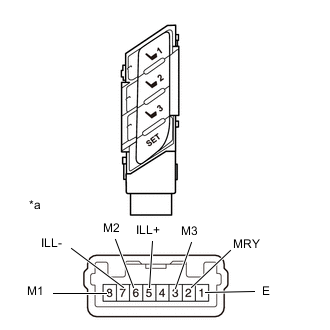
Text in Illustration *a Component without wire harness connected
(Seat Memory Switch)
Measure the resistance according to the value(s) in the table below.
Standard Resistance Tester Connection Switch Condition Specified Condition 8 (M1) - 1 (E) Switch 1 pressed Below 1 Ω 6 (M2) - 1 (E) Switch 2 pressed 3 (M3) - 1 (E) Switch 3 pressed 2 (MRY) - 1 (E) SET switch pressed If the result is not as specified, replace the seat memory switch.
-
Apply battery voltage to the switch connector, and check that the seat memory switch illuminates.
OK Measurement Condition Specified Condition Battery positive (+) → 5 (ILL+)
Battery negative (-) → 7 (ILL-)
Switch illuminates If the result is not as specified, replace the seat memory switch.
-
-
INSPECT SEAT MEMORY SWITCH (for RHD)
-
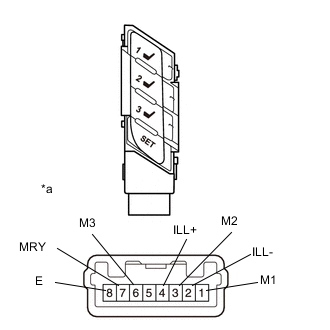
Text in Illustration *a Component without wire harness connected
(Seat Memory Switch)
Measure the resistance according to the value(s) in the table below.
Standard Resistance Tester Connection Switch Condition Specified Condition 1 (M1) - 8 (E) Switch 1 pressed Below 1 Ω 3 (M2) - 8 (E) Switch 2 pressed 6 (M3) - 8 (E) Switch 3 pressed 7 (MRY) - 8 (E) SET switch pressed If the result is not as specified, replace the seat memory switch.
-
Apply battery voltage to the switch connector, and check that the seat memory switch illuminates.
OK Measurement Condition Specified Condition Battery positive (+) → 4 (ILL+)
Battery negative (-) → 2 (ILL-)
Switch illuminates If the result is not as specified, replace the seat memory switch.
-