BLIND SPOT MONITOR SYSTEM OPERATION CHECK
-
BLIND SPOT MONITOR BEAM AXIS CONFIRMATION
Tech Tips
The blind spot monitor beam axis confirmation is performed to confirm whether the sensor's beam axis is correct, and perform adjustment of the beam axis by using reflector.
-
When performing the blind spot monitor beam axis confirmation, move the vehicle to a place where the space shown in the illustration can be secured.
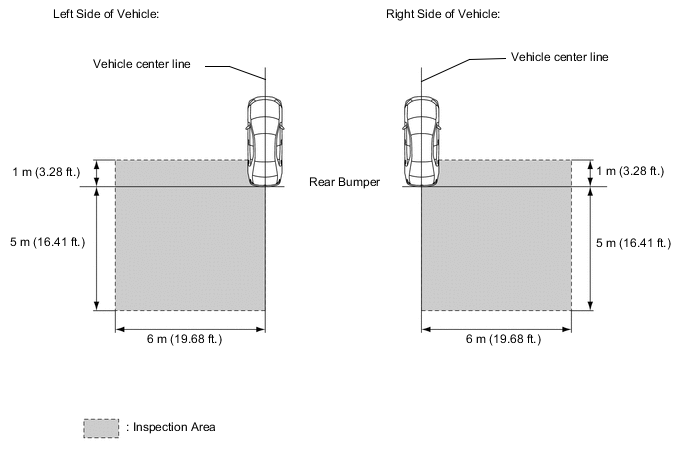
Note
-
Perform this inspection on level ground.
-
Make sure that there are no metal objects around the vehicle or on the ground.
-
Unload the vehicle before beginning the inspection.
-
Confirm that the tire pressure is correct before beginning the inspection.
-
Do not place any objects other than the reflector (such as a large metallic object) in or allow people to enter the inspection area (W 6 m (19.68 ft.) x L 6 m (19.68 ft.) x H 4 m (13.12 ft.)) shown in the illustration.
-
-
Place the reflector.
-
From the center of the rear bumper (center of the emblem), hang a weight with a pointed tip, and mark position on the ground (mark A).
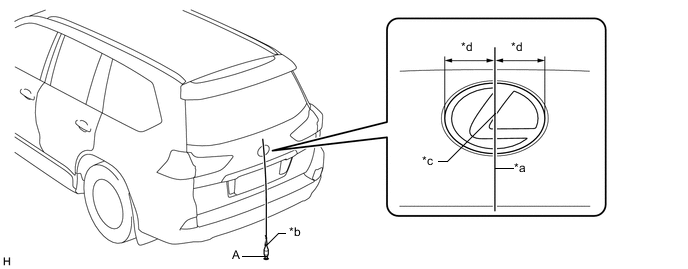
Text in Illustration *a String *b Weight *c Center point *d Same size Tech Tips
Lightly flick the string with your fingers several times to confirm that the string is aligned with mark A.
-
From the center of the front bumper (center of the emblem), hang a weight with a pointed tip, and mark position on the ground (mark B).
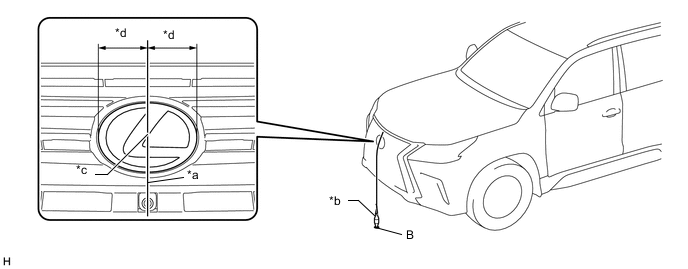
Text in Illustration *a String *b Weight *c Center point *d Same size Tech Tips
Lightly flick the string with your fingers several times to confirm that the string is aligned with mark (B).
-
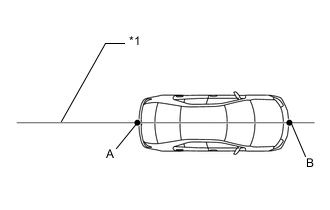
*1 Vehicle center line Draw a vehicle center line so that it passes through mark (A) and (B) (front and rear center points).
-
Enlarge and print out the poster shown in the illustration.
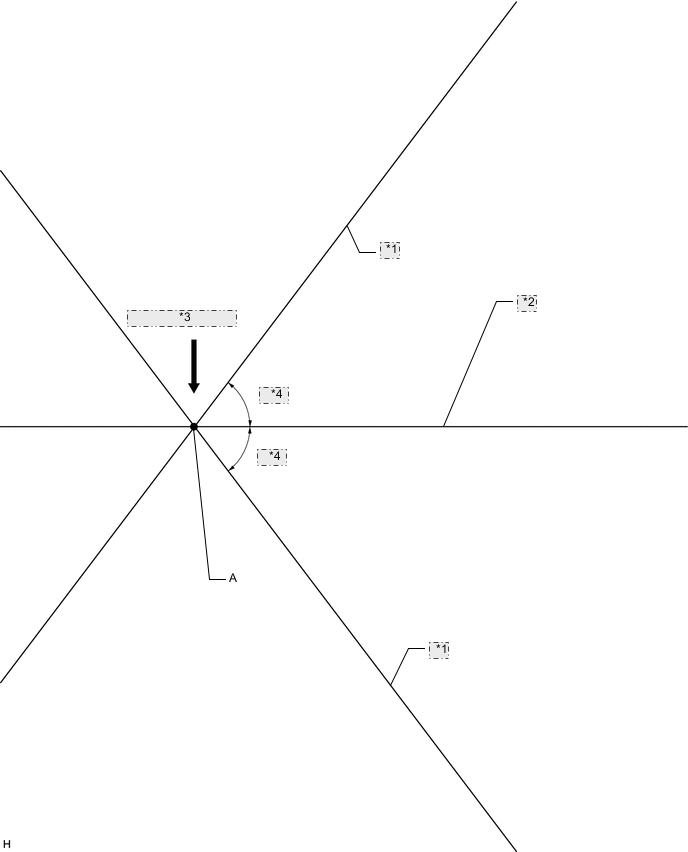
Poster *1 Line C *2 Vehicle center line *3 Edge of Rear Bumper *4 53.5° -
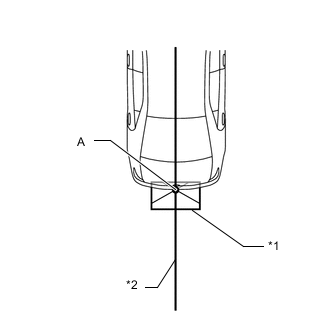
*1 Poster *2 Vehicle center line Attach the printed poster to the floor with the vehicle center line aligned with point A as shown in the illustration.
-
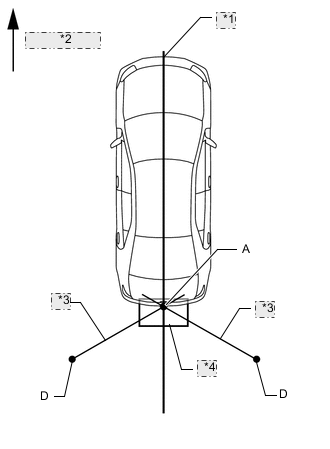
*1 Vehicle center line *2 Vehicle front *3 String *4 Poster Attach strings aligned with the lines labeled C and mark points D at a distance of 3484 mm (11.43 ft.) from point A.
-
Set the reflector at the position (E) or (F) shown in the illustration below.
- SST
- 09870-60000 ( 09870-60010 )
- 09870-60040
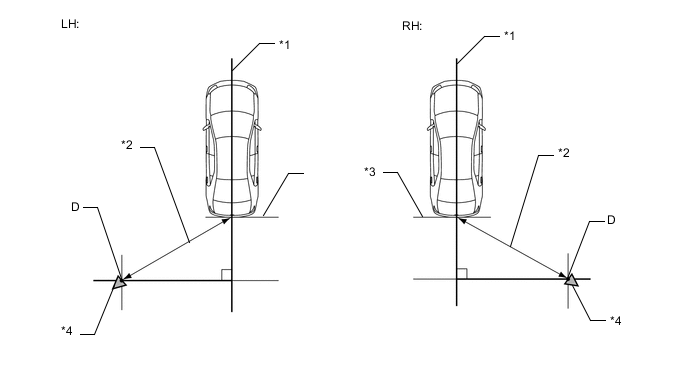
*1 Vehicle center line *2 3484 mm (11.43 ft) *3 Rear bumper *4 Reflector Note
-
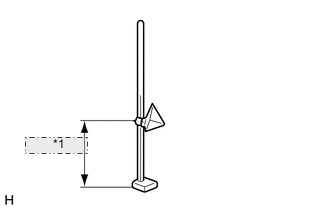
*1 882 mm (2.89 ft.) Set the reflector so that its center is 882 mm (2.89 ft) above the ground.
-
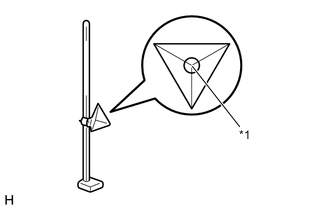
*1 Center of triangular pyramid The center of triangular pyramid is the reference point for the setting position and angle.
-
Set the reflector as shown in the illustration so that its center of triangular pyramid faces the blind spot monitor sensor.
-
Perform the operation as precisely as possible.
-
-
Perform the blind spot monitor beam axis display.
-
Connect the GTS to the DLC3.
-
Turn the engine switch on (IG).
-
Turn the blind spot monitor main switch (steering pad switch assembly [multi-function switch]) on.
-
Turn the GTS on.
-
Enter the following menus: Body Electrical / Blind spot monitor Master or Blind spot monitor Slave / Utility / BSM Master beam axis display or BSM Slave beam axis display.
-
Check the results displayed for the BSM beam axis display.
Tech Tips
If the results are outside the allowable range, try again as the reflector setting position may be incorrect or a metal object may exist near the detection area.
-
Perform the blind spot monitor beam axis adjustment using the GTS. Enter the following menus: Body Electrical / Blind spot monitor Master or Blind spot monitor Slave / Utility / BSM Master beam axis adjustment or BSM Slave beam axis adjustment.
Tech Tips
When values on the axis display are in the allowable range, performing this adjustment compensates the values to the normal value.
-
-
-
BLIND SPOT MONITOR INSTALLATION CONDITION INSPECTION
Note
-
Perform this inspection on level ground.
-
Unload the vehicle before beginning the inspection.
-
Confirm that the tire pressure is correct before beginning the inspection.
Tech Tips
The blind spot monitor sensor installation condition inspection is performed to confirm whether the sensor is perpendicular to the floor surface (+/-4°) by using a jig, and that the sensor is 46 to 54° from the line parallel to the vehicle center line.
-
Remove the rear bumper.
-
for Standard : Click here
-
w/ Towing Hitch : Click here
-
w/ Pintle Hook : Click here
-
-
Attach a jig similar to the one shown in the illustration to the outward facing surface of the blind spot monitor sensor and check that the blind spot monitor sensor is perpendicular to the floor surface or within the allowable range.
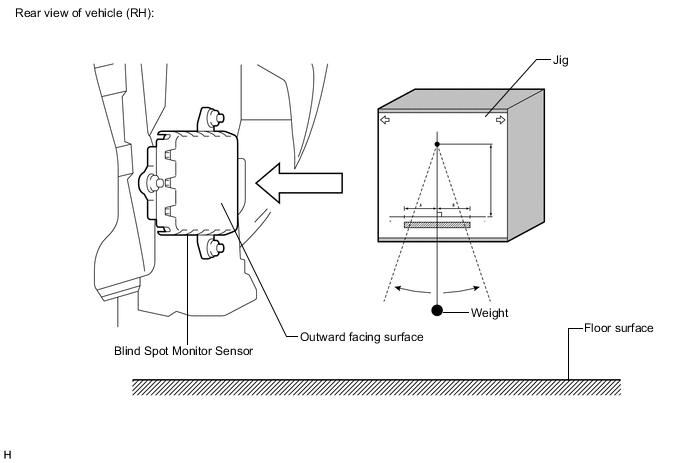
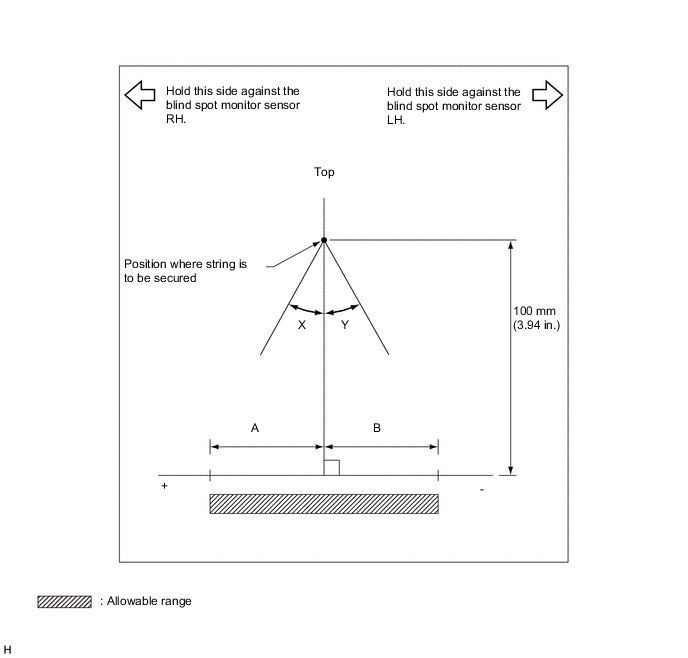
Standard A B Blind spot monitor sensor RH 5.2 mm
(0.315 in.)
-5.2 mm
(-0.315 in.)
Blind spot monitor sensor LH 5.2 mm
(0.315 in.)
-5.2 mm
(-0.315 in.)
X Y Blind spot monitor sensor RH 3° -3° Blind spot monitor sensor LH 3° -3° -
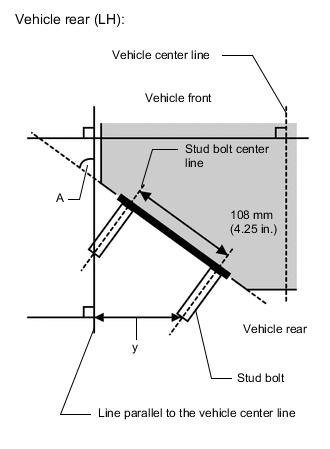
Using the sensor installation stud bolt center lines as a reference, check that the stud bolts are as shown in the illustration.
-