MAYDAY BATTERY INSTALLATION
PROCEDURE
-
INSTALL MOBILEPHONE BATTERY (w/ Telematics Transceiver except G-BOOK)
-
Connect the connector and install the mobilephone battery as shown in the illustration.
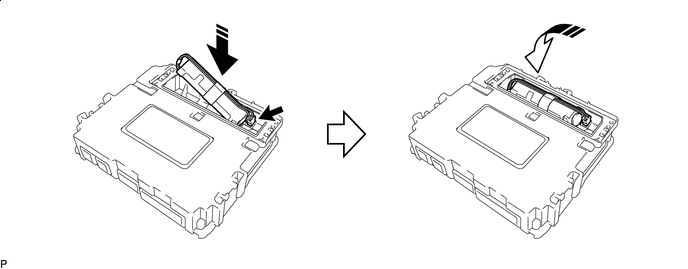

Install in this Direction (1) 
Install in this Direction (2) Note
Check that the connector is securely connected.
-
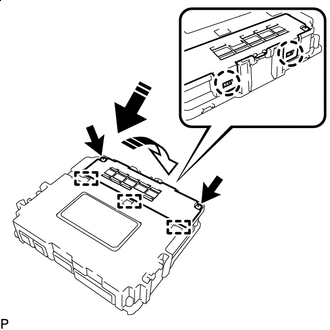
Install in this Direction (1) Install in this Direction (2) Insert the 3 guides and attach the 2 claws as shown in the illustration.
-
Install the battery cover with the 2 screws.
Note
Check that the battery cover does not lift up.
-
-
INSTALL MAYDAY BATTERY (w/ Telematics Transceiver for G-BOOK)
-
Install the mayday battery to the No. 3 telephone bracket.
-
Connect the connector.
-
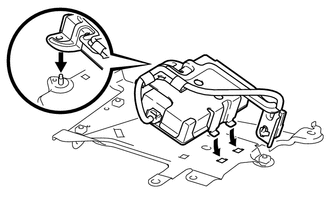
Align the bracket, 2 claws and the nut attachment shaft, and the mayday battery and bracket together.
-
Install the No. 3 telephone bracket with mayday battery with the nut.
- Torque:
- 8.5 N*m { 87 kgf*cm, 75 in.*lbf }
-
-
INSTALL TELEMATICS TRANSCEIVER (w/ Telematics Transceiver except G-BOOK)
-
INSTALL NO. 1 TELEPHONE BRACKET WITH TELEMATICS TRANSCEIVER (w/ Telematics Transceiver for G-BOOK)
-
Install the telephone bracket with telematics transceiver with the 3 bolts.
- Torque:
- 8.5 N*m { 87 kgf*cm, 75 in.*lbf }
-
Connect the connectors.
-
-
INSTALL REAR CONSOLE END PANEL SUB-ASSEMBLY
-
CONNECT CABLE TO NEGATIVE BATTERY TERMINAL
Note
When disconnecting the cable, some systems need to be initialized after the cable is reconnected Click here.
-
INSTALL UPPER RADIATOR SUPPORT SEAL
-
CHECK SRS WARNING LIGHT
-
Check the SRS warning light Click here.
-