TELEMATICS SYSTEM Alarm Notification Function Malfunction
PROCEDURE
-
CHECK CONNECTION
-
Select "G-BOOK.com" and check that G-BOOK.com screen is displayed.
Result Result Proceed to G-BOOK.com can be accessed A G-BOOK.com cannot be accessed B
B 
GO TO PROBLEM SYMPTOMS TABLE Click here
A 
-
-
CHECK SETTINGS
-
Check that the alarm notification function is on.
Result Result Proceed to The alarm notification function is on A The alarm notification function is off B
B
CHANGE SETTINGS
A
-
-
CHECK FOR SERVICE FLAG
-
Check for service flag.
-
Enter diagnostic mode Click here.
-
Select "Service Information" on the "Service Menu" screen.
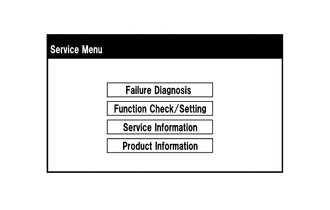
-
Select "G-BOOK Info for Contract" on the "Service Information" screen.
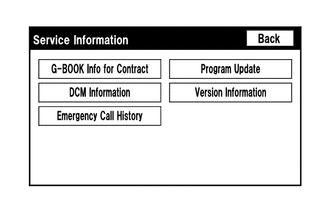
-
Check if the flag information indicates "1" as shown in the illustration.
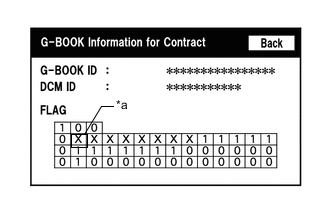
Text in Illustration *a Cell to be Checked Result Result Proceed to "1" is indicated A "1" is not indicated B
-
B 
RENEW DATA Click here
A
-
-
CHECK THEFT DETERRENT SYSTEM
-
Check if the theft deterrent system is operating and functioning normally.
OK The theft deterrent system is normal.
NG
GO TO THEFT DETERRENT SYSTEM Click here
OK
-
-
CHECK CELLULAR PHONE
-
Ask the customer to confirm that the reception of the cellular phone is normal.
-
Ask the customer to confirm that the call and e-mail functions of the cellular phone operate properly.
OK The cellular phone is normal.
NG
REPAIR OR REPLACE CELLULAR PHONE
OK
-
-
CHECK SETTINGS
-
Ask the customer to confirm that the incoming e-mail/call restriction is not set to on.
Result Result Proceed to Incoming e-mail/call restriction is not set to on A Incoming e-mail/call restriction is set to on B
A
CONTACT G-BOOK SUPPORT CENTER
B
CHANGE CELLULAR PHONE SETTINGS
-
-
RENEW DATA
-
Renew the data.
-
Refer to Perform "Download necessary data" Click here.
Result Result Proceed to Data can be renewed A Data cannot be renewed B
-
B
CONTACT G-BOOK SUPPORT CENTER
A
-
-
CHECK ALARM NOTIFICATION FUNCTION
-
Check that the alarm notification function operates normally.
OK The alarm notification function operates normally.
OK
END
NG
CONTACT G-BOOK SUPPORT CENTER
-